Inspiring
July 31, 2022
Answered

Actions non operational for non-English language Photoshop versions

  • July 31, 2022
  • 5 replies
  • 1272 views

I have made available some Actions which give enhanced filters for Photshop.


An Italian person has written to me saying that they don't work for him because he has an Italian version of PS.


He tells me "Select layer "Background"" and "Select layer "Background Copy"" have a problem because in my PS is "Sfondo" and "Sfondo copia" so PS cannot find the layer, and I had to record again the 2 actions". 

And also  "I can't find a fix for this issue: the actions "Hide Background" and "Show Background" don't exist."


Is there something I am doing wrong when I record my actions? Otherwise is there a workaround for this?  Fortunately, I have made these filters available for free.  But it does mean that I could not sell future actions even if I wanted to, because I couldn't guarantee that they would work on all versions of PS.


Correct answer c.pfaffenbichler

As for selecting the Background Layer try using 


As for selecting »Background Copy«: 

If a Layer needs to be selected again later in an Action it should immediately be renamed upon creation, if possible with a unique name that is unlikely to conflict with any existing Layers. 

5 replies

Inspiring
August 14, 2022

So, I have now looked at the default Actions provided with Photoshop.  (I didn’t think I need to before because I didn’t think producing my own Actions would be so tricky.)


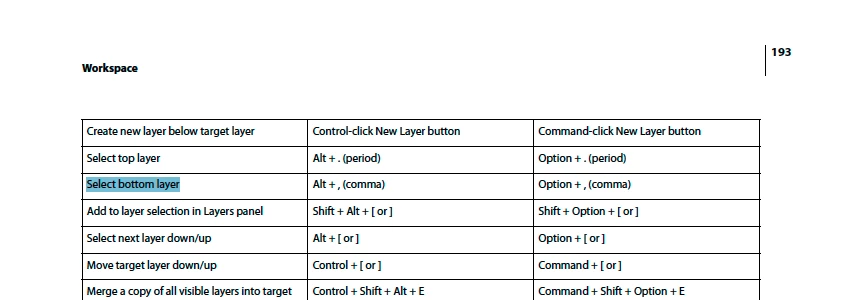
What I have noticed is that often the first step is to copy the current layer and thereafter all processing is performed on that layer or copies of that layer.   I had to learn one thing before I could emulate this.  I learnt that I could merge a subset of layers by selecting them and clicking ‘Merge Layers’.  Before that I was using ‘Merge Visible’ and I had to go to ‘Background’ to make that layer non-visible.  This I could do using Alt+[comma], but that key press was only recorded if I actually used it to move to the bottom layer from another layer. 


I was surprised that my Action was not as robust as I thought so I tried to generalise the method as far possible.  To this end I set myself the task that my Actions should be able to work recursively (should be able to apply the Action again to the output of an Action).  This created its own problems as recorded here.    https://community.adobe.com/t5/photoshop-ecosystem-discussions/blend-mode-jumps-layers/m-p/13134527


To summarise, my Action wouldn’t work with the Italian version of Photoshop.  I have now re-written my Actions and I have verified the results with the Italian person who originally highlighted the issue.


The way I did this was to write Actions which as a first step copied and renamed whatever layer was currently selected.  By working on the copied layer (and if required copies of that), I ensured that my Action operated independently of the name of the originally selected layer (whether its nomenclature was Italian or English).

Bojan Živković11378569
Community Expert
Community Expert
August 3, 2022

You must avoid hard coded names which always comes inside parentheses in action step. That will break action when played in non-english or non same language application because Photoshop will look for hard coded name. It is wise to avoid clicking on layer to select it whenever you can esspecially when you are not controling file from start to the end. It is good idea to inform user through stop what is requirement in order to sucesfully play action.

If you want to allow user to play action on layered file then check every possible situation and decide how to record action but also how to inform user what is requirement to play action.

Zesty_wanderlust15A7
Known Participant
August 3, 2022

"You must avoid hard coded names "

Agreed for the examples you give: the language-specific native terms PS uses for a few things.

Not if you rename layers (to optionally select later on). However, it is strongly recommended to use "totally unique" names that can not by accident select another layer (in general, or where the action was used previously in that doc). Then, when it's safe (at the end of the action, for example), change those unique (or weird) layer names to "readable" names. Usually, you only have to do this for a few key layers, as you can also do a lot with previous/next layer steps.

Inspiring
August 3, 2022

To rename a layer you have select it.  If you can do that without selecting it by name, then presumably there is no need to rename the layer or am I missing something?

didiermazier
Community Expert
Community Expert
August 1, 2022

ou could suggest to this person to get rid of localized files just by renaming :

  • Navigate to C:\Program Files\Adobe\Adobe Photoshop CC 2019\Locales
  • The default installation language is such as it_IT
  • Inside the folder Support Files folder rename tw10428_Photoshop_(your language).dat file to tw10428_Photoshop_it_IT.dat.old

so you can test in english. The suppress the suffix "old" and you go again in italian

 
Legend
August 1, 2022

You may need to write these as localized scripts, that way they work on all language editions.

c.pfaffenbichler
Community Expert
Community Expert
August 1, 2022

Adhering to meaningful Layers-/Channels-/…-naming conventions can help avoid some problems at least. 

c.pfaffenbichler
Community Expert
c.pfaffenbichlerCommunity ExpertCorrect answer
Community Expert
August 1, 2022

As for selecting the Background Layer try using 


As for selecting »Background Copy«: 

If a Layer needs to be selected again later in an Action it should immediately be renamed upon creation, if possible with a unique name that is unlikely to conflict with any existing Layers. 

Inspiring
August 1, 2022

Thank you I think you have given me enough to work on. I will think about this, then re-record my Actions (quite a daunting task!) then run them past the Italian person to see if the revised Actions work for him.  I will report back here in due course.

Zesty_wanderlust15A7
Known Participant
August 1, 2022

I find lots of "Background" stuff can be solved by using a temporary Merge Visible, unless you really need the actual Background. I seem to almost never need it in my own actions.

-

If you can avoid naming layers [correction: if you can avoid selecting a layer by name], even better. This way, you can use an action multiple times in the same doc. That's why many actions use multiple steps to go to a next/previous layer, although it doesn't look neat. I once thought I was clever to replace these, then found I couldn't use the action twice... 😉
-
I don't use automatic masks, so that makes a lot of 3rd party actions fail, yet there are some "tricks" to make it work for all people. If your action needs a layer mask, for Adjustment layers and Solid Color Fill you can do Select All before you lay down the layer. This will add a blank mask when needed (w/o PS complaining for anyone), whether the person has automatic masks on or not.
I don't know such a trick for a normal layer. Maybe if you remove the mask (whether it's there or not) and then add it back, but that's not very neat if you need it several times.
There's even pro (scripted) panels that don't check for this, which is pretty amateur.