
Actions: what do the "More" values mean?
I am trying to decipher the details of the action below. I ran Photo Restoration neural filters on a photo at these settings: Photo Enhance: 50; Enhance face:60. When I stopped recording the Action, and opened the details, this is what it says:
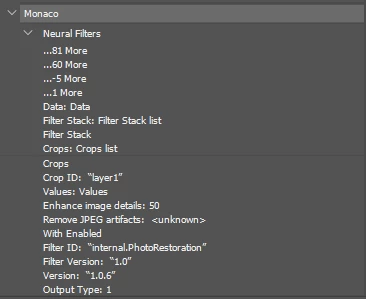
Here is the text version to help with SEO:
Action
... 81 More
... 60 More
... -5 More
... 1 More
Data: Data
Filter Stack: Filter Stack list
Filter Stack
Crops: Crops list
Crops
Crop ID: “layer!"
Values: Values
Enhance image details: 50
Remove JPEG artifacts: <unknown>
With Enabled
Filter ID: 'internal.PhotoRestoration"
Filter Version: “1.0”
Version: “1.0.6”
Output Type: 1
I have run the same Photo Restauration on a sample of other portrait-oriented photos (Photo Enhance: 50; Enhance face:60) to see what would appear in the Action details. Bottom line, the four "More" values are different. Sometimes photos taken in the same room with similar lighting, etc., have the same "More" values.
In test #2, I used the settings Photo Enhance: 100; Enhance face:100. But the "More" settings listed in the Action didn't change.
In test #3, I used the settings Photo Enhance: 100; Enhance face:100;Scratch:100. The "More" settings changed from:
81;60;-5;1
to
157;114;-5;4.
Do you know what these four numbers refer to?
 AdChoices