Known Participant
February 17, 2022
Answered

Add an image to a frame using JavaScript

  • February 17, 2022
  • 1 reply
  • 1996 views

I can't find a way to programmatiaclly add an image to a frame placed with "Frame Tool" in the document.
This is the Frame layer in Photoshop.


Some verification code and output:


$.writeln(frameLayer.typename); // === "LayerSet"
$.writeln(frameLayer.name); // === "placeholder_frame"
$.writeln(frameLayer.artLayers.length); // === 0
$.writeln(frameLayer.layers.length); // === 0
$.writeln(frameLayer.layerSets.length); // === 0


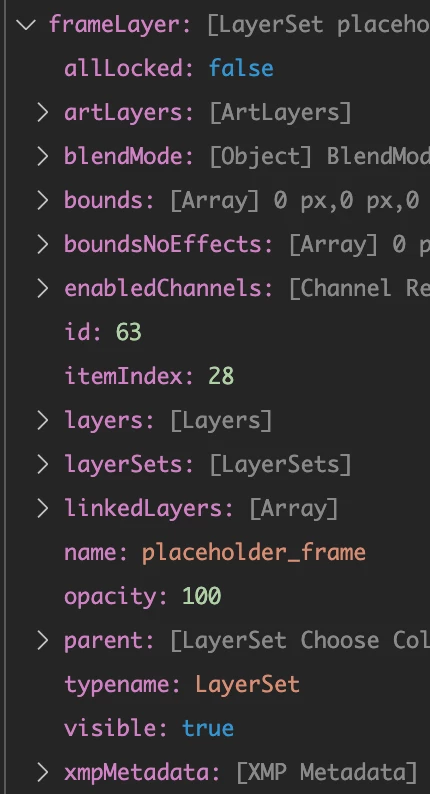
I assume that's ok, but there's no `add` method or anything like that. Object content from vscode debug console:


How can an I add an image to this layer?


This topic has been closed for replies.
Correct answer Stephen Marsh

My use case:

- a psd file with a mockup

- frame in the middle to contain an image

- script opens the psd doc

- script locates a jpg file in the file system

- script should add that image to the frame (just because the image can be placed nicely, without the need to adjust size if I were to use a smart object layer instead)


no masking involved


Many things are not covered under the standard JavaScript object model reference, one has to use action manager code. The easiest way to do this is to use the scripting listener plugin and or the clean sl script on the recorded code, however some folk understand how to write it from scratch without this crutch.


Presuming that your existing code is set to open the targetFile.psd and to select the targetLayer that contains the frame:


placeEvent(5, new File( "~/Desktop/sourceFile.jpg" ), true, 0, 0);

function placeEvent(ID, null2, linked, horizontal, vertical) {
	var s2t = function (s) {
		return app.stringIDToTypeID(s);
	};
	var descriptor = new ActionDescriptor();
	var descriptor2 = new ActionDescriptor();
	descriptor.putInteger( s2t( "ID" ), ID );
	descriptor.putPath( s2t( "null" ), null2 );
	descriptor.putBoolean( s2t( "linked" ), linked ); // change true to false to embedd
	descriptor.putEnumerated( s2t( "freeTransformCenterState" ), s2t( "quadCenterState" ), s2t( "QCSAverage" ));
	descriptor2.putUnitDouble( s2t( "horizontal" ), s2t( "pixelsUnit" ), horizontal );
	descriptor2.putUnitDouble( s2t( "vertical" ), s2t( "pixelsUnit" ), vertical );
	descriptor.putObject( s2t( "offset" ), s2t( "offset" ), descriptor2 );
	executeAction(s2t( "placeEvent" ), descriptor, DialogModes.NO);
}


The above code presumes a file titled sourceFile.jpg on the desktop.

1 reply

Stephen Marsh
Community Expert
Community Expert
February 17, 2022

A couple of different methods that come to mind:

  • Copy/paste content into active frame
  • Place linked or embedded into active frame


Or the opposite of what you currently have:

  • Existing layer active, then add the frame


Obvioulsy drag-n-drop is not for scripting. More here:

https://helpx.adobe.com/photoshop/using/place-image-frame-tool.html


fraktallAuthor
Known Participant
February 17, 2022

Thanks, though not sure I'm following. The frame layer is active but there's no method that'd would allow adding an image to it. I thought about doing something like that:

const imageFile = new File("/path/to/file.jpg");
frameLayer.artLayers.add(imageFile);

Obviously this is not working...

Stephen Marsh
Community Expert
Community Expert
February 17, 2022

Did you try:

  • Copy/paste content into active frame layer?
  • Place linked or place embedded into active frame layer?