
Inspiring
January 26, 2017
Answered

Add note to saved action?

  • January 26, 2017
  • 4 replies
  • 2462 views

I am organizing my actions and want to go back and add notes to some of my actions using the Note tool. i.e., In my Lasso tool action I want to make a note that I am selecting an image and placing into a different image. Thanks for looking, Lucie.
This topic has been closed for replies.
Correct answer Jeff Arola

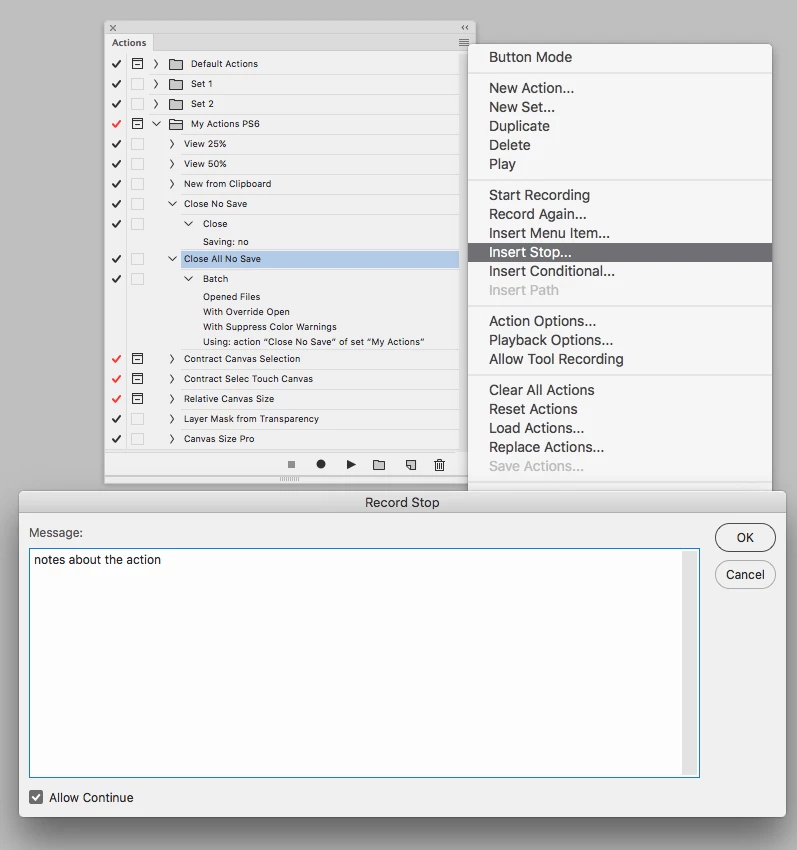
Instead of using the Note Tool, using a Stop in the action might be better.

It doesn't look like photoshop records the contents of a Note Tool.

With the action loaded in photoshop go to Insert Stop and you can type watever notes about the action you wish.

You can then move the Stop to anywhere in the action.

When playing the action the action stops at the stop and displays your text then press Ok to resume the action.

4 replies

Robert Studio Eight MN
Known Participant
September 18, 2020

I'm looking for the same type of thing.  I have an old action that I downloaded about 15 years ago.  It has a note action in it that includes text.  I'm now creating a new action and need to specify some instructions.  I thought I'd just add a note to the action and add the instruction but learned that this doesn't work.  I then tried to copy the portion of the action from that old action I've had for years but that doesn't work either.  So .... how is it that an action that I downloaded a lifetime ago contains exatcly the type of action I want, but I'm not able to recreated it?

Inspiring
January 27, 2017

I inserted the Stop at the beginning of my action (clicked on the option to Continue) and played it back. Thank you bunches, I am so excited to learn something new. Lucie

Stephen Marsh
Community Expert
Community Expert
January 27, 2017

Insert a “stop” command (with or without continue) and enter the note content. If you don’t wish for this window to popup during action playback then untick it so that it does not playback.

Jeff Arola
Community Expert
Jeff ArolaCommunity ExpertCorrect answer
Community Expert
January 27, 2017

Instead of using the Note Tool, using a Stop in the action might be better.

It doesn't look like photoshop records the contents of a Note Tool.

With the action loaded in photoshop go to Insert Stop and you can type watever notes about the action you wish.

You can then move the Stop to anywhere in the action.

When playing the action the action stops at the stop and displays your text then press Ok to resume the action.

Stephen Marsh
Community Expert
Community Expert
January 27, 2017

Haha, while I was writing my reply and editing the screen capture another reply came in saying pretty much the same thing!

Inspiring
January 27, 2017

The option to untick was was appreciated, thanks!