
Participant
February 4, 2016
Answered

Adding crop and bleed to an existing photoshop document

  • February 4, 2016
  • 1 reply
  • 24799 views

Hi all

I've been asked to edit some text on a business card, and have been given the following instruction;

The printing sizes are:

Cut size: 85 x 55 mm

Bleed size: 91 x 61 mm


Now I'm not as knowledgable about photoshop as I am about illustrator, but this is a PSD, so I opened it in photoshop, and to me it appears that the crop and bleed lines are way out what they need to be (unless I'm missing something obvious);
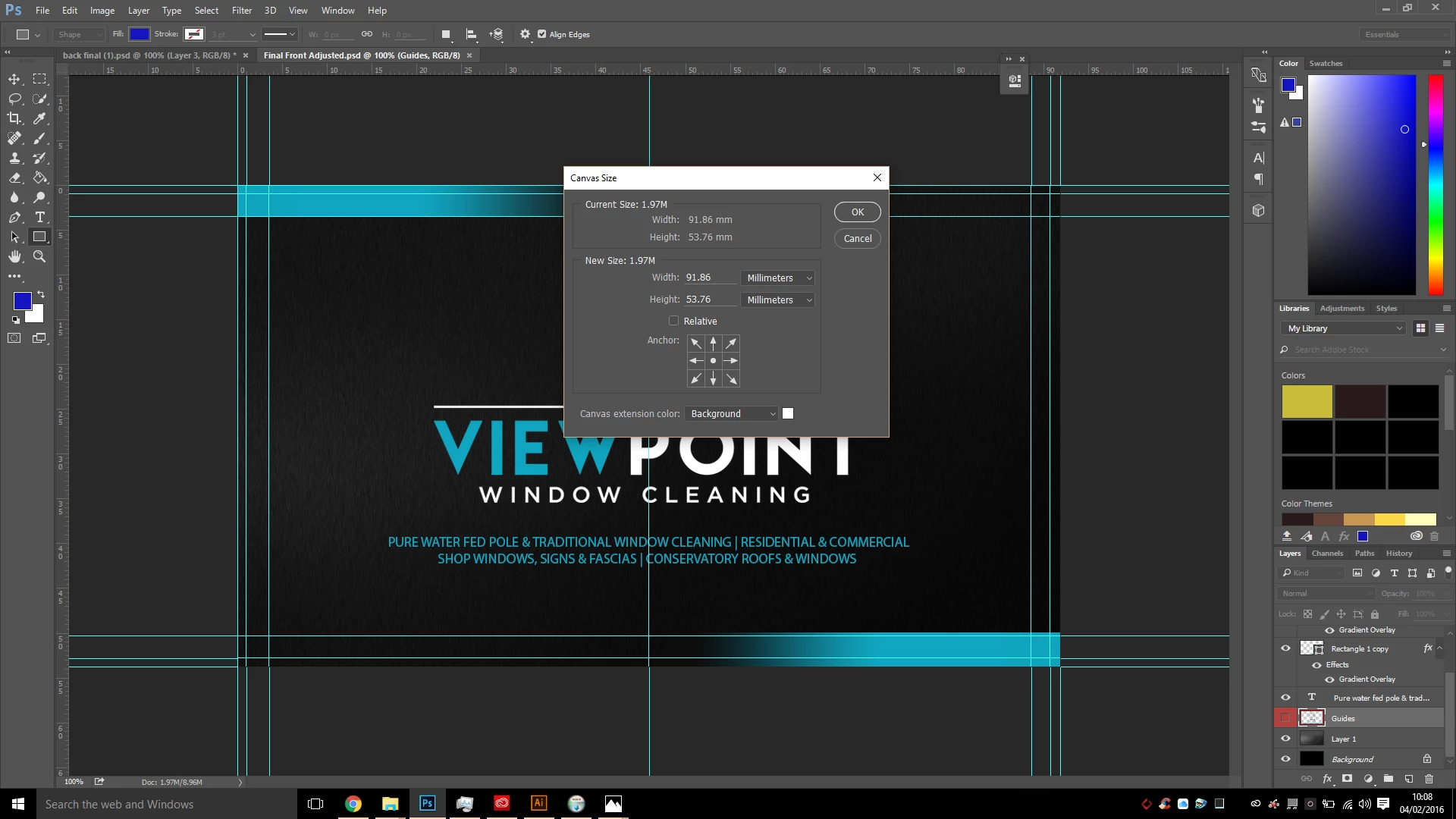

I can't seem to find where in photoshop I can amend the crop and bleed, it doesn't appear to show on the canvas size box?


Do I need to take this file over to indesign or illustrator to sort this part out, and if so, will that affect the quality at all?

Or is there a way to do this accurately in photoshop?

Thanks

Sally

    This topic has been closed for replies.
    Correct answer Stephen Marsh

    Photoshop is not Illustrator or InDesign (yes, I am stating the obvious there, however it needs to be said).

    The canvas size is the bleed if the file is setup correctly. Photoshop has no concept of uniquely sized PDF page boxes, they are all the same.

    You can save as the unflattened file as a Photoshop PDF using ZIP compression and elect to retain “vector” objects such as text or shapes.

    Then you could use Acrobat Pro to set correct media, trim and bleed page boxes, then add printer marks.

    Or you could place the Photoshop file into an appropriately sized InDesign file or Illustrator file and save out with the correct marks and then adjust page boxes if needed (for example, Illustrator does not correctly set the bleed box in CS6).

    1 reply

    Stephen Marsh
    Community Expert
    Stephen MarshCommunity ExpertCorrect answer
    Community Expert
    February 4, 2016

    Photoshop is not Illustrator or InDesign (yes, I am stating the obvious there, however it needs to be said).

    The canvas size is the bleed if the file is setup correctly. Photoshop has no concept of uniquely sized PDF page boxes, they are all the same.

    You can save as the unflattened file as a Photoshop PDF using ZIP compression and elect to retain “vector” objects such as text or shapes.

    Then you could use Acrobat Pro to set correct media, trim and bleed page boxes, then add printer marks.

    Or you could place the Photoshop file into an appropriately sized InDesign file or Illustrator file and save out with the correct marks and then adjust page boxes if needed (for example, Illustrator does not correctly set the bleed box in CS6).