
Participant
October 19, 2023
Question

Adjustment layer mask display new icon in the layer window

  • October 19, 2023
  • 1 reply
  • 937 views

Hi all, is there a possibility to remove the small icon in the mask of an adjustment layer?
and retrieve the old fashioned selected layer with the 4 "border lines"?
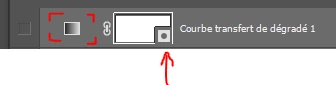
Thanks in advance!

This topic has been closed for replies.

1 reply

Trevor.Dennis
Community Expert
Community Expert
October 25, 2023

You'll be pleased to hear that the Development Team has added the option disable these icons in the latest beta version.  We can expect this option to be added to the full release version in a coming update, but you can use Photoshop beta for now if you really want rid of those icons.

wt_imagework
Known Participant
October 26, 2023

Very weird that an update like this doesn't have an turn off option when you push it onto it's users, but great news it will come in a later update!

Cerezine
Known Participant
October 26, 2023

Totally agree. Why put this on the release version instead of keeping it in the beta? It's affecting the workflow, since now I can't properly see my masks. With all the respect to the dev team, I know we can rollback to the previous version, but c'mon! Now we have to wait until god-knows-when they will release an update to allow to turn off this. I don't want to be mean, but new features or changes like this should be kept in the beta until it comes with an on/off solution.