
Participating Frequently
February 10, 2021
Question

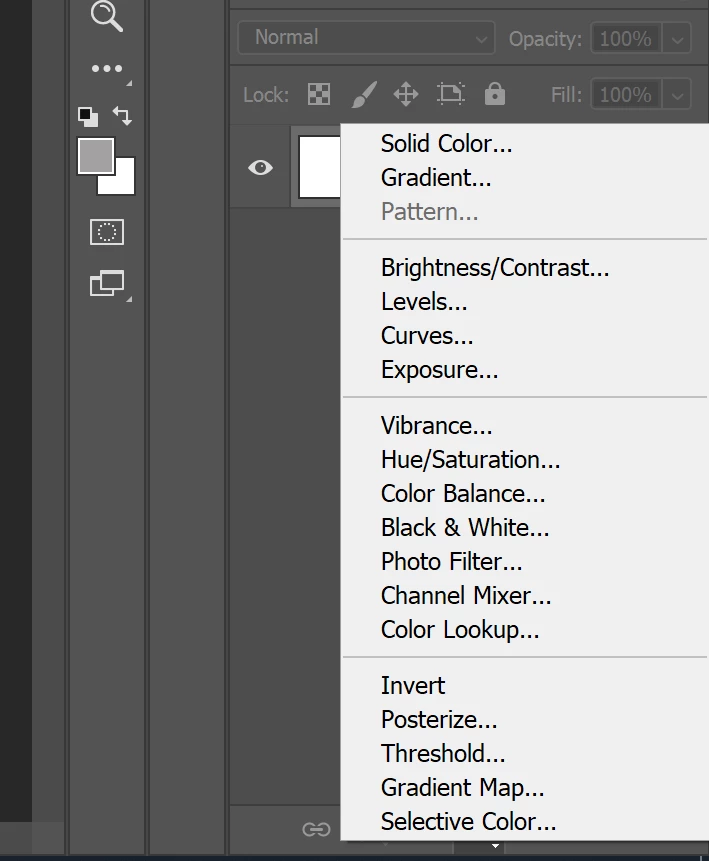
Adjustment layer pattern option grayed out

  • February 10, 2021
  • 2 replies
  • 1861 views

my photoshop updated today and suddenly I do not have the option for a pattern adjustment layer from the menu.  I can still create one by dragging and dropping from my patterns view but not from the menu.  Any idea why this is happening?
 

This topic has been closed for replies.

2 replies

Participant
November 4, 2021

Not sure if you solved this, but I found your post while trying to figure out what was wrong and, I don't know why, but all my patterns disappeared, so I had to install them again.

Bojan Živković11378569
Community Expert
Community Expert
February 11, 2021

Which Ps version exactly? Try to reset preferences https://helpx.adobe.com/photoshop/using/preferences.html#:~:text=Choose%20Photoshop%20>%20Preferences%20>%20General,Warning%20Dialogs%2C%20and%20click%20OK. what is general advice for all things weird in Photoshop.

ajahadiAuthor
Participating Frequently
February 11, 2021

Nope that didn't work.  I'm on creative cloud and am up to date on updates.  version 22.2 according to my creative cloud desktop version. 


I decided to create a new pattern and then suddenly it appeared again.  I'm a surface pattern designer so I have lots of patterns - not sure why it only showed up after I created another one. 


After deleting the placeholder pattern that I created it looks like it went away again (grayed out the option)  I think it has to do with some kind of directory thing - I have all my patterns in meaningful folders - there must be some kind of pattern root directory that I'm unaware of and must need to keep at least one pattern in that location. so strange as this is a new problem and I've been working this way forever.


Participant
November 28, 2021

I had a same problem and am glad I found your post.  I also deleted pattern I created and saved in the location now seems to be working.