Inspiring
June 14, 2023
Question

Adjustments menu window in PS 2023 weird look

  • June 14, 2023
  • 3 replies
  • 538 views

My adjustment menu window looks weird until I expand the adjustments presets a few times. First screen shows is how it looks and then after I expand the individual adjustments a few times.
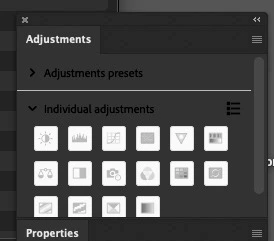
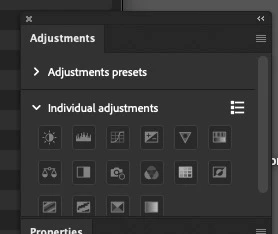
 

This topic has been closed for replies.

3 replies

gener7
Community Expert
Community Expert
June 20, 2023

Something is going on, but nothing I'm familar with. Hopefully one of the more experienced ACPs or Employees can help get your updates. If your Mac meets system reqs for 24, you  should get it.

Inspiring
June 20, 2023

Did that already.

gener7
Community Expert
Community Expert
June 20, 2023

I think the recently released (as of yesterday) Photoshop 2023/v24.6 solves this issue. I no longer see the "reverse negative" icons on my Mac. Update and give it a try.

Inspiring
June 20, 2023

When I look in CC and ask for updates the highest version it gives me is 24.4.0, which is what I am on.

Zesty_wanderlust15A7
Known Participant
June 20, 2023

24.6 is still the beta, AFAIK.

Sameer K
Community Manager
Community Manager
June 19, 2023

Hey, @stillrivereditions. Welcome to the Photoshop community. I'll help you figure this out.


Please share a screen recording of this behavior & the system info of Photoshop from Help > System info > Copy & paste into a text document > upload to Creative Cloud files (https://assets.adobe.com/files) and share the link here. 


What troubleshooting steps have you tried already?

Ensure Photoshop is in the default state, go to the location of the preference folder below, and rename it to backup. https://helpx.adobe.com/photoshop/using/preferences.html


  • Windows 10/11: Users/[user name]/AppData/Roaming/Adobe/Adobe Photoshop [version]
  • Press Windows + R & type this is the Run Window - %APPDATA%\Adobe


  • Rename the Adobe Photoshop folder by adding a .old at the end. (Adobe Photoshop 2023 > Rename > Adobe Photoshop 2023. old)


These changes will give a fresh start to Photoshop 2023 as a fresh install. Let me know if the issue exists.

Thanks!

Sameer K
