
DiraniehAW21129961
Participant
August 18, 2019
Question

Adobe 2019 not all executeAction(s) are work

  • August 18, 2019
  • 4 replies
  • 961 views

Hi,

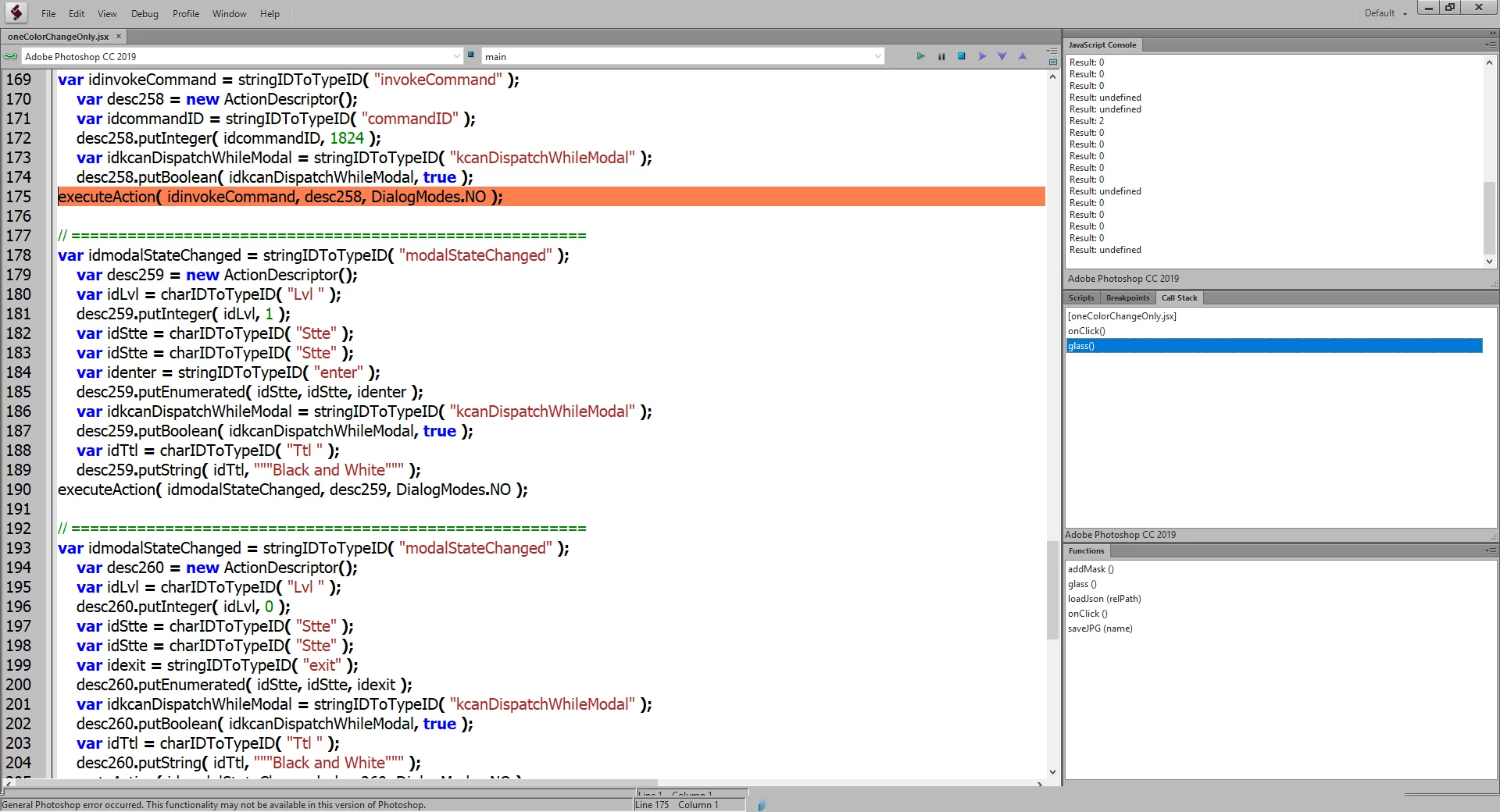
I try to execute some actions, but an ERROR generated, indicate that the function am trying to use, is no longer available on the latest version of adobe Photoshop 2019!, "This functionality may not be available in this version of Photoshop".

Is there any reference that I may use to get the latest adobe script methods?
This topic has been closed for replies.

4 replies

DiraniehAW21129961
Participant
August 20, 2019

thank you geppettol66959005​ I already used the Clean-Sl but I still have the same Errors!

I think there is some reasonable discussion by khaledObaid​ on Photoshop scripting in the following link :

Not all actions generated by (scriptlistener plug-in) are work for Adobe 2019

JJMack
Community Expert
Community Expert
August 20, 2019

When you used Clean SL did you use its  remove junk code button before cleaning the scriptlistener recorded code. Some code recorded by the plug-in is not useable in a Photoshop script see the array in Clean SL

var predefined = {

junkArray: [

"stringIDToTypeID( \"convertJSONdescriptor\" );",

"stringIDToTypeID( \"layersFiltered\" );",

"stringIDToTypeID( \"invokeCommand\" );",

"stringIDToTypeID( \"modalHTMLPending\" );",

"stringIDToTypeID( \"modalStateChanged\" );",

"stringIDToTypeID( \"toggleSearch\" );",

"stringIDToTypeID( \"toolModalStateChanged\" );"

],

JJMack
DiraniehAW21129961
Participant
August 21, 2019

No I didn't and I think was helpful thank you JJMack

Geppetto Luis
Legend
August 20, 2019

Yesterday I put the link to clean the file generated by scrptlistener

if you do not clean it up, an error occurs

link

https://github.com/rendertom/Clean-SL

Akash Sharma
Legend
August 20, 2019

Moved to Photoshop Scripting

Just a reminder, the Adobe Forums are transitioning to a new community experience soon. New threads and replies posts to the forums between August 22nd and September 9th will likely be lost, but we’re here to help.

c.pfaffenbichler
Community Expert
Community Expert
August 18, 2019

First: Why didn’t you post on the Scripting Forum?

Photoshop Scripting

Second: The warning may not be perfectly worded and the mistake could be that you are trying to invoke an operation that is not possible with the currently selected content.

You may want to provide a meaningful screenshot of the image in Photoshop (that means with all pertinent Panels visible) and the code.