Known Participant
September 20, 2023
Answered

Adobe accessibility bugs

  • September 20, 2023
  • 1 reply
  • 400 views

I have wrestled with Adobe for decades about a more complete accessiblity support. I am often frustrated by lack of effort.


I like PS ipad but sometimes its gui is poorly thought out which can hinder a user. I want to adjust the brush size but to do so I have to use an unfriendly slider. The slider auto hide is too quick; no setting for it. There is no numeric support to change size; like for zooming. To go from 3 to 10 is not easy for my fingers unless I go very slowk and steady movement. This slows me down.


Please, fellow disabled artists, post your experiences here or else where to get them addressed. We should not be hindered by digital tools to make art.


Thanks

This topic has been closed for replies.
Correct answer jane-e
quote

There is no numeric support to change size

By @meitnik


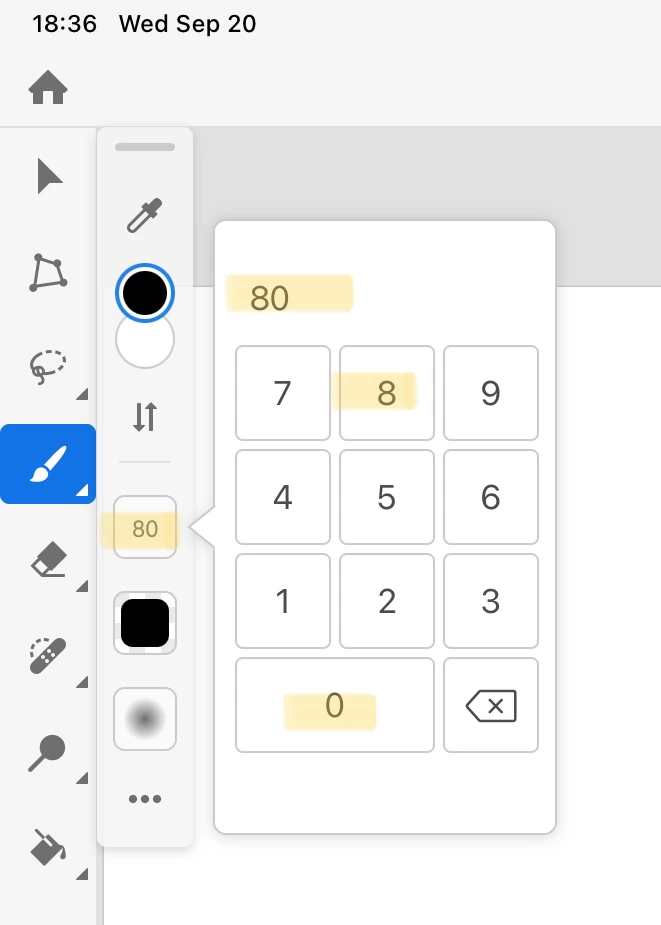
You can type the Brush size in Photoshop for iPad. Tap and linger on the size control to pop up the keypad — don't release instantaneously.


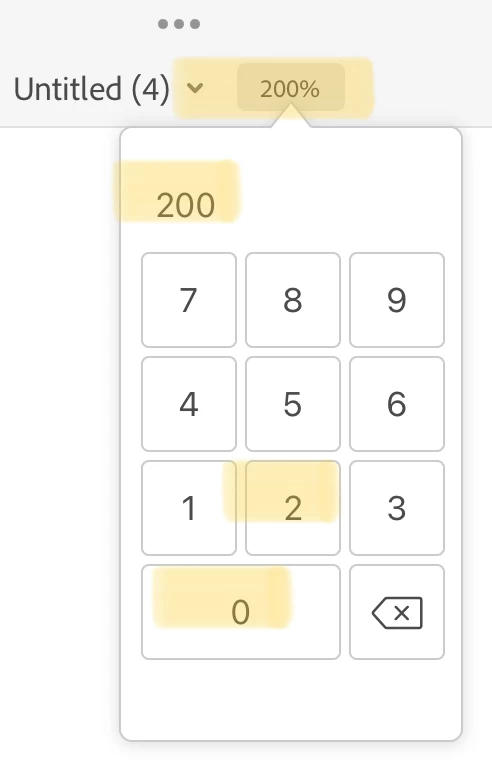
Same with Zoom. Tap and linger until the keypad appears. (Or you can pinch/spread two fingers on the canvas.)


Jane


1 reply

jane-e
Community Expert
jane-eCommunity ExpertCorrect answer
Community Expert
September 20, 2023
quote

There is no numeric support to change size

By @meitnik


You can type the Brush size in Photoshop for iPad. Tap and linger on the size control to pop up the keypad — don't release instantaneously.


Same with Zoom. Tap and linger until the keypad appears. (Or you can pinch/spread two fingers on the canvas.)


Jane


meitnikAuthor
Known Participant
September 20, 2023

Thank you very much. Adobe support never suggested that even after several calls by me. Joy to  work better.

jane-e
Community Expert
Community Expert
September 20, 2023

You're welcome @meitnik , I'm glad I could help 😊


Jane