

Adobe applications not responding for lengthy time during launch
Hello All,
I am a creative cloud subscriber that has regularly used Adobe on Mac since 2010. I have always had to wait on Adobe apps to launch. This typically ranged from 30 seconds to a minute for Photoshop, Illustrator, Indesign, you name it, to launch. During the launch, the launch splash screen is not visible, the application "does not respond". After a period of time, the splash screen will be visible momentarily then the app will launch. Once I see the app, it takes another 10-15 seconds for the app to become useable (unfrozen). Over recent months, this time has slowly ticked up till it now takes 2 minutes to launch a program into a useable state.
I am running the newest updates (as of this writing) on a 2012 MPB (see specs below).
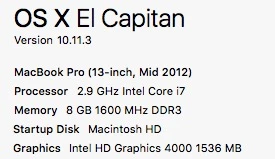
Additionally: 1TB Hard Drive with 250GB free, no other programs running during launch, computer connected to wall power, computer allowed to boot fully before launching any app.
Yesterday, I was at a colleagues office when he decided to show me an illustrator file on a Macbook, he woke the MBP up, clicked the Ai icon in the dock and within 10-15 seconds, he was browsing for the file in the open file dialog. I was blown away! So I made a comment about how he must have one awesome computer. He shrugged it off. After a few minutes discussion, I asked him what the specs on the computer where. THEY PERFECTLY MATCHED MINE! down to the version of the OS.
Is there anything I can do to speed up my launch time between apps? Suggestions?
 AdChoices