Participant
July 3, 2017
Question

Adobe Media Encoder option when rendering videos in Photoshop is grayed out. Please help

  • July 3, 2017
  • 1 reply
  • 4870 views

I have been trying to render out this simple little animation for a video I am doing but, I can only render the Photoshop layers into separate images because I can't select to use Adobe Media Encoder
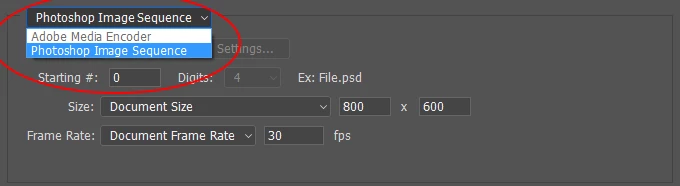
 

As you can see the option has been grayed out and won't let me select it. I have uninstalled the program two times now to see if that would fix the problem yet still no success. If you can help me that would be greatly appreciated.

Also in case you are wondering I am using Windows 8.1 (64 Bit)

This topic has been closed for replies.

1 reply

KR Seals
Community Expert
Community Expert
July 3, 2017

Do you have the full CC subscription including Media Encoder and Premier Pro?

If not and you are subscribing to the Photographers plan, Media Encoder does not seem to be included:

http://www.adobe.com/creativecloud/photography.htmlhttp://

Ken Seals - Nikon Z 9, Z 8, 14mm-800mm. Computer Win 11 Pro, I7-14700K, 64GB, RTX3070TI. Travel machine: 2021 MacBook Pro M1 MAX 64GB. All Adobe apps.
Participant
July 3, 2017

Yes I have the full creative cloud subscription with all the apps

KR Seals
Community Expert
Community Expert
July 3, 2017

Mine comes up like this, defaulting to AME:

I also have the full version of CC.

You might check to see if you open the video in Premier Pro if it will export to AME from there.

The only other think I can think of is to check to see if your video/graphics card meets the minimum specs.

Ken Seals - Nikon Z 9, Z 8, 14mm-800mm. Computer Win 11 Pro, I7-14700K, 64GB, RTX3070TI. Travel machine: 2021 MacBook Pro M1 MAX 64GB. All Adobe apps.