
Question
Adobe Photoshop 2023 displays invalid Chinese Characters in rectangular X
Hello,
I want to copy and paste from the source file (which is using Noto Sans CJK SC Regular font) into Photoshop, but some of the chinese characters are showing up as invalid characters (rectangular box with X inside).
I have tried installing the Noto Sans CJK SC Regular font file, and also Arial Unicode MS (just in case) already. But still not able to fix the issue.
For example, this "你知道吗" shows up in Photoshop as this:
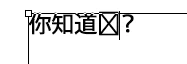
Please advise!
Thanks.
 AdChoices