
mahdir93819328
Participant
October 17, 2018
Question

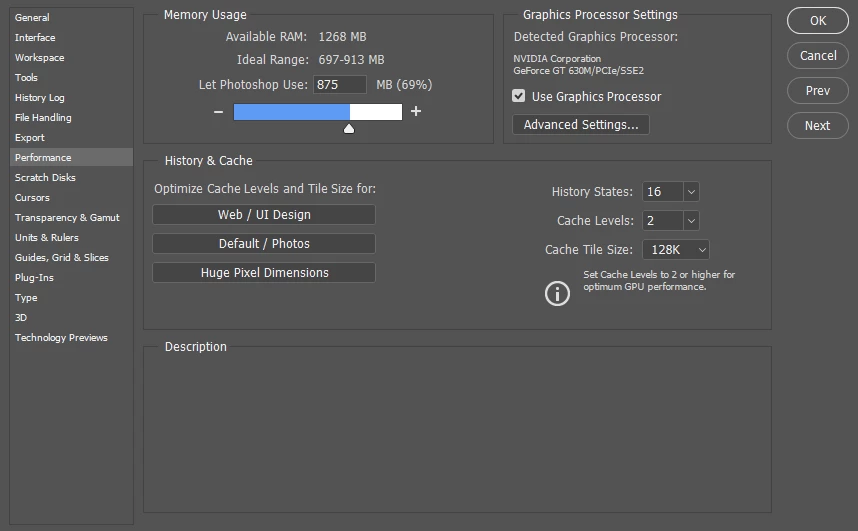
Adobe Photoshop CC (2017) doesn't get all my RAM
  • October 17, 2018
  • 2 replies
  • 943 views


Using ps on 64 bit system and 6 GB Ram and it just sees just 1200 MB of all ram?
I've been searching for solution and nearest answers was things like:
Adding override memory in regedit or runnig 64version of application...
I tried the first one but i've no idea what should i do to run in 64 version of ps

please give some guide

[Here is the list of all Adobe forums... https://forums.adobe.com/welcome]

[Moved from Encore to Photoshop... Mod]

This topic has been closed for replies.

2 replies

Jeff Arola
Community Expert
Community Expert
October 17, 2018

Update to photoshop 2018 or the new just released photoshop cc 2019.

Help>Updates from within photoshop.

It's a bug in the spring windows 10 creators update that is fixed in later photoshop versions.

mahdir93819328
Participant
October 18, 2018

tnx for replying.

I'll try 2018 version...
absolutely no other solution then?

Jeff Arola
Community Expert
Community Expert
October 18, 2018

The other solution is to edit the registry like explained here:

Error while accessing performance preferences - 'An integer between 96 and 8 is required.'

Stan Jones
Community Expert
Community Expert
October 17, 2018

You're in the Encore (DVD Authoring) forum.

Here is Photoshop:

Photoshop

mahdir93819328
Participant
October 18, 2018

How can I post there? I'm just new to adobe help community