Participant
February 16, 2017
Answered

Adobe Photoshop CS5 keep quitting unexpectedly

  • February 16, 2017
  • 2 replies
  • 1903 views

Hi Guys,

I have an issue where in my Adobe Photoshop CS5 keep quitting unexpectedly

Thank you for your help guys in advance

    This topic has been closed for replies.
    Correct answer S_Gans

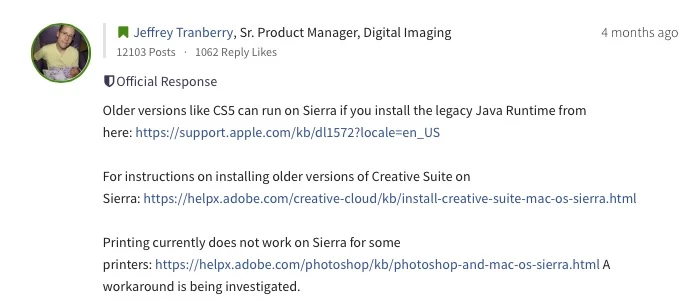
    Officially, Photoshop CS5 isn't supposed to run on Sierra - but there's a thread here, in which an official response with multiple steps and problems were addressed:
    Photoshop CS6 and earlier: Compatible with MacOS Sierra 10.12? | Photoshop Family Customer Community
    2 replies

    S_Gans
    Community Expert
    S_GansCommunity ExpertCorrect answer
    Community Expert
    February 16, 2017

    Officially, Photoshop CS5 isn't supposed to run on Sierra - but there's a thread here, in which an official response with multiple steps and problems were addressed:
    Photoshop CS6 and earlier: Compatible with MacOS Sierra 10.12? | Photoshop Family Customer Community

    Adobe Community Expert / Adobe Certified Instructor
    gener7
    Community Expert
    Community Expert
    February 16, 2017

    Can you supply some details?

    * Adobe product and version number  12.0 or 12.0.4?

    * Operating system and version number  OSX 10.7 or Windows 7 as an example.

    * The full text of any error message(s)

    * What you were doing when the problem occurred

    * Computer hardware, such as CPU; GPU; amount of RAM; etc.

    No personal contact information please. Your questions will be answered in the forums. Be wary of attempts to contact you privately especially via Skype.

    No serial numbers, this is a public forum and it will be copied and used by those who did not pay for it.

    Gene

    Participant
    February 16, 2017

    * Adobe product and version number  12.0 or 12.0.4?       Adobe Photoshop CS5   12.0.4 x64

    * Operating system and version number  OSX 10.7 or Windows 7 as an example.   OS  10.12.3

    * The full text of any error message(s)                          No error message. The program just quit.

    * What you were doing when the problem occurred  I had three photos open. Tried to close one, and the program quit.

    * Computer hardware, such as CPU; GPU; amount of RAM; etc.

                       Processor:  2.6 GHz Intel Core i7

                       Memory:     16 GB  1600 MHz DDR3

                       Graphics:     NVIDIA GeForce GT 650M  1024 MB

                                            Intel HD Graphics 4000 1536 MB

    Thanks for your help in advance

    gener7
    Community Expert
    Community Expert
    February 16, 2017

    OSX 10.12.3  That in itself is a red flag. Older software that ran under 10.6 is going to have difficulties with 10.12

    Simplest idea would be a restart of your Mac. Many times that clears up problems.

    Next is to look at third party plugins and fonts and resetting your Preferences if this problem persists.

    This blog will explain this in detail.

    http://blogs.adobe.com/crawlspace/2012/07/photoshop-basic-troubleshooting-steps-to-fix-most-issues.html

    Let us know how it turns out or if you have questions.