September 21, 2010
Question

Adobe Photoshop CS5 - Save As TARGA missing!

  • September 21, 2010
  • 1 reply
  • 29750 views

Hello helpful people!

I'm by no means a photoshop expert, but I've done some research about this problem of mine and I can't make any sense out of it.

I'm using Photosho CS5 (64 Bit) and for some reason the "Save As..." dialog does not have the TARGA file option.

I checked some other posts and articles across these forums and through some broader searches, but nothing helped me out.

I understand that CS5 came with a built-in TGA saving option rather than requiring a plug-in, as previous versions had required.

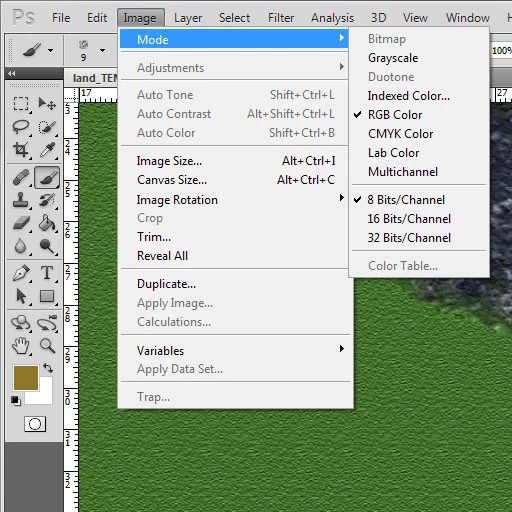
I understand that a TGA should be saved in 8-bit RGB mode (which is what my file is in anyway, since it's designed to go into 3DS Max as a texture)

Despite all this, and numerous restarts and verifying that I was up-to-date on the current patch, I still can't add .tga to any of my files

I've definitely got the mode set right... but then, in the "Save As..." window:
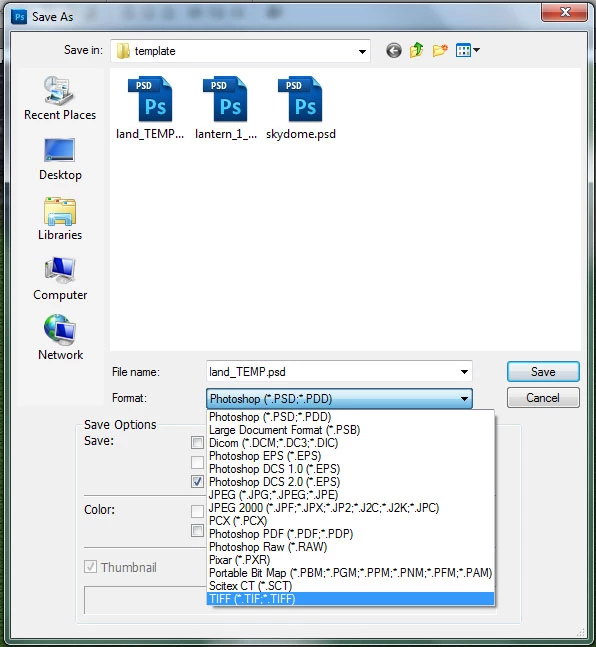
No TARGA (*.tga) option

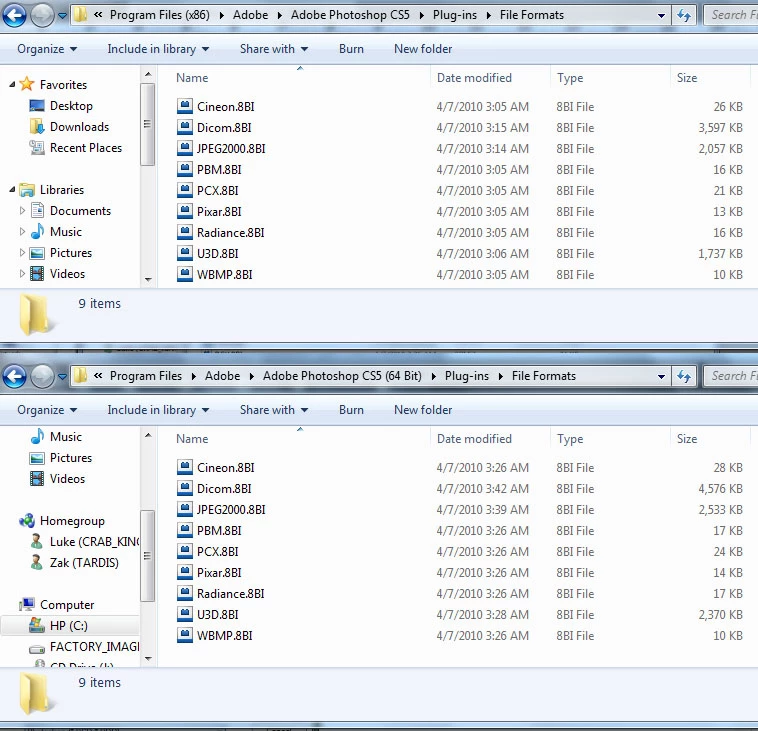
Since CS5 is supposed to have .tga capabilities built into to the program, and not need an add-on, I wasn't surprised to see that the File Formats folders in both my Program Files and Program Files (x86) directories didn't have the targa.8bi file.
So my question to you knowledgeable folks is this...

How do I restore my ability to Save As a TARGA?

    This topic has been closed for replies.

    1 reply

    Noel Carboni
    Legend
    September 21, 2010

    A number of formats that used to be available via separate plug-ins have been moved into Photoshop proper.  CS5 does not come with a Targa.8BI file like its predecessors did.

    Looks like you're missing some other formats (BMP, CompuServ GIF, PNG), and have one extra (Dicom) that I don't have.

    Here's my list (I've added Genuine Fractals):

    Edit:  I've done more research...  The Dicom format is only available in Photoshop Extended, which is why I don't have it.

    Have you installed any other format plug-ins?

    Do you, by chance, have your Additional Plug-Ins Folder (in Edit - Preferences - Plug-ins) pointed at a plug-ins folder from an older version of Photoshop?

    -Noel

    September 21, 2010

    Thanks so much for the response! I haven't taken any time to set up extra plug-ins, but it was very possible that I had the directory pointing to an older version! I was using the free trial before getting a licensed copy, and I believe my trial was NOT the extended version.

    I didn't seem to have any directory selected for plug-ins when I went to check, so I got really hopeful. But, after trying both my Program Files (x86) and my regular Program Files directories (down to the Plug-Ins folder in each), neither gave me a list similar to yours. I made sure to set the change, close, and restart before testing each time I changed the folder. Any other suggestions?

    EDIT: Just wanted to cross-reference... these are the directories under my Plug-Ins folders (in each of my Program Files directories). Perhaps I have the incorrect files?

    I have no idea if this is related at all, either, but my Filters seem to have been truncated as well. For example, the Filter > Render option is not available to me, even though the Filter Gallery. Not sure when that happened, exactly, because I'm certain I had use of that with my full licensed product and not just the trial I had (as opposed to the TARGA, which I can't remember using before now in either trial or licensed versions)

    Chris Cox
    Legend
    September 22, 2010

    Yeah, you've moved the application itself or the plug-ins folder and Photoshop isn't able to find the plugins.

    You don't have to have a directory selected in preferences -- Photoshop installed with the plugins directory in the correct place, and loads the plugins by default.


    And pointing the additional plugins preference to an older version of Photoshop WILL cause problems.