christophery76280259
Inspiring
November 29, 2019
Question

adobe photoshop does nothing and does not what every one elses does.

  • November 29, 2019
  • 2 replies
  • 865 views

I dont get it. I have taken classes, I have watch countless videos and looked through all the tutorials. My photoshop does not, NOT do anything like everyone else and I am getting mad. When I say nothing, I mean nothing. I can follow the guide to the Tee, watch and re-watch the same few seconds on a youtube video over and over and my phtoshop does not do what it supposed to do. My pen tool does not work, masking does not, gradiants don't work. I don't get it.
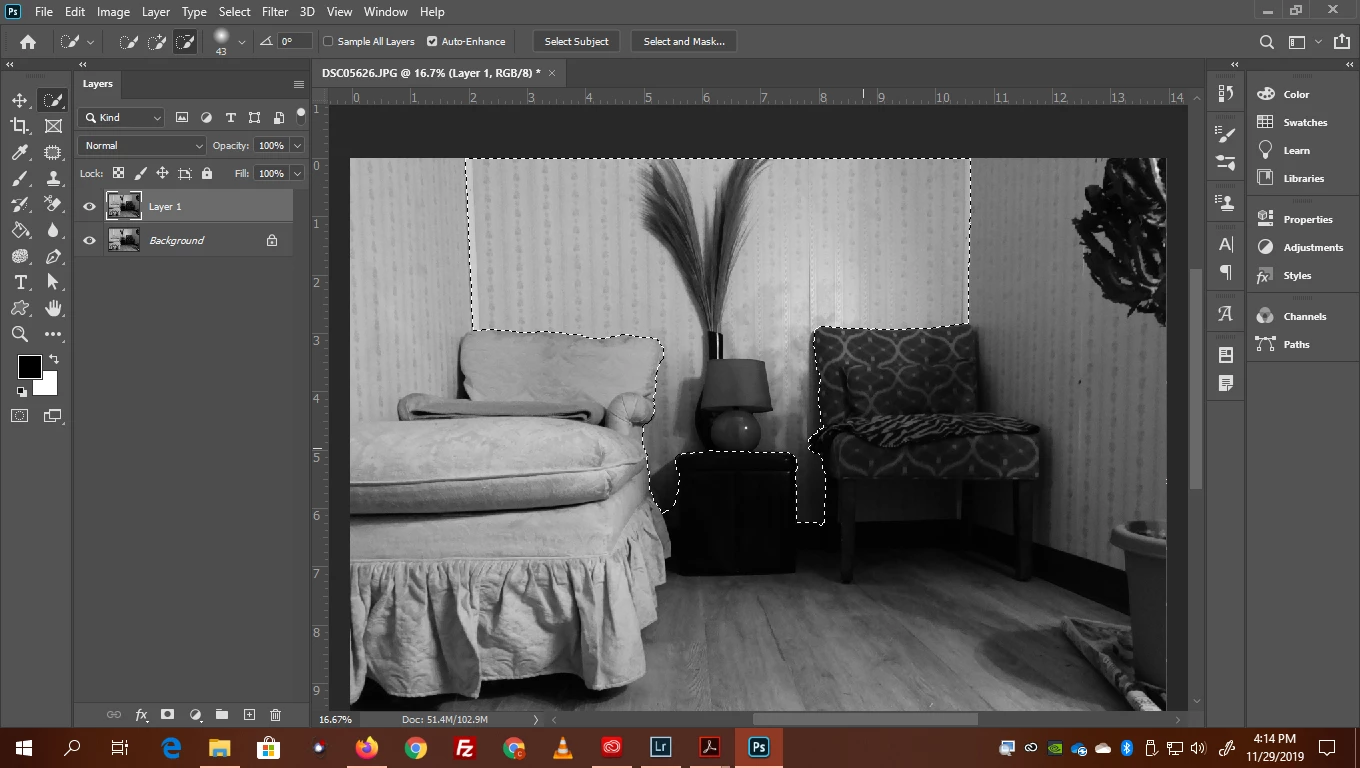
 

I want to remove the background. I have my selection. 27 videos all say to hit the select and mask and in all 27 videos the background just poofs, goes away. What does mine do? Nothing!!!!!!!!!!!!!! The selection goes away and I am looking at the orginal image.

This topic has been closed for replies.

2 replies

JJMack
Community Expert
Community Expert
November 30, 2019

Your Background layer is visible and photoshop background layer does not support transparency so it can not be masked unless converted to a normal layer.  Turn off the visibility of your] background layer. Your layer above the background layer does not have a layer mask. However,  you have selected the back wall. If you invert that selection. All but the back wall will be selected. Then click on the add layer mask icon in the bottom of the layers palette to add a layer mask to drop out the back wall. Its easy to miss point in Photoshop tutorials especially video tutorials.  Use a player you can pause and backup to replay part you are having problems with. It looks like your Photoshop is working correctly, but you missed some steps.

JJMack
paulhcrank
Participating Frequently
November 29, 2019

Hide your bottom layer first.