Participant
November 8, 2019
Question

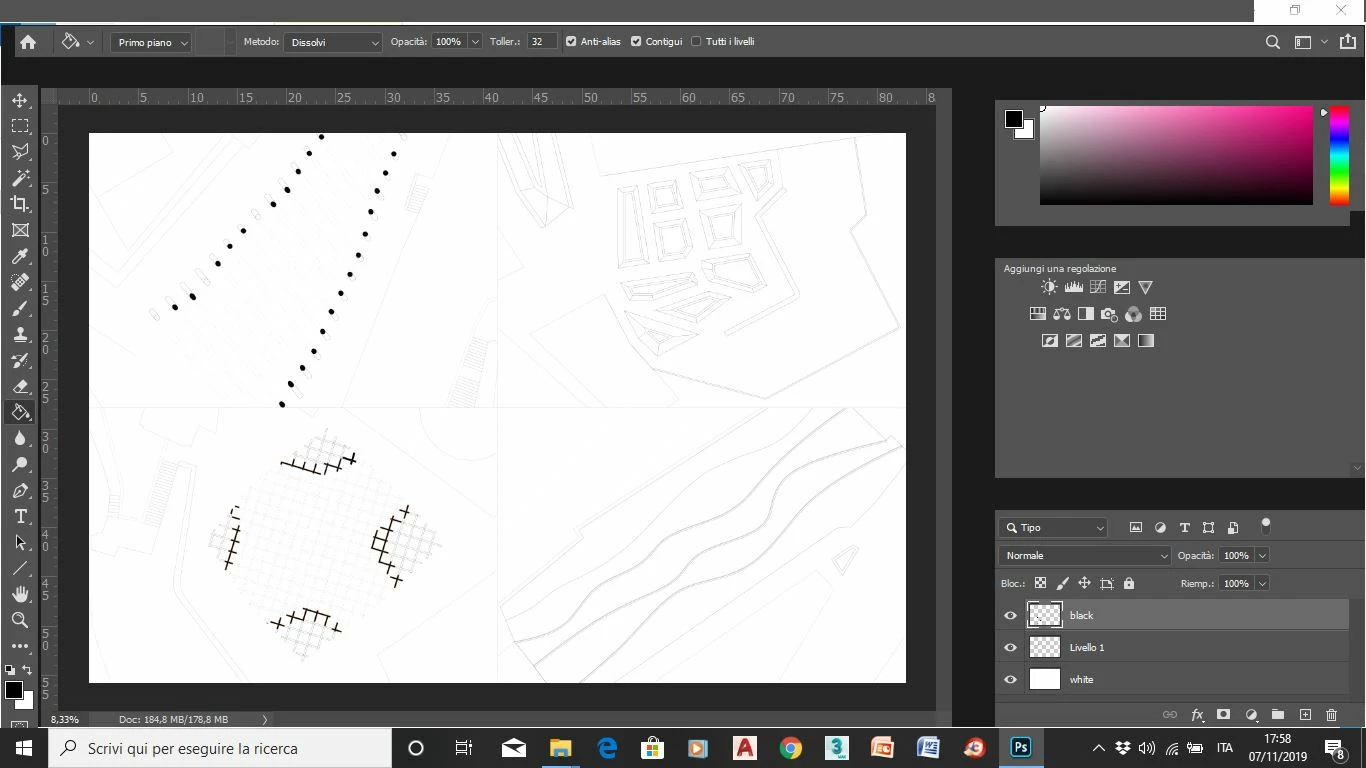
After the Photoshop 2020 update, the menu bar is hidden - Windows 10

  • November 8, 2019
  • 3 replies
  • 1768 views

After the 2020 update the menu bar is hidden, also I can't see the other things like in the picture below. 
{Thread renamed by moderator}

This topic has been closed for replies.

3 replies

Semaphoric
Community Expert
Community Expert
November 8, 2019

There's been several reports of this. This thread says it was due to having multiple graphics drivers on their system.

Participant
November 8, 2019

Problem solved. Thank you!

Sahil.Chawla
Adobe Employee
Adobe Employee
November 8, 2019

Hi there,

Sorry to hear about the hidden menu bar, could you please try resetting the preferences of Photoshop and let us know if it helps? https://helpx.adobe.com/photoshop/using/preferences.html


Note: Make sure that you back up all your custom presets, brushes and actions before restoring Photoshop's preferences. Migrate presets, actions, and settings


Regards,
Sahil

Participant
November 8, 2019
Participant
May 14, 2020

Sorry to disagree, this is not solved and the link you indicate offer no solution. I do not have dual drivers and I experience this annoying issue.

Participant
November 8, 2019

I am unable to complete my site's Shifa Rejuvenation images from adobe photoshop.