Let's agree to disagree about the bug-status then 🙂 Thanks for the discussion and for giving me the motivation to dig deeper!
I just discovered another piece of evidence that makes me to lean even more to the bug side.
- Open an image, flatten all layers, convert the Background layer to Smart Object.
- Using ScriptEventListener record applying Camera Raw preset containing AI masks (as described above) to a smart layer. Remove lines with "crs:InputDigest", "crs:MaskDigest" (not strictly necessary to remove, but just to be sure) and the entire section that adds the BigT field (desc439.putData( idBigT, String.fromCharCode...) - this is a must. The resulting code should look like this:
var cTID = charIDToTypeID;
var sTID = stringIDToTypeID;
var idAdobeCameraRawFilter = sTID("Adobe Camera Raw Filter");
var desc439 = new ActionDescriptor();
desc439.putString(cTID("CrVe"), """15.5.1""");
desc439.putInteger(cTID("PrVN"), 6);
desc439.putInteger(cTID("PrVe"), 251920384);
desc439.putString(cTID("LCs "), """<x:xmpmeta xmlns:x="adobe:ns:meta/" x:xmptk="Adobe XMP Core 7.0-c000 1.000000, 0000/00/00-00:00:00 ">
<rdf:RDF xmlns:rdf="http://www.w3.org/1999/02/22-rdf-syntax-ns#">
<rdf:Description rdf:about=""
xmlns:crs="http://ns.adobe.com/camera-raw-settings/1.0/">
<crs:MaskGroupBasedCorrections>
<rdf:Seq>
<rdf:li>
<rdf:Description
crs:What="Correction"
crs:CorrectionAmount="1"
crs:CorrectionActive="true"
crs:CorrectionName="Mask 1"
crs:CorrectionSyncID="4C2C200A187F3044A0F2BA8B1EBA146E"
crs:LocalExposure2012="0.3625"
crs:LocalContrast2012="-0.48"
crs:LocalHighlights2012="0.29"
crs:LocalCurveRefineSaturation="100">
<crs:CorrectionMasks>
<rdf:Seq>
<rdf:li
crs:What="Mask/Image"
crs:MaskActive="true"
crs:MaskName="Person 1 - Body Skin"
crs:MaskBlendMode="0"
crs:MaskInverted="false"
crs:MaskSyncID="3E8A13F2992E434DAE3FC1C3DAB45CA2"
crs:MaskValue="1"
crs:MaskVersion="1"
crs:MaskSubType="3"
crs:MaskSubCategoryID="4"
crs:ReferencePoint="0.633880 0.552734"
crs:InputDigest="481D664F03D3BE00CA2D26C190FECDDE"
crs:InputDigestVersion="2"
crs:MaskDigest="12D09EA62EA09A4EF0D68D23531E052A"
crs:WholeImageArea="0/1,0/1,1536/1,1097/1"
crs:Origin="185,258"
crs:ModelVersion="234881976"/>
<rdf:li
crs:What="Mask/Image"
crs:MaskActive="true"
crs:MaskName="Person 1 - Lips"
crs:MaskBlendMode="0"
crs:MaskInverted="false"
crs:MaskSyncID="A78C9B8F27F92F46B25E231C2926A39D"
crs:MaskValue="1"
crs:MaskVersion="1"
crs:MaskSubType="3"
crs:MaskSubCategoryID="6"
crs:ReferencePoint="0.562842 0.199219"
crs:InputDigest="481D664F03D3BE00CA2D26C190FECDDE"
crs:InputDigestVersion="2"
crs:MaskDigest="D9B3D4A972BAFD5D57C0D4736A714193"
crs:WholeImageArea="0/1,0/1,1536/1,1097/1"
crs:Origin="579,284"
crs:ModelVersion="234881976"/>
</rdf:Seq>
</crs:CorrectionMasks>
</rdf:Description>
</rdf:li>
</rdf:Seq>
</crs:MaskGroupBasedCorrections>
</rdf:Description>
</rdf:RDF>
</x:xmpmeta>
""");
var idPset = cTID("Pset");
desc439.putString(idPset, """<x:xmpmeta xmlns:x="adobe:ns:meta/" x:xmptk="Adobe XMP Core 7.0-c000 1.000000, 0000/00/00-00:00:00 ">
<rdf:RDF xmlns:rdf="http://www.w3.org/1999/02/22-rdf-syntax-ns#">
<rdf:Description rdf:about=""
xmlns:crs="http://ns.adobe.com/camera-raw-settings/1.0/">
<crs:Preset>
<rdf:Description
crs:Name="## AI mask"
crs:Amount="1"
crs:UUID="466679343ADD4546AE39653CBAE6947D">
<crs:Parameters>
<rdf:Description
crs:Version="15.5.1"
crs:CompatibleVersion="251658240"
crs:ProcessVersion="15.4">
<crs:MaskGroupBasedCorrections>
<rdf:Seq>
<rdf:li>
<rdf:Description
crs:What="Correction"
crs:CorrectionAmount="1"
crs:CorrectionActive="true"
crs:CorrectionName="Mask 1"
crs:CorrectionSyncID="4C2C200A187F3044A0F2BA8B1EBA146E"
crs:LocalExposure2012="0.3625"
crs:LocalContrast2012="-0.48"
crs:LocalHighlights2012="0.29"
crs:LocalCurveRefineSaturation="100">
<crs:CorrectionMasks>
<rdf:Seq>
<rdf:li
crs:What="Mask/Image"
crs:MaskActive="true"
crs:MaskName="Person 1 - Body Skin"
crs:MaskBlendMode="0"
crs:MaskInverted="false"
crs:MaskSyncID="3E8A13F2992E434DAE3FC1C3DAB45CA2"
crs:MaskValue="1"
crs:MaskVersion="1"
crs:MaskSubType="3"
crs:MaskSubCategoryID="4"
crs:ReferencePoint="0.500000 0.500000"
crs:ErrorReason="0"/>
<rdf:li
crs:What="Mask/Image"
crs:MaskActive="true"
crs:MaskName="Person 1 - Lips"
crs:MaskBlendMode="0"
crs:MaskInverted="false"
crs:MaskSyncID="A78C9B8F27F92F46B25E231C2926A39D"
crs:MaskValue="1"
crs:MaskVersion="1"
crs:MaskSubType="3"
crs:MaskSubCategoryID="6"
crs:ReferencePoint="0.500000 0.500000"
crs:ErrorReason="0"/>
</rdf:Seq>
</crs:CorrectionMasks>
</rdf:Description>
</rdf:li>
</rdf:Seq>
</crs:MaskGroupBasedCorrections>
</rdf:Description>
</crs:Parameters>
</rdf:Description>
</crs:Preset>
</rdf:Description>
</rdf:RDF>
</x:xmpmeta>
""");
executeAction(idAdobeCameraRawFilter, desc439, DialogModes.ALL);
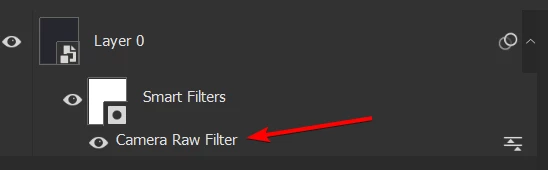
- Double click on the Camera Raw Filter smart filter
- Switch to the Masking mode and click "Update All" - or just press Ctrl+Shift+U immediately after opening Camera Raw.
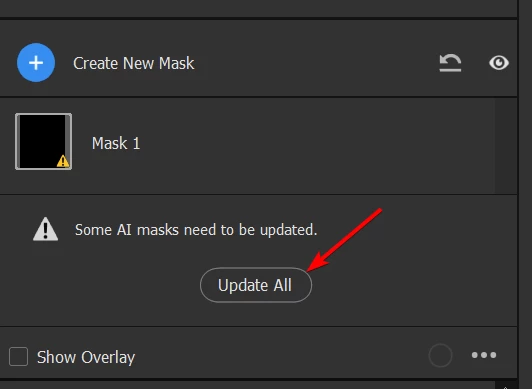
- Done - the masks are re-generated.
This proves the point that all the necessary data are already stored in the Action Descriptor (which can easily be converted to an Action) and in the smart object (which itself stores ADs). We only need a way to "automatically click" the "Update All" button from an action (or a script).
It might be as simple as handling something along the lines of:
desc439.putBoolean(stringIDToTypeID("updateAiMasks"), true)
For sure - that would require some work on Adobe side, but it should be relatively straightforward. 3 story points 😉 (famous last words)
For now I have a workaround using AHK to press the Ctrl+Shift+U combination as soon as the Camera Raw window pops up. Not the cleanest solution, but hey, it works.
Here's my final POC. Script (JSX):
var cTID = charIDToTypeID;
var sTID = stringIDToTypeID;

function addPresetBasedACR_interactive() {
    // exactly as above, just change the last line to
    executeAction( idAdobeCameraRawFilter, desc439, DialogModes.ALL);
    //                                                        ^^^^^^ interactive
}

function prepareToPress_CtrlShiftU() {
    var ahkPath = new File("/c/Program Files/AutoHotkey/AutoHotkey.exe");
    var scriptPath = new File("/c/whatever_you_want/update_AI_masks_when_ACR_ready.ahk");
    var command = 'start "' + ahkPath.fsName + '" "' + scriptPath.fsName + '"';
    app.system(command);
}

function createSmartObjectFromSelectedLayers() {
    executeAction(sTID("newPlacedLayer"), undefined, DialogModes.NO);
}

function rasterizeSmartObject() {
    var ref47 = new ActionReference();
    ref47.putEnumerated(cTID("Lyr "), cTID("Ordn"), cTID("Trgt"));

    var desc638 = new ActionDescriptor();
    desc638.putReference(cTID("null"), ref47);

    executeAction(sTID("rasterizeLayer"), desc638, DialogModes.NO);
}

function main() {
    createSmartObjectFromSelectedLayers();
    prepareToPress_CtrlShiftU();
    addPresetBasedACR_interactive();
    rasterizeSmartObject();
}

main();
AHK:
; Allow for partial window title matches
SetTitleMatchMode, 2

; Wait for a window with ahk_class Bridge_WindowClass to become active
WinWaitActive, Camera Raw, , 2
if ErrorLevel
{
    MsgBox, Camera Raw window not activated within timeout. Exiting.
    Exit
}

; Get the window handle (HWND) of the active window
WinGet, hWnd, ID

; Send the Ctrl+Shift+U key combination
Send, ^+u

; After pressing Ctrl+Shift+U for the first time, ACR loses focus
; after some time (in ms). In that time event loop is not buffered
; so we cannot send Enter now. Let's wait for Photoshop to become
; active, then reactivate ACR and send Enter to close the ACR dialog
WinWaitActive, ahk_class Photoshop, , 2
if ErrorLevel
{
    MsgBox, Focus did not went back to Photoshop. Strange... Exiting!
    Exit
}

WinActivate ahk_id %hWnd%
Send, {Enter}



 AdChoices