Inspiring
October 21, 2023
Answered

AI Camera Raw masks not re-computed when used in an Action

  • October 21, 2023
  • 17 replies
  • 3397 views

Workaround found: see my post down below

Steps to reproduce:

  1. Open any picture as a pixel layer (not a smart object).
  2. Start recording an action, name in "test"
  3. Click Filter>Camera Raw Filter, Camera Raw window opens.
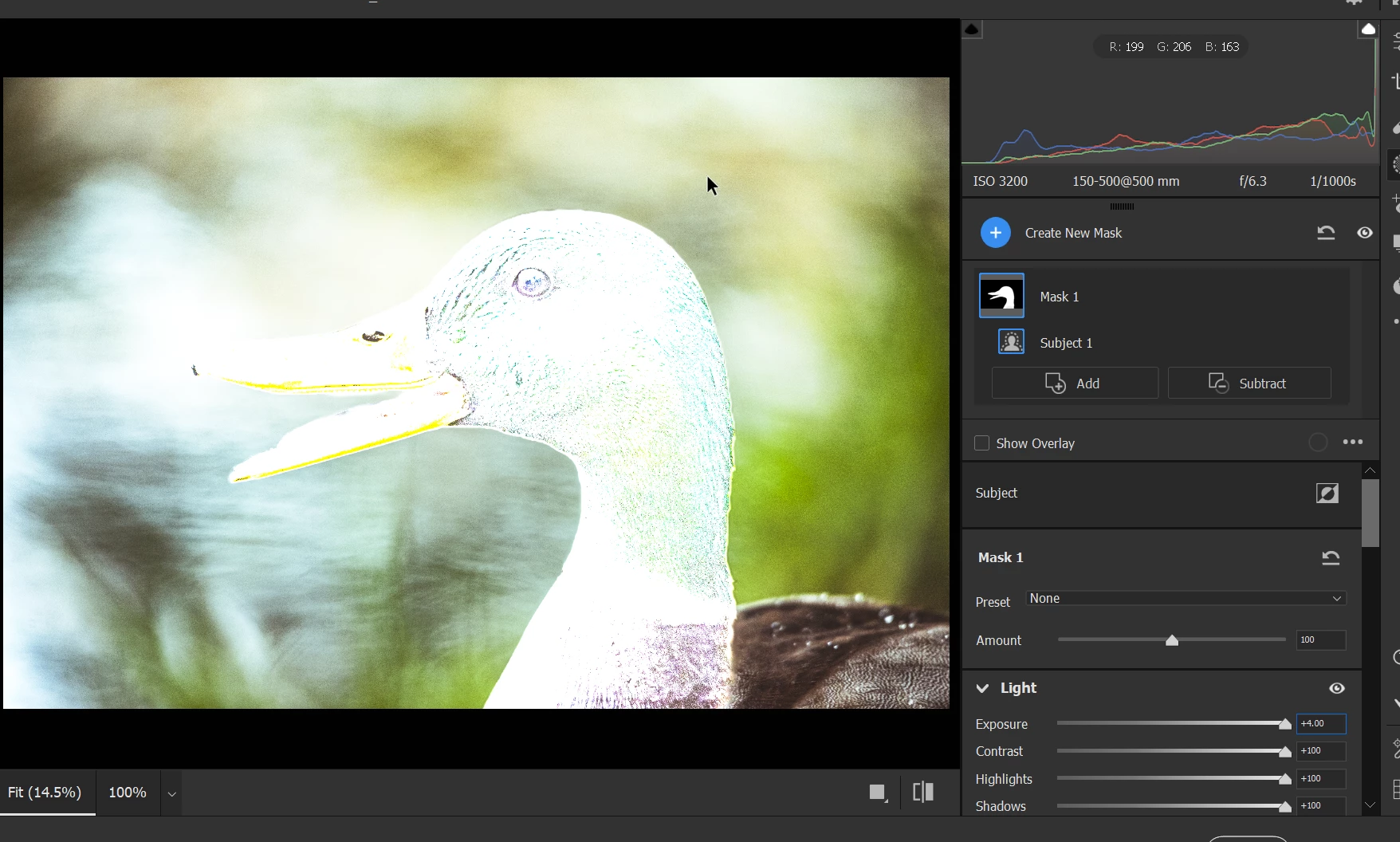
  4. Press M (switch to Masking), click "Subject", Adjust all Exposure, Highlight, Contrast to max (just to make the effect more visible).
  5. Click OK in Camera RAW. 
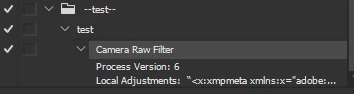
  6. Stop recording the 'test' action. The action recorded the Camera Raw filter:
  7. Close the picture. Open another (very different) picture.
  8. Run the recorded "test" action.
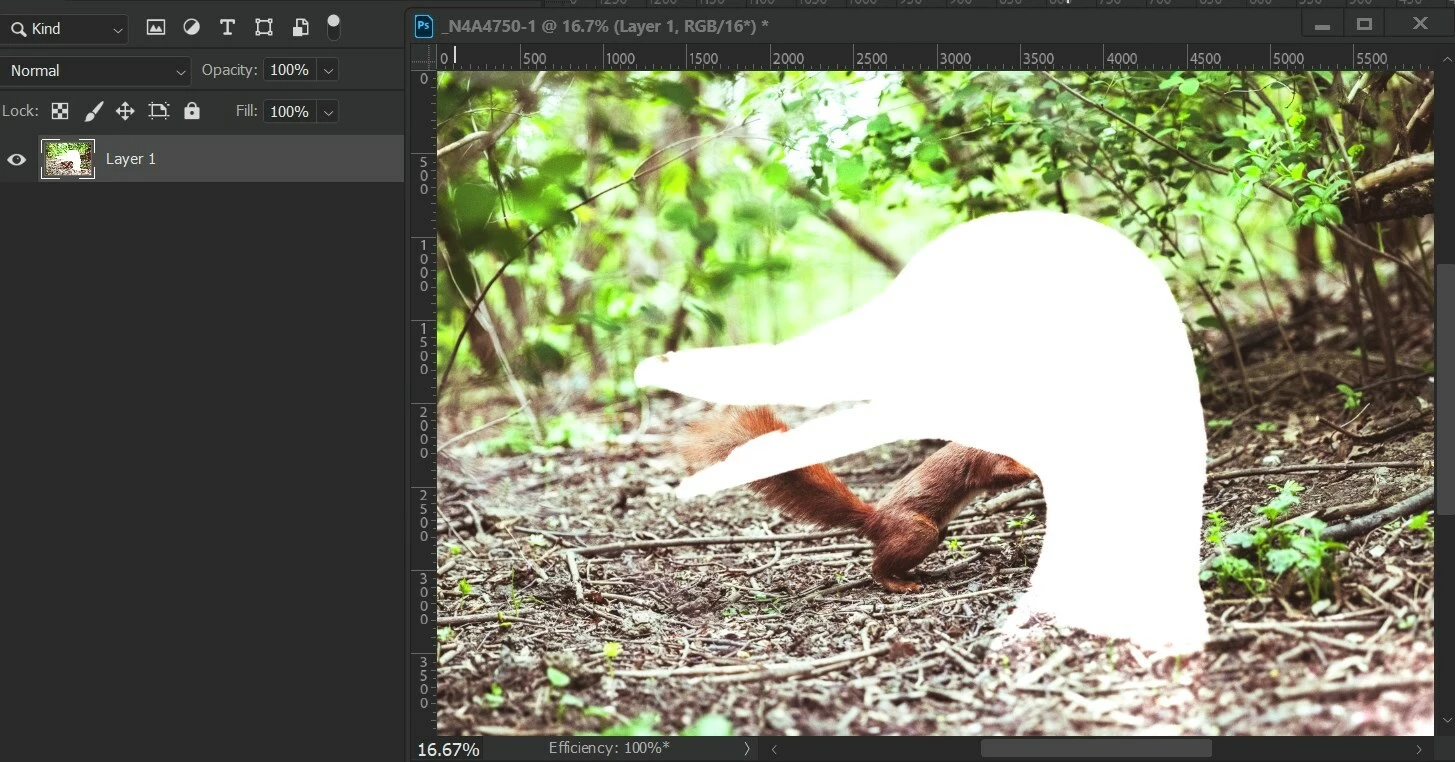
  9.  You've created duck-shaped correction on a squirrel. xD


Actual result: the initial AI mask is hard baked into an action.

Expected result: the AI mask feature (Subject, Background, body parts, etc.) are re-detected every time the action runs.


Version: Photoshop 25.0, Camera Raw 16.0 and 15.5.1

OS: Windows 10, x64


Correct answer DiodorS

Let's agree to disagree about the bug-status then 🙂 Thanks for the discussion and for giving me the motivation to dig deeper!


I just discovered another piece of evidence that makes me to lean even more to the bug side.


  1. Open an image, flatten all layers, convert the Background layer to Smart Object.
  2. Using ScriptEventListener record applying Camera Raw preset containing AI masks (as described above) to a smart layer. Remove lines with "crs:InputDigest", "crs:MaskDigest" (not strictly necessary to remove, but just to be sure) and the entire section that adds the BigT field (desc439.putData( idBigT, String.fromCharCode...) - this is a must. The resulting code should look like this:


var cTID = charIDToTypeID;
var sTID = stringIDToTypeID;

var idAdobeCameraRawFilter = sTID("Adobe Camera Raw Filter");
    var desc439 = new ActionDescriptor();
    desc439.putString(cTID("CrVe"), """15.5.1""");
    desc439.putInteger(cTID("PrVN"), 6);
    desc439.putInteger(cTID("PrVe"), 251920384);
    desc439.putString(cTID("LCs "), """<x:xmpmeta xmlns:x="adobe:ns:meta/" x:xmptk="Adobe XMP Core 7.0-c000 1.000000, 0000/00/00-00:00:00        ">
 <rdf:RDF xmlns:rdf="http://www.w3.org/1999/02/22-rdf-syntax-ns#">
  <rdf:Description rdf:about=""
    xmlns:crs="http://ns.adobe.com/camera-raw-settings/1.0/">
   <crs:MaskGroupBasedCorrections>
    <rdf:Seq>
     <rdf:li>
      <rdf:Description
       crs:What="Correction"
       crs:CorrectionAmount="1"
       crs:CorrectionActive="true"
       crs:CorrectionName="Mask 1"
       crs:CorrectionSyncID="4C2C200A187F3044A0F2BA8B1EBA146E"
       crs:LocalExposure2012="0.3625"
       crs:LocalContrast2012="-0.48"
       crs:LocalHighlights2012="0.29"
       crs:LocalCurveRefineSaturation="100">
      <crs:CorrectionMasks>
       <rdf:Seq>
        <rdf:li
         crs:What="Mask/Image"
         crs:MaskActive="true"
         crs:MaskName="Person 1 - Body Skin"
         crs:MaskBlendMode="0"
         crs:MaskInverted="false"
         crs:MaskSyncID="3E8A13F2992E434DAE3FC1C3DAB45CA2"
         crs:MaskValue="1"
         crs:MaskVersion="1"
         crs:MaskSubType="3"
         crs:MaskSubCategoryID="4"
         crs:ReferencePoint="0.633880 0.552734"
         crs:InputDigest="481D664F03D3BE00CA2D26C190FECDDE"
         crs:InputDigestVersion="2"
         crs:MaskDigest="12D09EA62EA09A4EF0D68D23531E052A"
         crs:WholeImageArea="0/1,0/1,1536/1,1097/1"
         crs:Origin="185,258"
         crs:ModelVersion="234881976"/>
        <rdf:li
         crs:What="Mask/Image"
         crs:MaskActive="true"
         crs:MaskName="Person 1 - Lips"
         crs:MaskBlendMode="0"
         crs:MaskInverted="false"
         crs:MaskSyncID="A78C9B8F27F92F46B25E231C2926A39D"
         crs:MaskValue="1"
         crs:MaskVersion="1"
         crs:MaskSubType="3"
         crs:MaskSubCategoryID="6"
         crs:ReferencePoint="0.562842 0.199219"
         crs:InputDigest="481D664F03D3BE00CA2D26C190FECDDE"
         crs:InputDigestVersion="2"
         crs:MaskDigest="D9B3D4A972BAFD5D57C0D4736A714193"
         crs:WholeImageArea="0/1,0/1,1536/1,1097/1"
         crs:Origin="579,284"
         crs:ModelVersion="234881976"/>
       </rdf:Seq>
      </crs:CorrectionMasks>
      </rdf:Description>
     </rdf:li>
    </rdf:Seq>
   </crs:MaskGroupBasedCorrections>
  </rdf:Description>
 </rdf:RDF>
</x:xmpmeta>
""");
    var idPset = cTID("Pset");
    desc439.putString(idPset, """<x:xmpmeta xmlns:x="adobe:ns:meta/" x:xmptk="Adobe XMP Core 7.0-c000 1.000000, 0000/00/00-00:00:00        ">
 <rdf:RDF xmlns:rdf="http://www.w3.org/1999/02/22-rdf-syntax-ns#">
  <rdf:Description rdf:about=""
    xmlns:crs="http://ns.adobe.com/camera-raw-settings/1.0/">
   <crs:Preset>
    <rdf:Description
     crs:Name="## AI mask"
     crs:Amount="1"
     crs:UUID="466679343ADD4546AE39653CBAE6947D">
    <crs:Parameters>
     <rdf:Description
      crs:Version="15.5.1"
      crs:CompatibleVersion="251658240"
      crs:ProcessVersion="15.4">
     <crs:MaskGroupBasedCorrections>
      <rdf:Seq>
       <rdf:li>
        <rdf:Description
         crs:What="Correction"
         crs:CorrectionAmount="1"
         crs:CorrectionActive="true"
         crs:CorrectionName="Mask 1"
         crs:CorrectionSyncID="4C2C200A187F3044A0F2BA8B1EBA146E"
         crs:LocalExposure2012="0.3625"
         crs:LocalContrast2012="-0.48"
         crs:LocalHighlights2012="0.29"
         crs:LocalCurveRefineSaturation="100">
        <crs:CorrectionMasks>
         <rdf:Seq>
          <rdf:li
           crs:What="Mask/Image"
           crs:MaskActive="true"
           crs:MaskName="Person 1 - Body Skin"
           crs:MaskBlendMode="0"
           crs:MaskInverted="false"
           crs:MaskSyncID="3E8A13F2992E434DAE3FC1C3DAB45CA2"
           crs:MaskValue="1"
           crs:MaskVersion="1"
           crs:MaskSubType="3"
           crs:MaskSubCategoryID="4"
           crs:ReferencePoint="0.500000 0.500000"
           crs:ErrorReason="0"/>
          <rdf:li
           crs:What="Mask/Image"
           crs:MaskActive="true"
           crs:MaskName="Person 1 - Lips"
           crs:MaskBlendMode="0"
           crs:MaskInverted="false"
           crs:MaskSyncID="A78C9B8F27F92F46B25E231C2926A39D"
           crs:MaskValue="1"
           crs:MaskVersion="1"
           crs:MaskSubType="3"
           crs:MaskSubCategoryID="6"
           crs:ReferencePoint="0.500000 0.500000"
           crs:ErrorReason="0"/>
         </rdf:Seq>
        </crs:CorrectionMasks>
        </rdf:Description>
       </rdf:li>
      </rdf:Seq>
     </crs:MaskGroupBasedCorrections>
     </rdf:Description>
    </crs:Parameters>
    </rdf:Description>
   </crs:Preset>
  </rdf:Description>
 </rdf:RDF>
</x:xmpmeta>
""");
executeAction(idAdobeCameraRawFilter, desc439, DialogModes.ALL);​


  •  Double click on the Camera Raw Filter smart filter
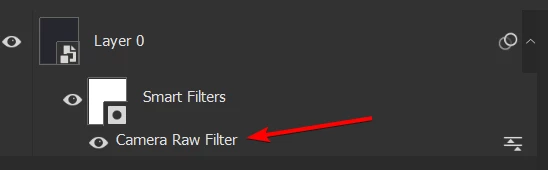
     

  • Switch to the Masking mode and click "Update All" - or just press Ctrl+Shift+U immediately after opening Camera Raw.
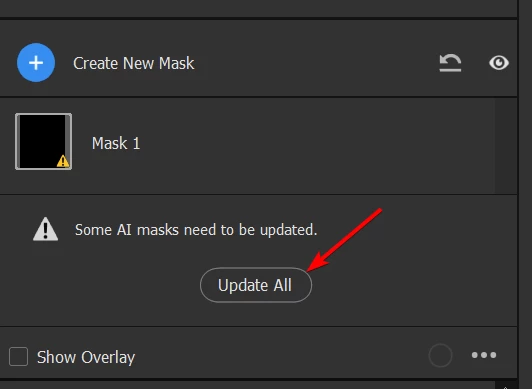
     

  • Done - the masks are re-generated.


This proves the point that all the necessary data are already stored in the Action Descriptor (which can easily be converted to an Action) and in the smart object (which itself stores ADs). We only need a way to "automatically click" the "Update All" button from an action (or a script).


It might be as simple as handling something along the lines of:

desc439.putBoolean(stringIDToTypeID("updateAiMasks"), true)

For sure - that would require some work on Adobe side, but it should be relatively straightforward. 3 story points 😉 (famous last words)


For now I have a workaround using AHK to press the Ctrl+Shift+U combination as soon as the Camera Raw window pops up. Not the cleanest solution, but hey, it works.


Here's my final POC. Script (JSX):


var cTID = charIDToTypeID;
var sTID = stringIDToTypeID;

function addPresetBasedACR_interactive() {
    // exactly as above, just change the last line to
    executeAction( idAdobeCameraRawFilter, desc439, DialogModes.ALL);
    //                                                        ^^^^^^ interactive
}

function prepareToPress_CtrlShiftU() {
    var ahkPath = new File("/c/Program Files/AutoHotkey/AutoHotkey.exe");
    var scriptPath = new File("/c/whatever_you_want/update_AI_masks_when_ACR_ready.ahk");
    var command = 'start "' + ahkPath.fsName + '" "' + scriptPath.fsName + '"';
    app.system(command);
}

function createSmartObjectFromSelectedLayers() {
    executeAction(sTID("newPlacedLayer"), undefined, DialogModes.NO);
}

function rasterizeSmartObject() {
    var ref47 = new ActionReference();
    ref47.putEnumerated(cTID("Lyr "), cTID("Ordn"), cTID("Trgt"));

    var desc638 = new ActionDescriptor();
    desc638.putReference(cTID("null"), ref47);

    executeAction(sTID("rasterizeLayer"), desc638, DialogModes.NO);
}

function main() {
    createSmartObjectFromSelectedLayers();
    prepareToPress_CtrlShiftU();
    addPresetBasedACR_interactive();
    rasterizeSmartObject();
}

main();


AHK:


; Allow for partial window title matches
SetTitleMatchMode, 2

; Wait for a window with ahk_class Bridge_WindowClass to become active
WinWaitActive, Camera Raw, , 2
if ErrorLevel
{
    MsgBox, Camera Raw window not activated within timeout. Exiting.
    Exit
}

; Get the window handle (HWND) of the active window
WinGet, hWnd, ID

; Send the Ctrl+Shift+U key combination
Send, ^+u

; After pressing Ctrl+Shift+U for the first time, ACR loses focus
; after some time (in ms). In that time event loop is not buffered
; so we cannot send Enter now. Let's wait for Photoshop to become
; active, then reactivate ACR and send Enter to close the ACR dialog
WinWaitActive, ahk_class Photoshop, , 2
if ErrorLevel
{
    MsgBox, Focus did not went back to Photoshop. Strange... Exiting!
    Exit
}

WinActivate ahk_id %hWnd%
Send, {Enter}




17 replies

Stephen Marsh
Community Expert
Community Expert
October 28, 2023
quote

The AI-mask shape itself should not be a "fixed value" and I expect it to change depending on the underlying image. But yes, it's currently also a "fixed value"


By @DiodorS


I agree with you that it would be nice if these things adapted, but they currently don't and I'm guessing without a redesign of actions they won't.


I believe that this is simply how actions work. You may or may not agree with how they are implemented with the CRF, but I still don't think that is a bug.


I think that we are lucky that we can even record the use of the CRF in actions and scripts.


Such features work in ACR as it is designed for parametric editing. If this didn't work inside ACR when batching then I would consider that to be a bug.


DiodorSAuthor
Inspiring
October 28, 2023

@Stephen Marsh 

> This isn’t an absolute value and is not what I was referring to.

I think there is a slight miscommunication. I will try to explain my point better.

> Your ScriptingListener code clearly shows absolute values, which is what actions also record


The "fixed value" in the context of my original post are the settings which AI-masks are being enabled and what settings/corrections are applied to those masks. The AI-mask shape itself should not be a "fixed value" and I expect it to change depending on the underlying image. But yes, it's currently also a "fixed value": 

    var idBigT = charIDToTypeID( "BigT" );
    desc439.putData(idBigT, String.fromCharCode(65, 67, /* ... a lot of bytes, ~500 000 ...*/ 115));

The main point of my bug is that it shouldn't be! This binary blob describes the exact shapes (on a pixel level) of the AI-masks, not the semantics of AI masks (describing what should be selected, lips, hair, etc.).


Take another look at the code: crs:MaskSubType="3", crs:MaskSubCategoryID="6" determines that this particular mask (more precisely: a correction item) is of type "Body Parts" and subcategory "Lips", and the properties of the parent node indicate which corrections should be applied (for example: crs:LocalExposure2012="0.3625", crs:LocalContrast2012="-0.48").


Those are the "fixed values" and I don't want to change those! What I expect is that the (pixel) location of  "Lips", "Hair" etc masks change depending on the underlying image to match the actual location of those body parts. It already works that way in Camera Raw presets or even when simply Syncing raw settings between multiple images in Bridge.

Stephen Marsh
Community Expert
Community Expert
October 28, 2023

Actions are the old way to automate Photoshop.


The Adobe Camera Raw plugin is a newer, different way of working with raw camera sensor data or rendered RGB pixel data in JPEG or TIFF files. It has its own workflow and batch tools and is outside of Photoshop and traditional Actions automation.


When Adobe added the Camera Raw Filter, many of the features of ACR were made available inside Photoshop and were available to actions and scripts.


That being said, some things should not be expected to work the same way, especially with actions which are designed to record absolute values.


So, forget about doing this with the Camera Raw Filter and Actions which record absolute values. Use JPEG or TIFF and use the Adobe Camera Raw plugin to process multiple images via a parametric workflow where the masks are unique to each image.

Stephen Marsh
Community Expert
Community Expert
October 28, 2023

@DiodorS 


quote

Not true, there are some exceptions. Try recording an action using Select>Subject - it re-detects the subject every time the action is run.


By @DiodorS


This isn’t an absolute value and is not what I was referring to.


Your ScriptingListener code clearly shows absolute values, which is what actions also record:


crs:MaskInverted="false"


The advantage of scripts is that we can swap out the fixed absolute value for a variable, perform logic, math etc.


DiodorSAuthor
Inspiring
October 28, 2023

@Stephen Marsh thanks for your opinion, but I do not agree.


> Actions have always recorded absolute values, it's what they do.

Not true, there are some exceptions. Try recording an action using Select>Subject - it re-detects the subject every time the action is run.


Perhaps this could be scripted with Action Manager code recorded by the ScriptingListener plugin though.
I don't see how... Not without triggering re-detection of AI masks. 
But I'm open for ideas!


The masks are identified by crs:MaskDigest, which references a binary blob stored in "BigT" field of "Adobe Camera Raw Filter"'s action descriptor. What I miss, is a way to re-generate the content of the "BigT" field every time the script/action is run.


I still think it is a bug. Inconsistent user experience at least. First of all - Select>Subject when recorded in an action works as expected - it re-detects the object every time it is run.


Second reason - the functionality is already there, accessible through camera raw presets. If I create a preset, that contains AI-masks (subject, body parts, etc.) and apply that preset to different images, the AI masks are re-generated accordingly (if possible).


It gets even funnier - if I enable "Toggle dialog" in the Camera Raw Filter action step, applying the AI mask stored in a preset results in bad (hard-baked) mask the picture I recorded the action on. Even if I reset the Camera Raw settings to Default, the AI masks are still not re-detected.


But when I run the Camera Raw Filter from the menu, and choose the preset with AI masks, everything works as expected - the masks are re-detected!


Long story short - I would like to have an option to record an action step (or have an ActionDescriptor) that behaves exactly the same as if I manually ran Filter>Camera Raw Filter, then switched to Presets (Shift-P), selected a preset and clicked OK.


I was able to record "Pset" data field being added to the "Adobe Camera Raw Filter" a.d., but when run, it does nothing without having the "BigT" data. (If it does apply the corrections try restarting Photoshop - it gets the values from cache)


It would be really great if the code below would result in re-generating AI masks, and applying the preset (currently it does not, in 25.2 beta 2374):

var idAdobeCameraRawFilter = stringIDToTypeID( "Adobe Camera Raw Filter" );
    var desc439 = new ActionDescriptor();
    var idCrVe = charIDToTypeID( "CrVe" );
    desc439.putString( idCrVe, """15.5.1""" );
    var idPrVN = charIDToTypeID( "PrVN" );
    desc439.putInteger( idPrVN, 6 );
    var idPrVe = charIDToTypeID( "PrVe" );
    desc439.putInteger( idPrVe, 251920384 );

    var idPset = charIDToTypeID( "Pset" );
    desc439.putString( idPset, """<x:xmpmeta xmlns:x="adobe:ns:meta/" x:xmptk="Adobe XMP Core 7.0-c000 1.000000, 0000/00/00-00:00:00        ">
 <rdf:RDF xmlns:rdf="http://www.w3.org/1999/02/22-rdf-syntax-ns#">
  <rdf:Description rdf:about=""
    xmlns:crs="http://ns.adobe.com/camera-raw-settings/1.0/">
   <crs:Preset>
    <rdf:Description
     crs:Name="## AI mask"
     crs:Amount="1"
     crs:UUID="466679343ADD4546AE39653CBAE6947D">
    <crs:Parameters>
     <rdf:Description
      crs:Version="15.5.1"
      crs:CompatibleVersion="251658240"
      crs:ProcessVersion="15.4">
     <crs:MaskGroupBasedCorrections>
      <rdf:Seq>
       <rdf:li>
        <rdf:Description
         crs:What="Correction"
         crs:CorrectionAmount="1"
         crs:CorrectionActive="true"
         crs:CorrectionName="Mask 1"
         crs:CorrectionSyncID="4C2C200A187F3044A0F2BA8B1EBA146E"
         crs:LocalExposure2012="0.3625"
         crs:LocalContrast2012="-0.48"
         crs:LocalHighlights2012="0.29"
         crs:LocalCurveRefineSaturation="100">
        <crs:CorrectionMasks>
         <rdf:Seq>
          <rdf:li
           crs:What="Mask/Image"
           crs:MaskActive="true"
           crs:MaskName="Person 1 - Body Skin"
           crs:MaskBlendMode="0"
           crs:MaskInverted="false"
           crs:MaskSyncID="3E8A13F2992E434DAE3FC1C3DAB45CA2"
           crs:MaskValue="1"
           crs:MaskVersion="1"
           crs:MaskSubType="3"
           crs:MaskSubCategoryID="4"
           crs:ReferencePoint="0.500000 0.500000"
           crs:ErrorReason="0"/>
          <rdf:li
           crs:What="Mask/Image"
           crs:MaskActive="true"
           crs:MaskName="Person 1 - Lips"
           crs:MaskBlendMode="0"
           crs:MaskInverted="false"
           crs:MaskSyncID="A78C9B8F27F92F46B25E231C2926A39D"
           crs:MaskValue="1"
           crs:MaskVersion="1"
           crs:MaskSubType="3"
           crs:MaskSubCategoryID="6"
           crs:ReferencePoint="0.500000 0.500000"
           crs:ErrorReason="0"/>
         </rdf:Seq>
        </crs:CorrectionMasks>
        </rdf:Description>
       </rdf:li>
      </rdf:Seq>
     </crs:MaskGroupBasedCorrections>
     </rdf:Description>
    </crs:Parameters>
    </rdf:Description>
   </crs:Preset>
  </rdf:Description>
 </rdf:RDF>
</x:xmpmeta>
""" );

executeAction( idAdobeCameraRawFilter, desc439, DialogModes.NO );


Stephen Marsh
Community Expert
Community Expert
October 28, 2023

It's not a bug, Actions have always recorded absolute values, it's what they do.


This should be performed in the Adobe Camera Raw plugin, not the Camera Raw Filter.


Perhaps this could be scripted with Action Manager code recorded by the ScriptingListener plugin though.

DiodorSAuthor
Inspiring
October 28, 2023

Still present in the newest beta: Adobe Photoshop Version: 25.2.0 20231024.m.2374 4ab9439 x64