
Participant
October 6, 2018
Question

Align or distribute artboards to each other

  • October 6, 2018
  • 2 replies
  • 2813 views

Hi there,

I am trying to write a script to align artboards in Photoshop but an not having much success.

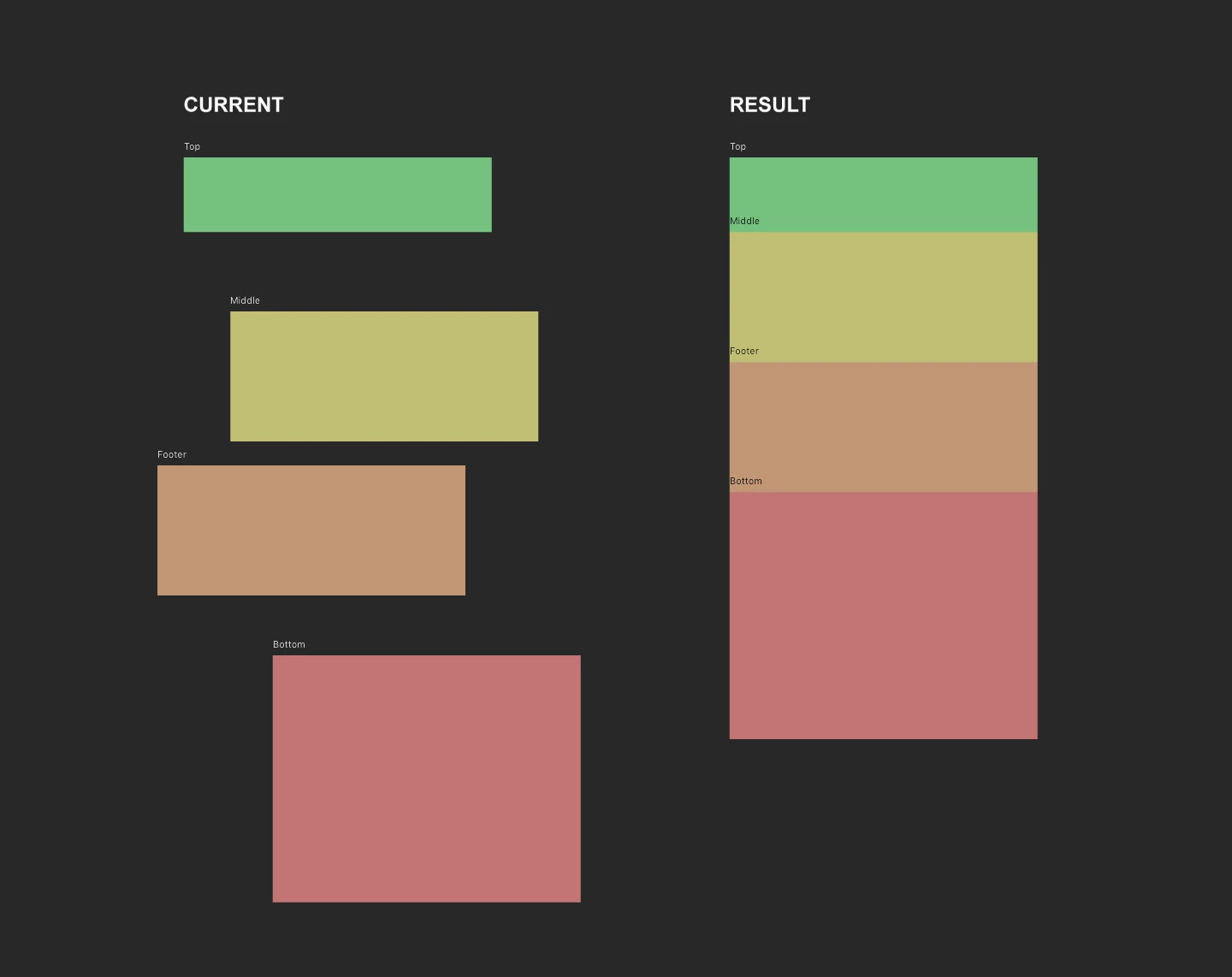
I can align artboards manually by selecting them and clicking on the left align button, but I also want to be able to align the top edge of each consecutive artboard to the bottom edge of the previous one (see diagram).

Ideally one script that would do both would be amazing!

Is it even possible to align artboards via a photoshop script?

A diagram of what I am trying to achieve is attached below. I would really appreciate any help anyone can give.

Thanks,

Jay
2 replies

Jay617aAuthor
Participant
October 9, 2018

Anyone else interested in this I found this script from Paul Riggott really helpful too.

Space layers

PS-Scripts/Space Layers.jsx at master · Paul-Riggott/PS-Scripts · GitHub

Exact same functionality as distribute spacing in inDesign. Allows vertical and horizontal distributed spacing between layers or artboards.

Pasted below for reference:

function main(){

if(!documents.length) return;

var win = new Window('dialog','Space Layers');

g = win.graphics;

var myBrush = g.newBrush(g.BrushType.SOLID_COLOR, [0.99, 0.99, 0.99, 1]);

g.backgroundColor = myBrush;

win.p1= win.add("panel", undefined, undefined, {borderStyle:"black"});

win.g1 = win.p1.add('group');

win.g1.orientation = "row";

win.title = win.g1.add('statictext',undefined,'Space Layers');

win.title.alignment="fill";

var g = win.title.graphics;

g.font = ScriptUI.newFont("Georgia","BOLDITALIC",22);

win.g5 =win.p1.add('group');

win.g5.orientation = "row";

win.g5.alignment='fill';

win.g5.spacing=3;

win.g5.st1 = win.g5.add('statictext',undefined,'Horizontal');

win.g5.et1 = win.g5.add('edittext',undefined,'20');

win.g5.et1.preferredSize=[50,20];

win.g5.st1a = win.g5.add('statictext',undefined,'px');

win.g5.st10 = win.g5.add('statictext',undefined,'');

win.g5.st10.preferredSize=[55,20];

win.g5.st2 = win.g5.add('statictext',undefined,'Vertical');

win.g5.et2 = win.g5.add('edittext',undefined,'20');

win.g5.et2.preferredSize=[50,20];

win.g5.st2a = win.g5.add('statictext',undefined,'px');

win.g10 =win.p1.add('group');

win.g10.orientation = "row";

win.g10.alignment='fill';

win.g10.spacing=10;

win.g10.st1 = win.g10.add('statictext',undefined,'Plus ~ Minus Pixels ,Top of Layers');

win.g10.et1 = win.g10.add('edittext',undefined,'50');

win.g10.et1.helpTip="This is the amount of top pixels can differ\nFor a low res document use a lower number\rFor a high res document use a higher number"

win.g10.et1.preferredSize=[50,20];

win.g10.et1.onChanging = function() {

  if (this.text.match(/[^\-\.\d]/)) {

  this.text = this.text.replace(/[^\-\.\d]/g, '');

  }

};

win.g15 =win.p1.add('group');

win.g15.orientation = "row";

win.g15.alignment='fill';

win.g15.spacing=10;

win.g15.bu1 = win.g15.add('button',undefined,'Space Layers');

win.g15.bu1.preferredSize=[150,30];

win.g15.bu2 = win.g15.add('button',undefined,'Cancel');

win.g15.bu2.preferredSize=[150,30];

if(version.substr(0,version.indexOf('.'))<10){

alert("Sorry this script is only valid for Photoshop CS3 or higher");

return;

}

win.g5.et1.onChanging = function() {

  if (this.text.match(/[^\-\.\d]/)) {

  this.text = this.text.replace(/[^\-\.\d]/g, '');

  }

}

win.g5.et2.onChanging = function() {

  if (this.text.match(/[^\-\.\d]/)) {

  this.text = this.text.replace(/[^\-\.\d]/g, '');

  }

}

win.g15.bu1.onClick=function(){

if(win.g5.et1.text== ''){

  alert("No horizontal pixels entered");

  return;

  }

if(win.g5.et2.text== ''){

  alert("No vertical pixels entered");

  return;

  }

var plusMinus =0;

if(Number(win.g10.et1.text) < 1) {

  plusMinus=2;

  }else{

  plusMinus=Number(win.g10.et1.text);

  }

win.close(1);

spaceMasks(Number(win.g5.et1.text),Number(win.g5.et2.text),plusMinus)

}

win.center();

win.show()

}

function spaceMasks(spacingA,spacingD,plusMinus){

var startRulerUnits = app.preferences.rulerUnits;

app.preferences.rulerUnits = Units.PIXELS;

var selectedLayers = getSelectedLayersIdx();

if(selectedLayers.length <2){

  alert("Not enough layers selected!");

  return;

  }

var boundsList=[];

var tempbnds=[];

showFX(false);

for(var a=0;a<selectedLayers.length;a++){

var LB =getLayerBoundsByIndex(selectedLayers );

boundsList.push([[selectedLayers],[LB[0]],[LB[1]],[LB[2]],[LB[3]]]);

tempbnds=[];

}

showFX(true);

boundsList.sort(function(a,b){return a[2]-b[2];});

var row1=[]; var row2=[]; var row3=[]; var row4=[]; var row5=[];

var row6=[]; var row7=[]; var row8=[]; var row9=[]; var row10=[];

var row11=[]; var row12=[]; var row13=[]; var row14=[]; var row15=[];

var row16=[]; var row17=[]; var row18=[]; var row19=[]; var row20=[];

var row21=[]; var row22=[]; var row23=[]; var row24=[]; var row25=[];

var row26=[]; var row27=[]; var row28=[]; var row29=[]; var row30=[];

var row31=[]; var row32=[]; var row33=[]; var row34=[]; var row35=[];

var row36=[]; var row37=[]; var row38=[]; var row39=[]; var row40=[];

var row41=[]; var row42=[]; var row43=[]; var row44=[]; var row45=[];

var row46=[]; var row47=[]; var row48=[]; var row49=[]; var row50=[];

var row51=[]; var row52=[]; var row53=[]; var row54=[]; var row55=[];

var row56=[]; var row57=[]; var row58=[]; var row59=[]; var row60=[];

var row61=[]; var row62=[]; var row63=[]; var row64=[]; var row65=[];

var row66=[]; var row67=[]; var row68=[]; var row69=[]; var row70=[];

var row71=[]; var row72=[]; var row73=[]; var row74=[]; var row75=[];

var row76=[]; var row77=[]; var row78=[]; var row79=[]; var row80=[];

var row81=[]; var row82=[]; var row83=[]; var row84=[]; var row85=[];

var row86=[]; var row87=[]; var row88=[]; var row89=[]; var row90=[];

var row91=[]; var row92=[]; var row93=[]; var row94=[]; var row95=[];

var row96=[]; var row97=[]; var row98=[]; var row99=[]; var row100=[];

var row101=[]; var row102=[]; var row103=[]; var row104=[]; var row105=[];

var row106=[]; var row107=[]; var row108=[]; var row109=[]; var row110=[];

var row111=[]; var row112=[]; var row113=[]; var row114=[]; var row115=[];

var row116=[]; var row117=[]; var row118=[]; var row119=[]; var row120=[];

var arrayNumber =1;

var TOP =Number(boundsList[0][2]);

for(var f =0;f<boundsList.length;f++){

if(TOP > (boundsList[2]-plusMinus) && boundsList[2] < (boundsList[2]+plusMinus)){

eval("row" +arrayNumber).push(boundsList);

}else{

  TOP =Number(boundsList[2]);

arrayNumber++;

eval("row" +arrayNumber).push(boundsList);

}

}

for(var d=0;d<arrayNumber;d++){

eval("row" +(d+1)).sort(function(a,b){return a[1]-b[1];});

}

if((row1.length*arrayNumber) != boundsList.length){

alert("Unable to distribute this selection of layers!");

return;

}

for(var l=0;l<arrayNumber;l++){

var leftAnchor =Number(eval("row"+(l+1))[0][3]);

for(var a = 1;a<eval("row"+(l+1)).length;a++){

makeActiveByIndex(Number(eval("row"+(l+1))[0]),false);

var Width = Number(eval("row"+(l+1))[3]) - Number(eval("row"+(l+1))[1]);

var shiftPixels = (leftAnchor+spacingA) - Number(eval("row"+(l+1))[1]);

activeDocument.activeLayer.translate(shiftPixels,0);

leftAnchor +=(Width+spacingA);

}

}

for(var l=0;l<row1.length;l++){

var topAnchor =Number(row1[4]);

for(var a = 1;a<arrayNumber;a++){

makeActiveByIndex(Number(eval("row"+(a+1))[0]),false);

var Height = Number(eval("row"+(a+1))[4]) - Number(eval("row"+(a+1))[2]);

var shiftPixels = (topAnchor+spacingD) - Number(eval("row"+(a+1))[2]);

activeDocument.activeLayer.translate(0,shiftPixels);

topAnchor +=(Height+spacingD);

}

}

for(var a in selectedLayers){

  makeActiveByIndex(Number(selectedLayers),false,true);

}

app.preferences.rulerUnits = startRulerUnits;

}

main();

function selectLayerByIdx(idx, add) {

var ref = new ActionReference();

ref.putIndex(charIDToTypeID('Lyr '), idx);

var desc = new ActionDescriptor();

desc.putReference(charIDToTypeID('null'), ref);

if(add) desc.putEnumerated(stringIDToTypeID('selectionModifier'), stringIDToTypeID('selectionModifierType'), stringIDToTypeID('addToSelection'));

  desc.putBoolean(charIDToTypeID('MkVs'), false);

executeAction(charIDToTypeID('slct'), desc, DialogModes.NO);

}

function makeActiveByIndex( idx, visible,add ){

  if(add == undefined) add=false;

  var desc = new ActionDescriptor();

  var ref = new ActionReference();

  ref.putIndex(charIDToTypeID( "Lyr " ), idx)

  desc.putReference( charIDToTypeID( "null" ), ref );

  if(add) desc.putEnumerated(stringIDToTypeID('selectionModifier'), stringIDToTypeID('selectionModifierType'), stringIDToTypeID('addToSelection'));

  desc.putBoolean( charIDToTypeID( "MkVs" ), visible );

  executeAction( charIDToTypeID( "slct" ), desc, DialogModes.NO );

};

function getSelectedLayersIdx(){

  var selectedLayers = new Array;

  var ref = new ActionReference();

  ref.putEnumerated( charIDToTypeID("Dcmn"), charIDToTypeID("Ordn"), charIDToTypeID("Trgt") );

  var desc = executeActionGet(ref);

  if( desc.hasKey( stringIDToTypeID( 'targetLayers' ) ) ){

  desc = desc.getList( stringIDToTypeID( 'targetLayers' ));

  var c = desc.count

  var selectedLayers = new Array();

  for(var i=0;i<c;i++){

  try{

  activeDocument.backgroundLayer;

  selectedLayers.push( desc.getReference( i ).getIndex() );

  }catch(e){

  selectedLayers.push( desc.getReference( i ).getIndex()+1 );

  }

  }

  }else{

  var ref = new ActionReference();

  ref.putProperty( charIDToTypeID("Prpr") , charIDToTypeID( "ItmI" ));

  ref.putEnumerated( charIDToTypeID("Lyr "), charIDToTypeID("Ordn"), charIDToTypeID("Trgt") );

  try{

  activeDocument.backgroundLayer;

  selectedLayers.push( executeActionGet(ref).getInteger(charIDToTypeID( "ItmI" ))-1);

  }catch(e){

  selectedLayers.push( executeActionGet(ref).getInteger(charIDToTypeID( "ItmI" )));

  }

  }

  return selectedLayers;

};

function getLayerBoundsByIndex( idx ) {

  var ref = new ActionReference();

  ref.putProperty( charIDToTypeID("Prpr") , stringIDToTypeID( "bounds" ));

  ref.putIndex( charIDToTypeID( "Lyr " ), idx );

  var desc = executeActionGet(ref).getObjectValue(stringIDToTypeID( "bounds" ));

  var bounds = [];

  bounds.push(desc.getUnitDoubleValue(stringIDToTypeID('left')));

  bounds.push(desc.getUnitDoubleValue(stringIDToTypeID('top')));

  bounds.push(desc.getUnitDoubleValue(stringIDToTypeID('right')));

  bounds.push(desc.getUnitDoubleValue(stringIDToTypeID('bottom')));

  return bounds;

};

function showFX(FX) {

  var desc48 = new ActionDescriptor();

  var ref34 = new ActionReference();

  ref34.putProperty( charIDToTypeID('Prpr'), charIDToTypeID('lfxv') );

  ref34.putEnumerated( charIDToTypeID('Dcmn'), charIDToTypeID('Ordn'), charIDToTypeID('Trgt') );

  desc48.putReference( charIDToTypeID('null'), ref34 );

  var desc49 = new ActionDescriptor();

  desc49.putBoolean( charIDToTypeID('lfxv'), FX );

  desc48.putObject( charIDToTypeID('T '), charIDToTypeID('lfxv'), desc49 );

  try{

  executeAction( charIDToTypeID('setd'), desc48, DialogModes.NO );

  }catch(e){}

};

Tom Winkelmann
Inspiring
October 6, 2018

This might be a start...

Script to arrange artboard in grid

Jay617aAuthor
Participant
October 7, 2018

Hi Tom, I tried out the script, thanks for posting!

It seems to be getting the size of the largest artboard in the photoshop document and then setting the grid dimensions based on that.

My artboards are the same width but they are different heights.

I will need to try and calculate the height of the previous artboard in order to set the position correctly of those that follow.

I'll post my results!