
Participant
July 20, 2018
Answered

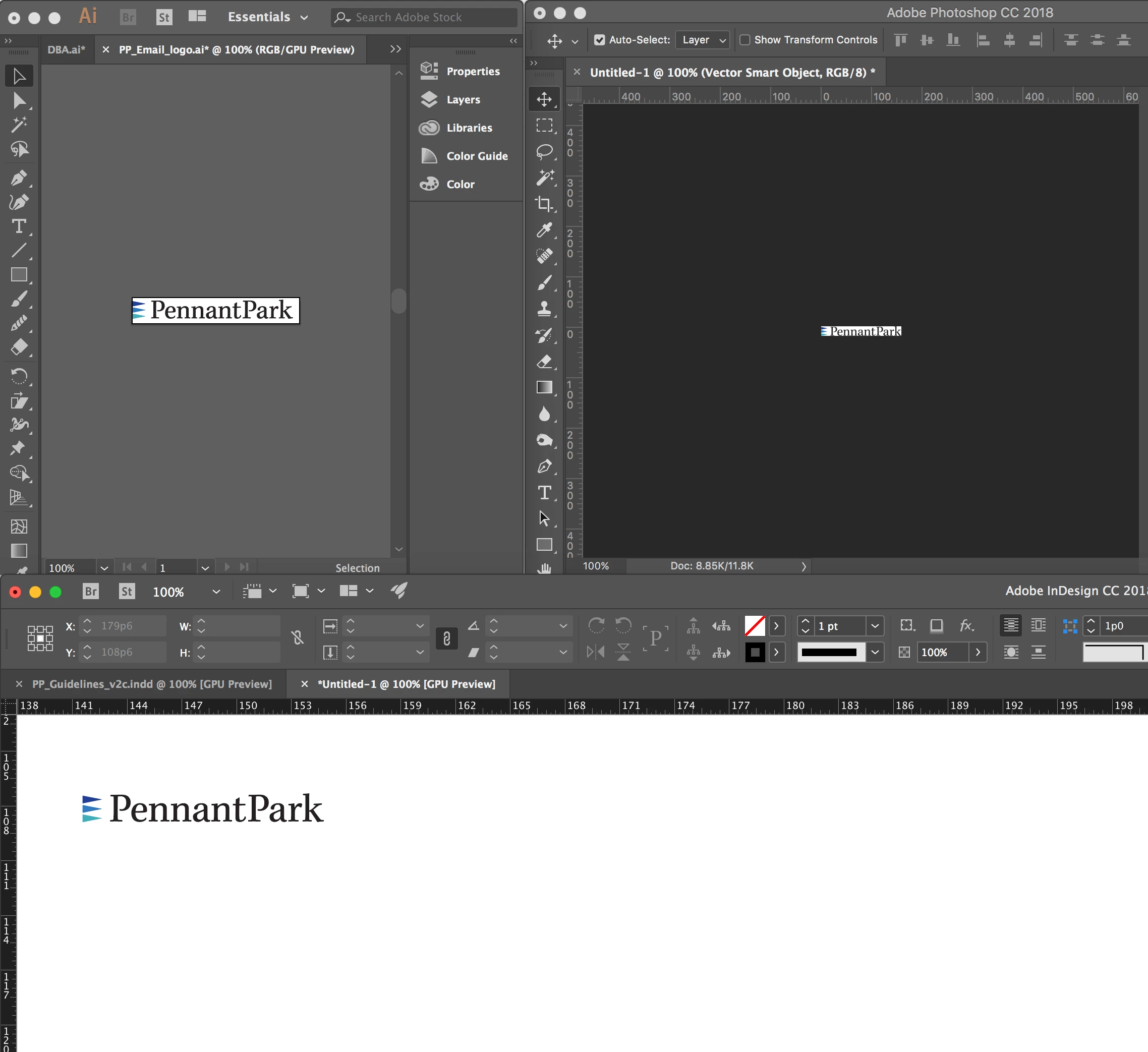
All my adobe apps are showing the same file on screen at different sizes

  • July 20, 2018
  • 4 replies
  • 472 views

The same file open in Indesign, Illustrator and Photoshop are display at different sizes. All are being viewed at 100%.

Also when I export vector logos from illustrator as png or jpeg they are extremely blurry/pixelated. I've recently upgraded my Adobe Creative Apps and also got a new mac imac. I've not had this issue on my old mac.
    This topic has been closed for replies.
    Correct answer D Fosse

    scottm35509528  wrote

    Could it be a retina display thing?

    That's exactly what we're all trying to tell you

    4 replies

    D Fosse
    Community Expert
    Community Expert
    August 7, 2018

    That's right. 100% does not mean the same thing in Photoshop, as it does in InDesign/Illustrator. Id/Ai are vector-based and display according to physical print size, they know nothing about pixels.

    This is normal and expected.

    Pixel artwork viewed in native Mac viewers outside Photoshop are scaled up to compensate for the high resolution display.

    Participant
    August 7, 2018

    Okay. I understand that. I'm just wondering why my old imac and Creative suite 6 didn't have this issue. Could it be a retina display thing? I've only had this issue since upgrading to the latest CC and imac.

    D Fosse
    Community Expert
    D FosseCommunity ExpertCorrect answer
    Community Expert
    August 7, 2018

    scottm35509528  wrote

    Could it be a retina display thing?

    That's exactly what we're all trying to tell you

    Abambo
    Community Expert
    Community Expert
    August 7, 2018

    Photoshop uses for 100% the one pixel on screen is one pixel in the picture rule.

    The other programs (Ai and Id) use the screen size and assumed pixel density.

    If you look into your pixel files, you find the ppi parameter (pixels per inch). This one is used to determine the size of the picture on your artboard/page.

    If you print the design, Photoshop will use the ppi value and all the other will use the artboard/page size to determine at which size something needs to get printed.

    ABAMBO | Hard- and Software Engineer | Photographer
    Kanikas
    Legend
    August 7, 2018

    Moving to Photoshop

    Per Berntsen
    Community Expert
    Community Expert
    July 21, 2018

    Photoshop is a pixel editor, and will always display one screen pixel for one image pixel at 100% view. If your new Mac has a retina screen, images will display smaller than on your old Mac because the pixels are smaller.

    Digital images don't have physical dimensions, only pixel dimensions.

    I don't use Illustrator, but since it works with vector images that don't have pixel dimensions, it will probably display images at print size at 100% view.

    The same thing goes for Indesign, which is mainly used for designing for print.