
valeriejoyyang
Participant
June 18, 2019
Question

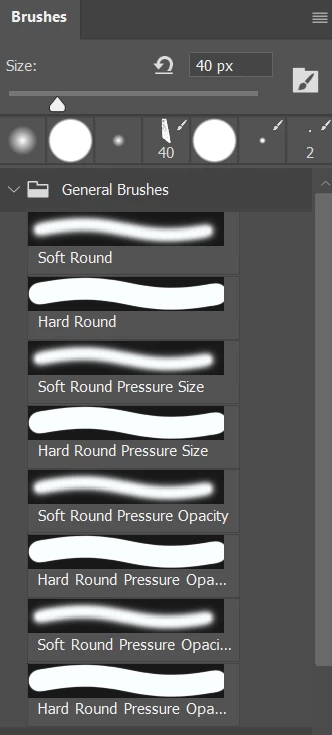
All my brush stroke previews appear to be highlighted/selected. Any idea how to fix this?

  • June 18, 2019
  • 2 replies
  • 261 views

Hi! I've tried to just deal with this problem, but it's just annoyed me too much. After messing with trying to split my Photoshop window between my tablet and computer screens, my brush stroke previews all appear to be highlighted (see below). Any idea on how to fix this? Thank you.
    This topic has been closed for replies.

    2 replies

    Bojan Živković11378569
    Community Expert
    Community Expert
    June 19, 2019

    Are you complaining about dark color behind brush stroke preview? I do not have idea how to fix, just checking to give right direction for those who perhaps knows solution.

    Trevor.Dennis
    Community Expert
    Community Expert
    June 18, 2019

    Select the brush and right click inside the document window

    Click on the little cog icon

    Uncheck ​Show Additional Preset Info

    valeriejoyyang
    Participant
    June 19, 2019

    Hi, thanks for your prompt response! It didn't appear to work for me, the icons/previews just got a litter larger.

    Trevor.Dennis
    Community Expert
    Community Expert
    June 19, 2019

    Sorry my mistake.  It's Brush stroke you need to turn off.