kakachiex
Participant
September 5, 2025
Question

All my script snip and tools experiment while lerning.

  • September 5, 2025
  • 1 reply
  • 214 views

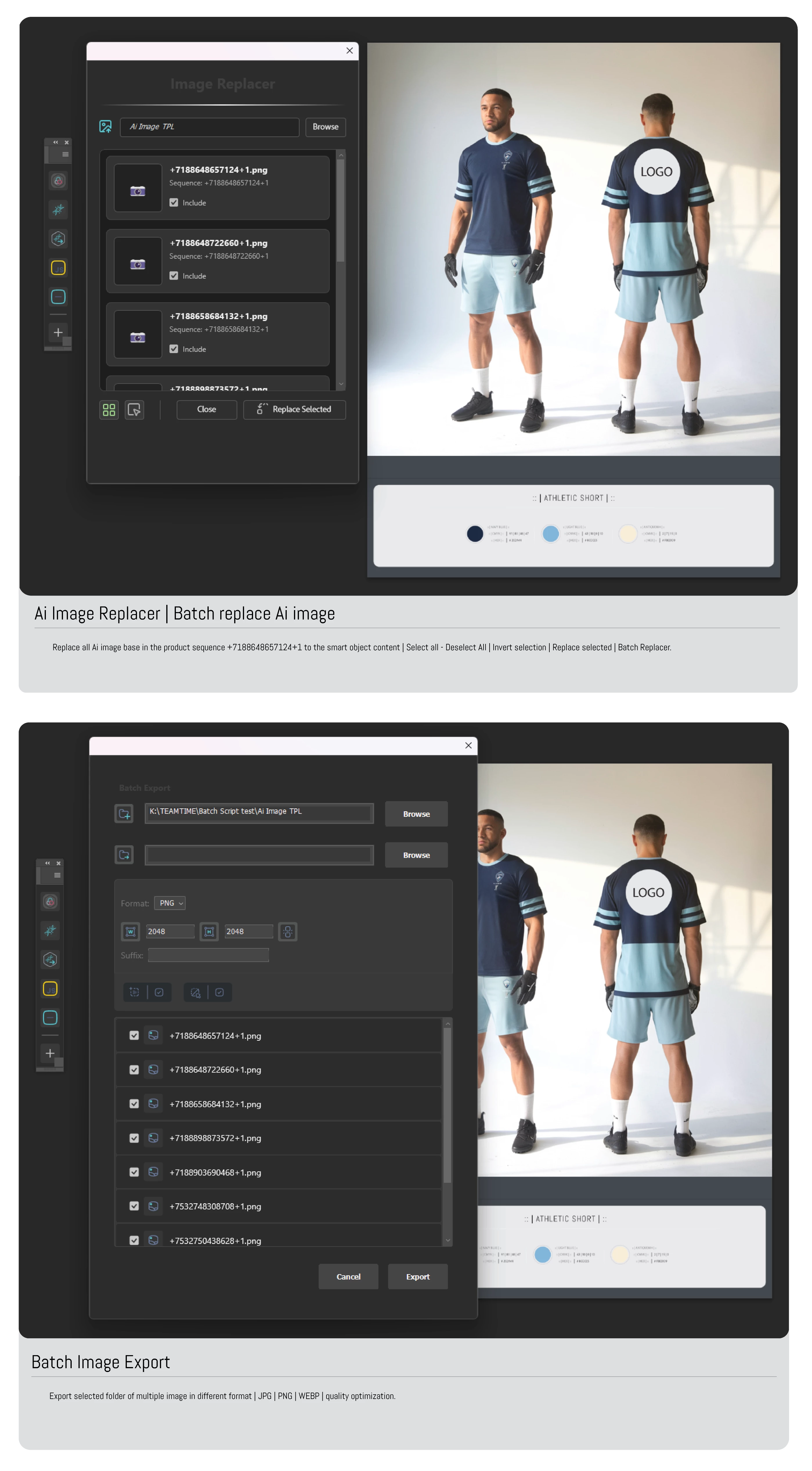
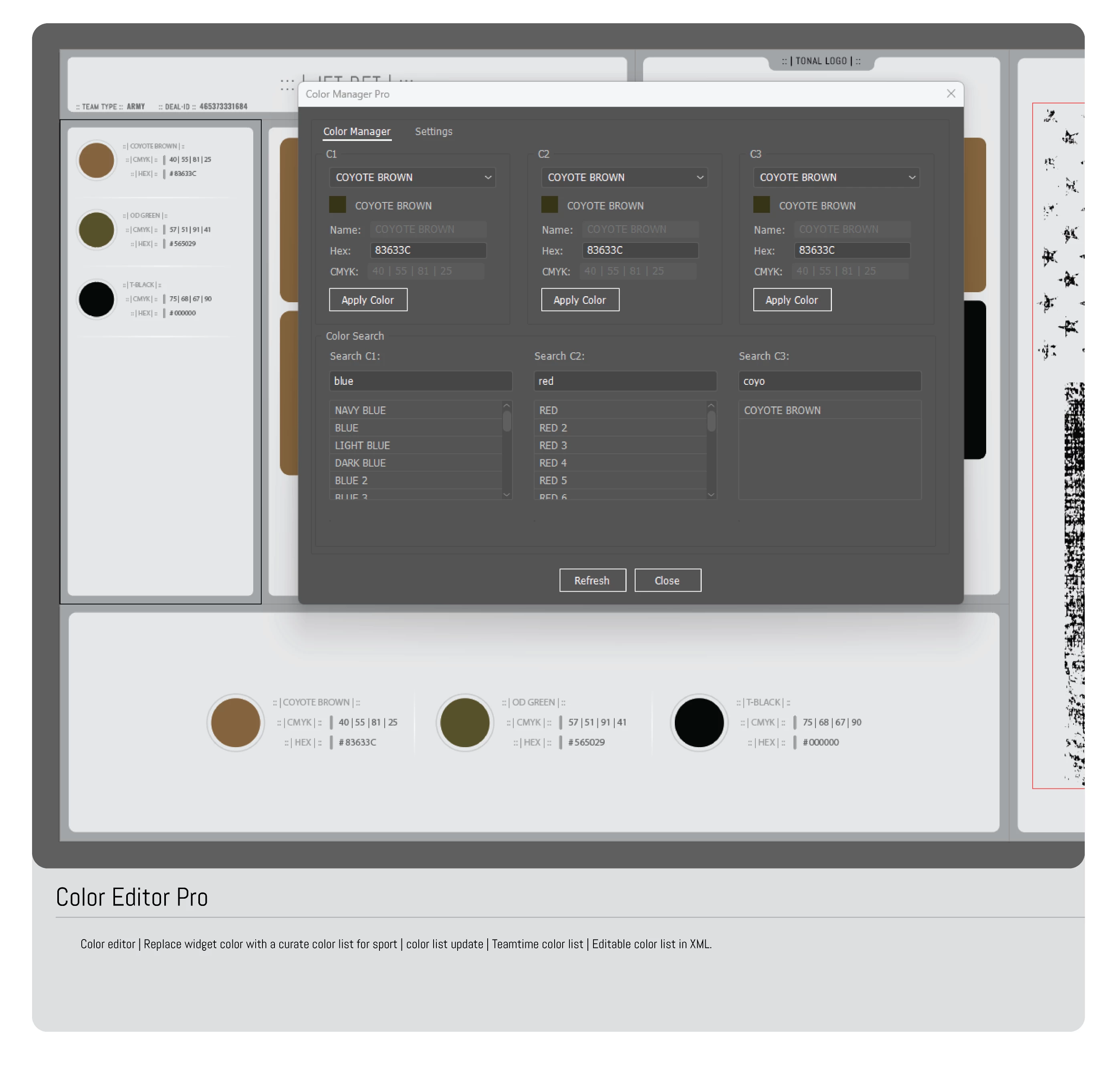
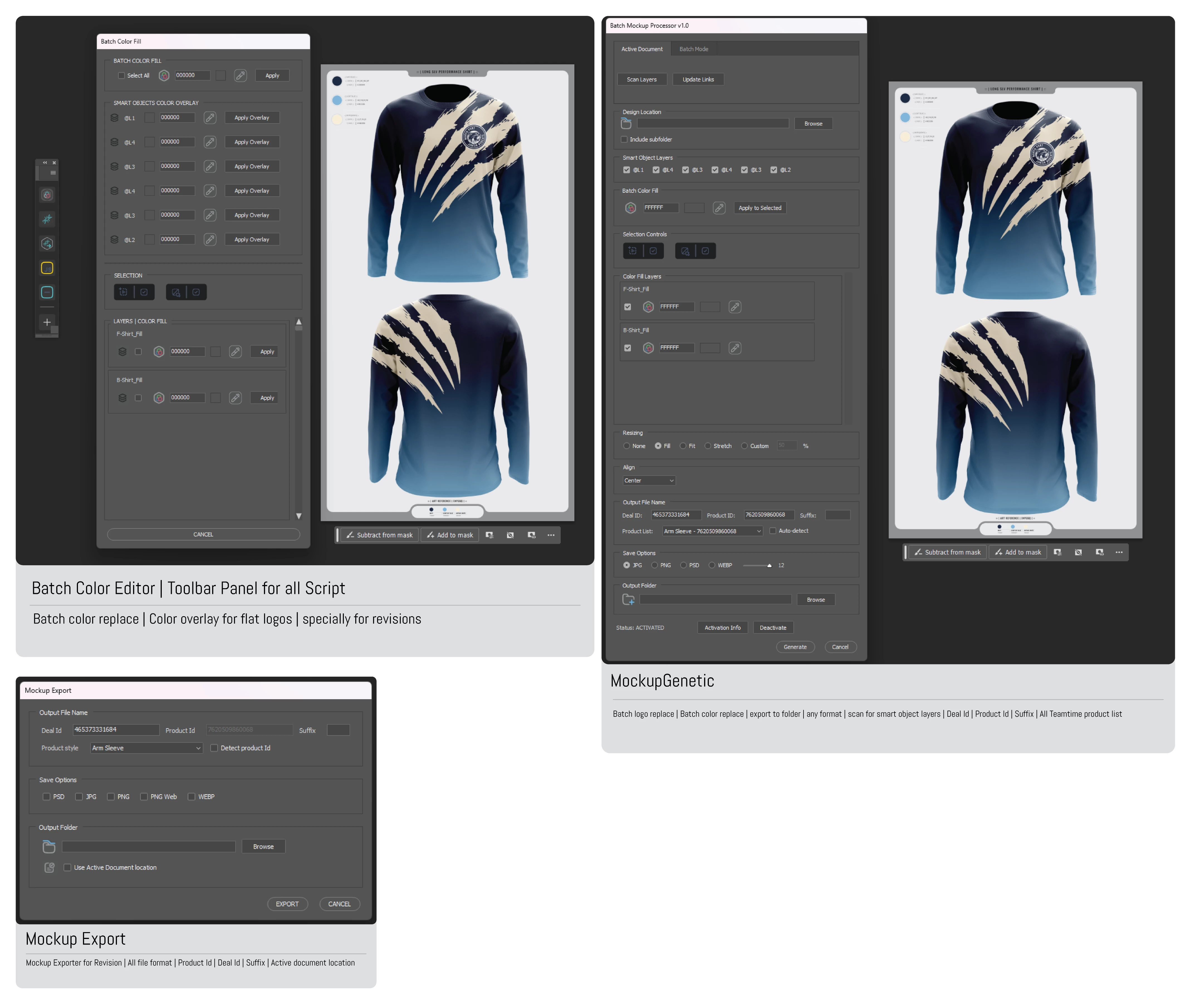
Hi everyone while learning to code as a beginner I found myself frustrate by not find answer to specific function or implementation so I have create with the help of Ai and my knowlege a lot of code snippet that can help other beginner to implement a nice an efficient script tools, in this threat I will share some of my snippet code here is some of the tools I create by myself while learning I'm good at UI but not much as a coder I have some knowlege and understanding of code. Ai is my teacher and coder companion.

Here are some tools Mockup Genetic | Color Editor pro | Mockup Export | Batch image export | Batch Image Replacer | Color Manager Pro etc.. Most of those are extend script | Cep panel | UXP scripting. 
1 reply

kakachiex
kakachiexAuthor
Participant
September 6, 2025

Align Toolbar | One of my first experiments in extendScript snippet for photoshop

- Cystom toggle icon buttons | round corner background image

Button's | Background image:


#target photoshop
var imagePaths = {
    ALIGN: {
        centerNormal: "C:/Users/rafae/Documents/LA Extensions/LAScripts/Illustrator/My Scripts/BulkMockupGen/img/A_Center_N.png",
        centerActive: "C:/Users/rafae/Documents/LA Extensions/LAScripts/Illustrator/My Scripts/BulkMockupGen/img/A_Center_A.png",
        leftNormal: "C:/Users/rafae/Documents/LA Extensions/LAScripts/Illustrator/My Scripts/BulkMockupGen/img/A_Left_N.png",
        leftActive: "C:/Users/rafae/Documents/LA Extensions/LAScripts/Illustrator/My Scripts/BulkMockupGen/img/A_Left_A.png",
        rightNormal: "C:/Users/rafae/Documents/LA Extensions/LAScripts/Illustrator/My Scripts/BulkMockupGen/img/A_Right_N.png",
        rightActive: "C:/Users/rafae/Documents/LA Extensions/LAScripts/Illustrator/My Scripts/BulkMockupGen/img/A_Right_A.png",
        topNormal: "C:/Users/rafae/Documents/LA Extensions/LAScripts/Illustrator/My Scripts/BulkMockupGen/img/A_Top_N.png",
        topActive: "C:/Users/rafae/Documents/LA Extensions/LAScripts/Illustrator/My Scripts/BulkMockupGen/img/A_Top_A.png",
        bottomNormal: "C:/Users/rafae/Documents/LA Extensions/LAScripts/Illustrator/My Scripts/BulkMockupGen/img/A_Bottom_N.png",
        bottomActive: "C:/Users/rafae/Documents/LA Extensions/LAScripts/Illustrator/My Scripts/BulkMockupGen/img/A_Bottom_A.png"
    }
};

try {
    // Create a new window
    var win = new Window("dialog", "Panel with Background");
    win.orientation = "column";
    win.alignChildren = ["fill", "top"];
    win.spacing = 10;
    win.margins = 16;

    // Add a panel to the window
    var panel = win.add("panel");
    panel.orientation = "column";
    panel.alignChildren = ["center", "center"];
    panel.spacing = 10;
    panel.margins = 10;
    panel.preferredSize = [450, 103];

    // Load and add the background image
    var backgroundImage = ScriptUI.newImage(File("C:/Users/rafae/Documents/LA Extensions/LAScripts/Illustrator/My Scripts/BulkMockupGen/img/AlignPanel.png"));
    
    // Add custom drawing to the panel
    panel.onDraw = function() {
        var g = this.graphics;
        var bounds = this.bounds;
        
        // Draw the background image
        if (backgroundImage) {
            g.drawImage(backgroundImage, 0, 0, bounds.width, bounds.height);
        } else {
            alert("Failed to load background image");
        }
    };

    // Create a group for alignment buttons
    var alignButtonGroup = panel.add("group");
    alignButtonGroup.orientation = "row";
    alignButtonGroup.spacing = 5;
    alignButtonGroup.margins = [0, 10, 0, 0];

    // Function to create alignment button
    function createAlignButton(parent, normalPath, activePath) {
        var button = parent.add("iconbutton", [0, 0, 91, 43], 
            ScriptUI.newImage(File(normalPath)),
            {style: "toolbutton", toggle: true}
        );
        
        button.size = button.preferredSize = button.minimumSize = button.maximumSize = [91, 43];
        button.alignment = ['left', 'center'];
        
        // Store paths and initial state
        button.normalPath = normalPath;
        button.activePath = activePath;
        button.checked = false;
        
        button.onClick = function() {
            // Uncheck all other buttons first
            var buttons = this.parent.children;
            for (var i = 0; i < buttons.length; i++) {
                if (buttons[i] !== this) {
                    buttons[i].checked = false;
                    buttons[i].image = ScriptUI.newImage(
                        File(buttons[i].normalPath),    // normal
                        File(buttons[i].normalPath),    // mouseOver
                        File(buttons[i].normalPath),    // mouseDown
                        File(buttons[i].normalPath)     // disabled
                    );
                }
            }
            
            // Toggle current button after others are reset
            this.checked = !this.checked;
            this.image = ScriptUI.newImage(
                File(this.checked ? this.activePath : this.normalPath),    // normal
                File(this.checked ? this.activePath : this.normalPath),    // mouseOver
                File(this.checked ? this.activePath : this.normalPath),    // mouseDown
                File(this.checked ? this.activePath : this.normalPath)     // disabled
            );
        }
        
        return button;
    }

    // Create buttons in order
    var centerButton = createAlignButton(alignButtonGroup, imagePaths.ALIGN.centerNormal, imagePaths.ALIGN.centerActive);
    var leftButton = createAlignButton(alignButtonGroup, imagePaths.ALIGN.leftNormal, imagePaths.ALIGN.leftActive);
    var rightButton = createAlignButton(alignButtonGroup, imagePaths.ALIGN.rightNormal, imagePaths.ALIGN.rightActive);
    var topButton = createAlignButton(alignButtonGroup, imagePaths.ALIGN.topNormal, imagePaths.ALIGN.topActive);
    var bottomButton = createAlignButton(alignButtonGroup, imagePaths.ALIGN.bottomNormal, imagePaths.ALIGN.bottomActive);

    // Debug: Verify final states
    for (var i = 0; i < alignButtonGroup.children.length; i++) {
        var btn = alignButtonGroup.children[i];
        $.writeln("Button " + i + " final state: " + btn.checked);
    }

    // Initialize all buttons with normal state
    var allButtons = [centerButton, leftButton, rightButton, topButton, bottomButton];
    for (var i = 0; i < allButtons.length; i++) {
        var btn = allButtons[i];
        btn.checked = false;
        btn.image = ScriptUI.newImage(
            File(btn.normalPath),    // normal
            File(btn.normalPath),    // mouseOver
            File(btn.normalPath),    // mouseDown
            File(btn.normalPath)     // disabled
        );
    }

    // Add text content below the background image
    //var text = panel.add("statictext", undefined, "Panel Content");
    //text.graphics.foregroundColor = text.graphics.newPen(text.graphics.PenType.SOLID_COLOR, [1, 1, 1], 1);
    //text.alignment = ['left', 'center'];
    //text.graphics.margin = [10, 0, 0, 0];


    win.center();
    win.show();

} catch(e) {
    alert("Error: " + e.message);
    $.writeln("Script error: " + e);
}


kakachiex
kakachiexAuthor
Participant
October 14, 2025

Custom scrollbat panel with mouse whell support.

:: | Scrollbar Code | ::

// @Target photoshop
#target photoshop

(function() {
    // Constants
    var MAX_VISIBLE_PANELS = 6;
    var PANEL_HEIGHT = 60;
    var PANEL_WIDTH = 300;
    var SCROLLBAR_WIDTH = 15;
    var VISIBLE_HEIGHT = PANEL_HEIGHT * MAX_VISIBLE_PANELS;
    var WINDOW_HEIGHT = VISIBLE_HEIGHT + 100;

    // Create main window with fixed size
    var dialog = new Window("palette", "Scroll Panel Example", undefined);
    dialog.orientation = "column";
    dialog.alignChildren = ["center", "top"];
    dialog.spacing = 10;
    dialog.margins = 16;
    dialog.preferredSize = [PANEL_WIDTH + 32, WINDOW_HEIGHT];
    dialog.minimumSize = dialog.preferredSize;
    dialog.maximumSize = dialog.preferredSize;

    // Create container group for better layout
    var mainGroup = dialog.add("group");
    mainGroup.orientation = "column";
    mainGroup.alignChildren = ["center", "top"];
    mainGroup.spacing = 10;
    mainGroup.preferredSize = [PANEL_WIDTH, VISIBLE_HEIGHT];
    mainGroup.minimumSize = mainGroup.preferredSize;
    mainGroup.maximumSize = mainGroup.preferredSize;

    // Create main content group with list and scrollbar side by side
    var contentGroup = mainGroup.add("group");
    contentGroup.orientation = "row";
    contentGroup.alignChildren = ["left", "top"];
    contentGroup.spacing = 0;
    contentGroup.margins = 0;
    contentGroup.preferredSize = [PANEL_WIDTH, VISIBLE_HEIGHT];
    contentGroup.minimumSize = contentGroup.preferredSize;
    contentGroup.maximumSize = contentGroup.preferredSize;

    // Create clip panel to contain list
    var clipPanel = contentGroup.add("panel");
    clipPanel.orientation = "row";
    clipPanel.spacing = 0;
    clipPanel.margins = 0;
    clipPanel.preferredSize = [PANEL_WIDTH - SCROLLBAR_WIDTH, VISIBLE_HEIGHT];
    clipPanel.minimumSize = clipPanel.preferredSize;
    clipPanel.maximumSize = clipPanel.preferredSize;

    // List container
    var listContainer = clipPanel.add("group");
    listContainer.orientation = "column";
    listContainer.alignChildren = ["left", "top"];
    listContainer.spacing = 0;
    listContainer.margins = 0;
    listContainer.preferredSize.width = PANEL_WIDTH - SCROLLBAR_WIDTH;

    // Scrollbar
    var scrollBar = contentGroup.add("scrollbar");
    scrollBar.stepdelta = PANEL_HEIGHT;
    scrollBar.jumpdelta = PANEL_HEIGHT * 2;
    scrollBar.preferredSize = [SCROLLBAR_WIDTH, VISIBLE_HEIGHT];
    scrollBar.minimumSize = scrollBar.preferredSize;
    scrollBar.maximumSize = scrollBar.preferredSize;
    scrollBar.visible = true;
    scrollBar.style = "scrollbar";

    // Array to store panel references
    var panels = [];

    // Function to create a panel
    function createPanel(index) {
        var panel = listContainer.add("panel");
        panel.preferredSize = [PANEL_WIDTH - SCROLLBAR_WIDTH - 20, PANEL_HEIGHT];
        panel.minimumSize = panel.preferredSize;
        panel.maximumSize = panel.preferredSize;
        
        // Center the label in the panel
        var label = panel.add("statictext", undefined, "Panel " + (index + 1));
        label.preferredSize = [PANEL_WIDTH - SCROLLBAR_WIDTH - 40, 20];
        label.alignment = ["center", "center"];  // Center the text
        label.justify = "center";  // Center justify the text content
        
        // Center the label vertically in the panel
        label.location = [
            10,  // Horizontal position
            (PANEL_HEIGHT - label.preferredSize.height) / 2  // Vertical center
        ];
        
        panels.push(panel);
        return panel;
    }

    // Create initial panels
    for (var i = 0; i < 10; i++) {
        createPanel(i);
    }

    // Handle scrollbar change
    scrollBar.onChanging = function() {
        listContainer.location.y = -this.value;
    }

    // Handle mouse wheel scrolling
    contentGroup.addEventListener('mousewheel', function(e) {
        if (panels.length > MAX_VISIBLE_PANELS) {
            var newValue = scrollBar.value - (e.deltaY * scrollBar.stepdelta);
            scrollBar.value = Math.max(0, Math.min(scrollBar.maxvalue, newValue));
            listContainer.location.y = -scrollBar.value;
        }
    });

    // Buttons group
    var buttonGroup = dialog.add("group");
    buttonGroup.orientation = "row";
    buttonGroup.alignChildren = ["center", "center"];
    buttonGroup.spacing = 10;

    // Add panel button
    var addButton = buttonGroup.add("button", undefined, "Add Panel");
    addButton.preferredSize.width = 100;
    addButton.onClick = function() {
        // Create new panel without layout update
        dialog.layout.layout(false);
        
        var newPanel = createPanel(panels.length);
        
        // Update scrollbar
        scrollBar.maxvalue = Math.max(0, (panels.length - MAX_VISIBLE_PANELS) * PANEL_HEIGHT);
        scrollBar.value = scrollBar.maxvalue;
        listContainer.location.y = -scrollBar.value;
        
        // Single layout update
        dialog.layout.layout(true);
    };

    // OK button
    var okButton = buttonGroup.add("button", undefined, "OK");
    okButton.preferredSize.width = 80;
    okButton.onClick = function() {
        dialog.close();
    };

    // Initial scrollbar setup
    if (panels.length > MAX_VISIBLE_PANELS) {
        scrollBar.maxvalue = (panels.length - MAX_VISIBLE_PANELS) * PANEL_HEIGHT;
    }

    // Show the dialog
    dialog.center();
    dialog.show();
})();
kakachiex
kakachiexAuthor
Participant
October 14, 2025

:: | UXP Script Template | ::

- | Template Code | -


const { app } = require('photoshop');
const fs = require('uxp').storage.localFileSystem;

console.clear(); // Clear previous console output
console.log("UI Elements Demo starting...");

async function showDialog() {
    const dialog = createDialog();
    document.body.appendChild(dialog).showModal();

    // Give the script time to show the dialog by returning a promise
    return new Promise((resolve, reject) => {
        try {
            // Handle button clicks and other interactions
            const closeBtn = document.getElementById("closeBtn");
            closeBtn.addEventListener("click", () => {
                console.log("Dialog closed by user");
                dialog.close();
                resolve("Dialog closed");
            });

            // Reject when dialog is cancelled or closed
            dialog.addEventListener("cancel", () => {
                console.log("Dialog cancelled");
                reject("Dialog cancelled");
            });

            dialog.addEventListener("close", () => {
                console.log("Dialog closed");
                reject("Dialog closed");
            });

            // Add interactivity for UI elements
            document.getElementById('regularBtn').addEventListener('click', () => {
                console.log('Regular button clicked!');
                app.showAlert('Regular button clicked!');
            });
            // Toggle Button Event Listener
            document.getElementById('toggleBtn').addEventListener('click', () => {
                const btn = document.getElementById('toggleBtn');
                btn.classList.toggle('active');
                console.log('Toggle button state:', btn.classList.contains('active') ? 'On' : 'Off');
                app.showAlert(`Toggle button is now ${btn.classList.contains('active') ? 'On' : 'Off'}`);
            });
            // Icon Button Event Listener
            document.getElementById('iconBtn').addEventListener('click', () => {
                console.log('Icon button clicked!');
                app.showAlert('Icon button clicked!');
            });
            // Slider Event Listener
            document.getElementById('slider1').addEventListener('input', (e) => {
                const value = e.target.value;
                document.getElementById('sliderValue').textContent = value;
                console.log('Slider value:', value);
            });
            // Text Input Event Listener
            document.getElementById('textInput').addEventListener('input', (e) => {
                console.log('Text input:', e.target.value);
            });
            // Number Input Event Listener
            document.getElementById('numberInput').addEventListener('input', (e) => {
                console.log('Number input:', e.target.value);
            });
            // Dropdown Menu Event Listener
            document.getElementById('dropdown').addEventListener('change', (e) => {
                console.log('Dropdown selection:', e.target.value);
                app.showAlert(`Selected: ${e.target.value}`);
            });

            // Scrollbar interaction (optional, for demo purposes)
            const scrollbarDemo = document.querySelector('.scrollbar-demo');
            scrollbarDemo.addEventListener('scroll', () => {
                console.log('Scrolling...', scrollbarDemo.scrollTop);
            });

        } catch (e) {
            console.error('Error setting up dialog:', e);
            reject(e);
        }
    });
}

function createDialog() {
    const dialog = document.createElement("dialog");
    dialog.style.color = "white";

    // Create main container
    const container = document.createElement("div");
    container.style.display = "flex";
    container.style.flexDirection = "column";
    container.style.height = "850px"; // Increased height to accommodate all elements
    container.style.width = "600px";
    container.style.padding = "10px";
    container.style.backgroundColor = "#2D2D2D";
    container.style.borderRadius = "6px";

    // Header
    const header = document.createElement("h2");
    header.id = "head";
    header.style.color = "white";
    header.textContent = ":: | UXP UI Elements Demo | ::";
    container.appendChild(header);

    // Scrollbar Section
    const scrollbarSection = document.createElement("div");
    scrollbarSection.style.display = "flex";
    scrollbarSection.style.flexDirection = "column";
    scrollbarSection.style.padding = "10px";
    scrollbarSection.style.backgroundColor = "#383838";
    scrollbarSection.style.borderRadius = "6px";
    scrollbarSection.style.marginBottom = "10px";
    scrollbarSection.style.alignContent = "center";
    scrollbarSection.style.justifyContent = "center";
    scrollbarSection.innerHTML = `
        <h3 style="color: white; font-size: 13px; font-weight: semi-bold; margin-top: 0;">:: | Scrollbar | ::</h3>
        <div class="scrollbar-demo" style="height: 150px; overflow-y: auto; border: 1px solid #555; border-radius: 6px; background: #2d2d2d; padding: 10px;">
            <div class="scroll-content" style="height: 300px;">
                <p>Scrollable content. Scroll down to see more...</p>
                <p>Lorem ipsum dolor sit amet, consectetur adipiscing elit. Sed do eiusmod tempor incididunt ut labore et dolore magna aliqua.</p>
                <p>Ut enim ad minim veniam, quis nostrud exercitation ullamco laboris nisi ut aliquip ex ea commodo consequat.</p>
                <p>Duis aute irure dolor in reprehenderit in voluptate velit esse cillum dolore eu fugiat nulla pariatur.</p>
                <p>Excepteur sint occaecat cupidatat non proident, sunt in culpa qui officia deserunt mollit anim id est laborum.</p>
            </div>
        </div>
    `;
    container.appendChild(scrollbarSection);

    // Buttons Section with improved layout
    const buttonsSection = document.createElement("div");
    buttonsSection.style.padding = "15px";
    buttonsSection.style.marginBottom = "10px";
    buttonsSection.style.backgroundColor = "#383838";
    buttonsSection.style.borderRadius = "6px";
    buttonsSection.style.border = "1px solid #444";
    buttonsSection.style.display = "flex";
    buttonsSection.style.flexDirection = "column"; // Change to column to stack header above buttons
    buttonsSection.style.gap = "10px"; // Add gap between header and buttons

    buttonsSection.innerHTML = `
        <h3 style="color: #FFFFFF; font-size: 13px; font-weight: semi-bold; margin: 0;">:: | Buttons | ::</h3>
        <div style="display: flex; flex-direction: row; gap: 10px; align-items: center;">
            <div id="iconBtn" class="icon-button" style="background: #444; padding: 4px; width: 40px; height: 40px; display: flex; align-items: center; justify-content: center; cursor: pointer;">
                <img src="./Icons/Image-Icon.svg" alt="Icon Button" id="iconImg" style="width: 100%; height: 100%; object-fit: contain;">
            </div>
            <button id="regularBtn" style="background: #444; color: #FFFFFF; border: none; padding: 8px 16px; border-radius: 4px; cursor: pointer;">Regular Button</button>
            <button id="toggleBtn" class="toggle-button" style="background: #444; color: #FFFFFF; border: none; padding: 8px 16px; border-radius: 4px; cursor: pointer;">Toggle Button</button>
        </div>
    `;
    container.appendChild(buttonsSection);

    // Sliders Section with Spectrum Web Components
    const slidersSection = document.createElement("div");
    slidersSection.style.padding = "15px";
    slidersSection.style.marginBottom = "10px";
    slidersSection.style.backgroundColor = "#383838";
    slidersSection.style.borderRadius = "6px";
    slidersSection.style.border = "1px solid #444";
    slidersSection.innerHTML = `
        <h3 style="color: #FFFFFF; font-size: 13px; font-weight: semi-bold; margin: 0 0 10px;">:: | Sliders | ::</h3>
        <div style="display: flex; align-items: center; gap: 10px; margin-bottom: 10px;">
            <sp-slider 
                id="slider1"
                min="0"
                max="100"
                value="50"
                step="1"
                style="width: 100%;"
            ></sp-slider>
            <span id="sliderValue" style="color: #FFFFFF; min-width: 30px; text-align: right;">50</span>
        </div>
    `;
    container.appendChild(slidersSection);

    // Input Boxes Section
    const inputsSection = document.createElement("div");
    inputsSection.style.padding = "10px";
    inputsSection.style.backgroundColor = "#383838";
    inputsSection.style.borderRadius = "6px";
    inputsSection.style.marginBottom = "10px";
    inputsSection.innerHTML = `
        <h3 style="color: white; font-size: 13px; font-weight: semi-bold; margin-top: 0;">:: | Input Boxes | ::</h3>
        <sp-textfield label="Text" type="text" id="textInput"></sp-textfield>
        <sp-textfield label="Number" type="number" id="numberInput"></sp-textfield>
    `;
    container.appendChild(inputsSection);

    // Dropdown Menu Section
    const dropdownSection = document.createElement("div");
    dropdownSection.style.padding = "10px";
    dropdownSection.style.backgroundColor = "#383838";
    dropdownSection.style.borderRadius = "6px";
    dropdownSection.style.marginBottom = "10px";
    dropdownSection.innerHTML = `
        <h3 style="color: white; font-size: 13px; font-weight: semi-bold; margin-top: 0;">:: | Dropdown Menu | ::</h3>
        <select id="dropdown" style="background: #383838; color: white; border: 1px solid #444; padding: 8px; border-radius: 4px; margin: 5px 0; width: 200px;">
            <option value="option1">Option 1</option>
            <option value="option2">Option 2</option>
            <option value="option3">Option 3</option>
        </select>
    `;
    container.appendChild(dropdownSection);

    // Close Button
    const buttonContainer = document.createElement("div");
    buttonContainer.style.display = "flex";
    buttonContainer.style.flexDirection = "row";
    buttonContainer.style.alignItems = "center";
    buttonContainer.style.justifyContent = "flex-start";
    buttonContainer.style.marginTop = "10px";

    const closeButton = document.createElement("button");
    closeButton.id = "closeBtn";
    closeButton.textContent = "Close";
    closeButton.style.background = "#444";
    closeButton.style.color = "white";
    closeButton.style.border = "none";
    closeButton.style.padding = "8px 16px";
    closeButton.style.borderRadius = "4px";
    closeButton.style.cursor = "pointer";
    buttonContainer.appendChild(closeButton);

    container.appendChild(buttonContainer);

    dialog.appendChild(container);

    // Add toggle button styling dynamically (since classList.toggle is used)
    const toggleBtn = dialog.querySelector('.toggle-button');
    toggleBtn.style.background = '#444';
    toggleBtn.addEventListener('mouseover', () => {
        if (!toggleBtn.classList.contains('active')) toggleBtn.style.background = '#555';
    });
    toggleBtn.addEventListener('mouseout', () => {
        if (!toggleBtn.classList.contains('active')) toggleBtn.style.background = '#444';
    });

    return dialog;
}

// Wait for the dialog to render
await showDialog();