
Known Participant
January 8, 2018
Answered

All of my text is in caps

  • January 8, 2018
  • 1 reply
  • 12655 views

For some reason all the words I type into a text box in photoshop are in upper case, even thought the caps lock isn't on.

I read on another forum that this can be changed in the 'character panel' menu - but I can't find where this is?! Or perhaps it is another problem entirely?

Please help!
    This topic has been closed for replies.
    Correct answer Norman Sanders

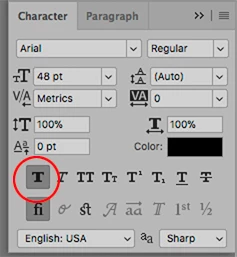
    Go to Window > Character. It will present the Character panel.

    Among the T symbols you may be set at the third one in from the left in the top row.

    Choose the first symbol and "unchoose" the TT symbol

    1 reply

    Norman Sanders
    Norman SandersCorrect answer
    Legend
    January 8, 2018

    Go to Window > Character. It will present the Character panel.

    Among the T symbols you may be set at the third one in from the left in the top row.

    Choose the first symbol and "unchoose" the TT symbol

    rosalyncAuthor
    Known Participant
    January 8, 2018

    You star - thanks for that :-)

    chanaart
    Community Expert
    Community Expert
    January 8, 2018

    Just remember if you clicked on the all caps for one project..or any other type properties...Photoshop inherits it...same for Tracking, Leading etc.

    So pay attention to these properties.

    Chana