Participant
December 2, 2021
Question

All save as options gone

  • December 2, 2021
  • 2 replies
  • 184 views

hi there

I've read numerous posts about the update, removing all 'save as' options, after the Apple API thing.

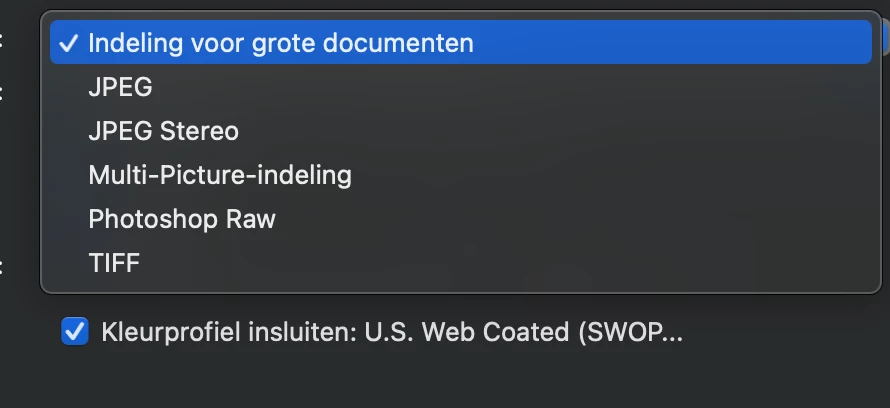
I still encounter these problems, using save as / save as copy is still not giving any of the file formats, like PDF, I need 😞

Have been working now for hours, it's not working. Apparently this is also the only way to contact Adobe... so hope there is a new solution for this, I haven't found after hours of research...
This topic has been closed for replies.

2 replies

PECourtejoie
Community Expert
Community Expert
December 2, 2021

Gooie dag, the profile tells me that you are trying to save a CYMK image, not all file formats support it...

It is really rare to have to work on CYMK files. You can work in RGB, use a second window for the document in proof colors with the desired profile, then import the file in InDesign to convert in CYMK at separation time, so that you can also export an RGB PDF file if needed.

Remember that the desktop printers might use CYMK+ inks, but they expect an RGB file. Otherwise, there are two conversions.

Participant
December 2, 2021

Goedemiddag! 🙂

Its in RGB:

PECourtejoie
Community Expert
Community Expert
December 2, 2021

Gooie middag...  I think that at one point it was converted to CYMK, otherwise, how do you explain the U.S. Web Coated that is a CYMK color profile in the first screen capture?

jane-e
Community Expert
Community Expert
December 2, 2021

Hi @Jan220457469whe 

As of 22.4.1, you can find png, jpg, pdf, etc., using Save a Copy (from the File menu or from within the Save as dialog).


As of 22.4.2 you can revert to the previous behavior in Preferences > File Handling > File Saving Options:

  • Enable Legacy Save As
  • Do not append Copy to filename


See this help page for details:
https://helpx.adobe.com/photoshop/using/saving-images.html  

~ Jane


Participant
December 2, 2021

Dear Jane,

Many thanks for your quick reply! Really appreciate it 🙂

Already clicked this function, as I found it in one of the other topics here at the forum


I have the 22.5 version, where you even cannot disable the 'add copy to filename' anymore


So unfortunately, this option also didnt work 😞