Participant
October 4, 2023
Answered

Alt+ Right Click problem

  • October 4, 2023
  • 1 reply
  • 381 views

Hello, when I update photoshop, now when I adjust the size of the brush with alt + right click, when I take my hand off the alt key or right click, the size of the brush grows and shrinks again. How can I solve this problem? In the past, there was no such problem when I took my hand off the right click, but with the new update, it became like this
This topic has been closed for replies.
Correct answer Trevor.Dennis

That function uses the GPU, so I wonder if there is an issue there?  Have a look at your video card maker's website and see if there is a more recent driver available?


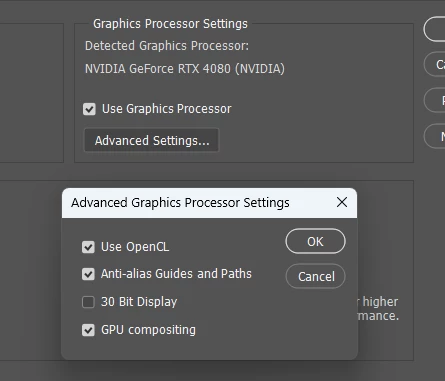
Check Preferences > Performance > Graphics Processor settings.  Are they all ticked (other than 30 bit display)?


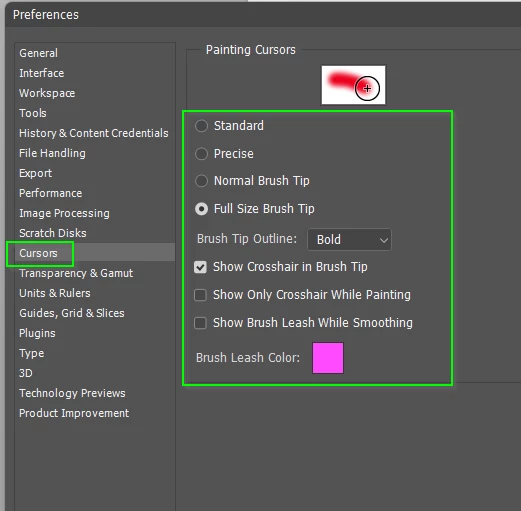
What are your brush cursor settings?


It does sound like somethingis broken, so if all else fails, you might need to reset your Preferences.

1 reply

Trevor.Dennis
Community Expert
Trevor.DennisCommunity ExpertCorrect answer
Community Expert
October 4, 2023

That function uses the GPU, so I wonder if there is an issue there?  Have a look at your video card maker's website and see if there is a more recent driver available?


Check Preferences > Performance > Graphics Processor settings.  Are they all ticked (other than 30 bit display)?


What are your brush cursor settings?


It does sound like somethingis broken, so if all else fails, you might need to reset your Preferences.

Participant
October 4, 2023

Hello, thank you for your comment. I checked what you said and my settings are the same as in the photo you posted but I reset my prefences settings as you said at the end and the problem was solved. Thank you so much