
Known Participant
July 21, 2025
Answered

Am I using Generative Fill completely wrong?

  • July 21, 2025
  • 1 reply
  • 213 views

I recently shot the finish line of a marathon for some 7100 images

Approx 40 were out of focus so I flagged them as rejected and put them in a seperate folder.

I used the Focus Point plugin for LrC to see what I was aiming at and sure enough the problem was me. 

I somehow stumbled across Black Forest Lab's Flux Playground website and ran those out of focus images through it, using this prompt:

"Improve this image and put the subject in clear focus and blur the background like an f2.8 lens". 

It did exactly as instructed and runners who were totally out of focus, were generated clearly, other than some of the illegible text on their bibs remaining garbled. The background f2.8 simulation was nearly as good as I could get from my 70-200 lens. 

OK ...I've used PS for over 20 years and it has generative Ai so I thought I'd try that on some of those photos just as a test. Using the same prompt just produced absolute garbage, so I tried first selecting the subject onto its own layer then shortened the prompt to: ""Improve this image and put the subject in clear focus". 

What a mess. I've used it that way before and improved images but now it simply has a mind of its own and even took my prompt as text to add to the image:
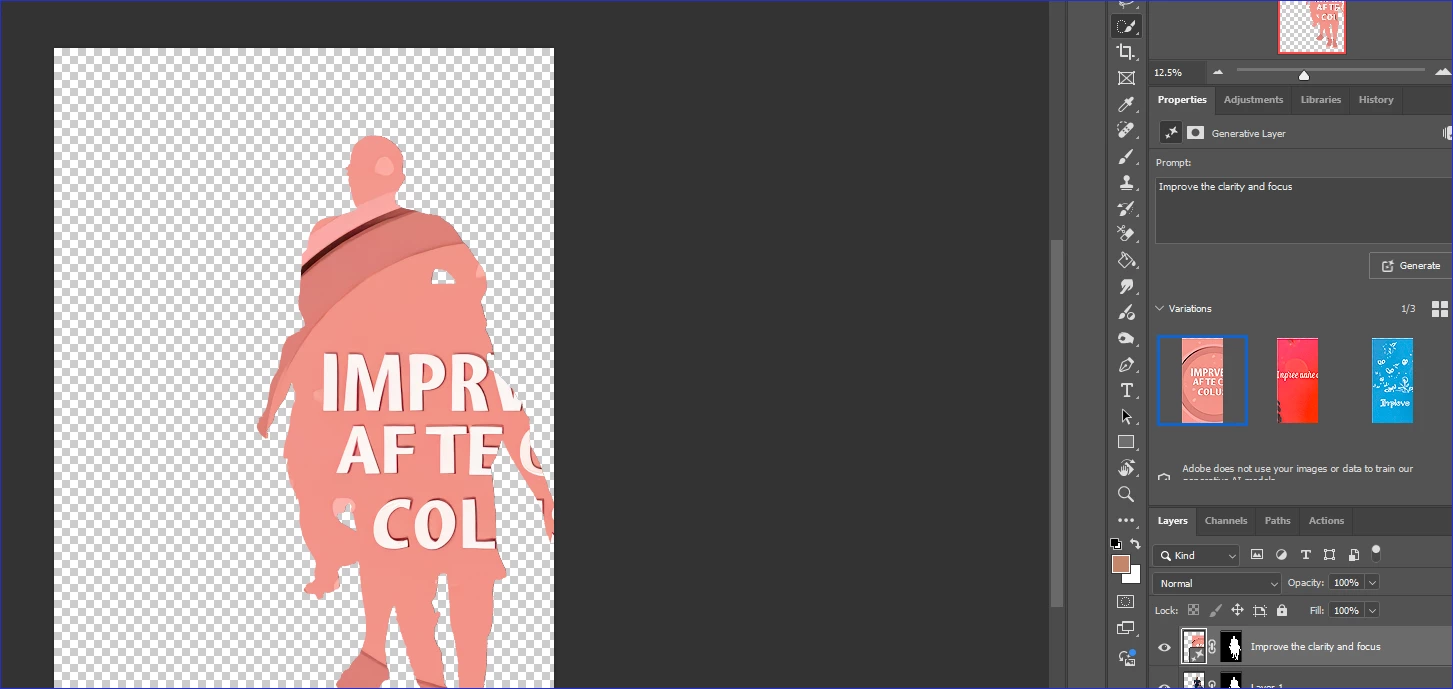
Is there just no way to use Photoshop for this purpose now.

Here's a typical a side by side of what that BF website did.
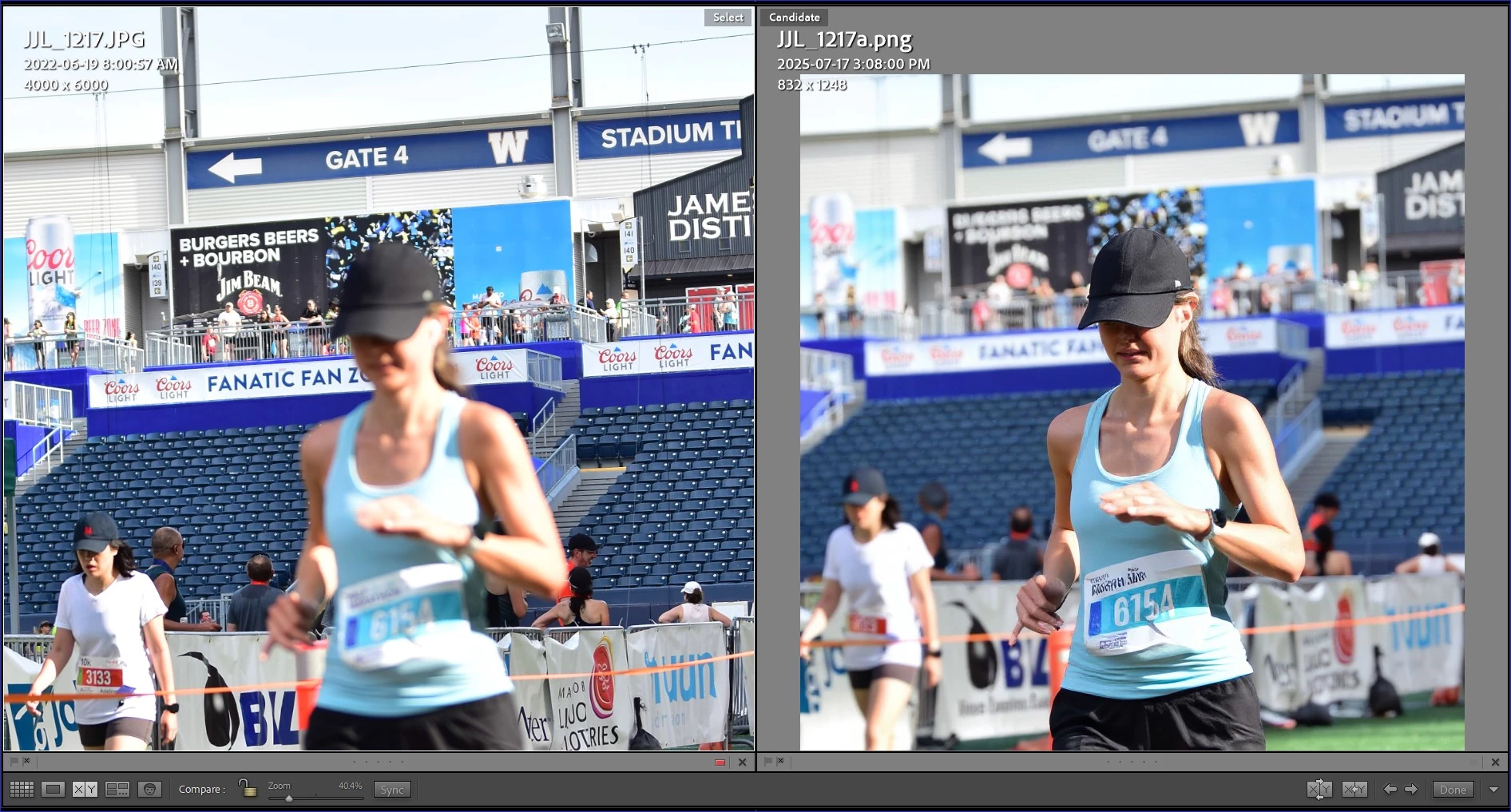
 Is there any way to achieve anything like that using Photoshop with Generative Fill or any of its other tools now?


Correct answer creative explorer

@jjaylad from my understanding, you are simply asking it to do something it wasn't primarily designed for.  Generative Fill, powered by Adobe Firefly, is primarily designed for adding new content based on text prompts, expanding canvases, removing objects, and conceptually blending elements. While it can sometimes mimic photographic effects, it's not its core strength. Its understanding of "focus" or "f/2.8 blur" is more about creating new content that looks like it has that quality, rather than enhancing the existing image's focus. When you prompted "Improve this image and put the subject in clear focus," Generative Fill might have seen "put the subject in clear focus" as a literal text instruction to render on the image, because its primary mode is "add content." It's not designed to take an out-of-focus subject and magically sharpen it while inventing detail. I do think for fixing out-of-focus photos and adding realistic depth of field after the fact, specialized AI photo enhancement tools are currently superior to Photoshop's Generative Fill. Sadly. But, I hope it will change one day! 

1 reply

creative explorer
Community Expert
creative explorerCommunity ExpertCorrect answer
Community Expert
July 21, 2025

@jjaylad from my understanding, you are simply asking it to do something it wasn't primarily designed for.  Generative Fill, powered by Adobe Firefly, is primarily designed for adding new content based on text prompts, expanding canvases, removing objects, and conceptually blending elements. While it can sometimes mimic photographic effects, it's not its core strength. Its understanding of "focus" or "f/2.8 blur" is more about creating new content that looks like it has that quality, rather than enhancing the existing image's focus. When you prompted "Improve this image and put the subject in clear focus," Generative Fill might have seen "put the subject in clear focus" as a literal text instruction to render on the image, because its primary mode is "add content." It's not designed to take an out-of-focus subject and magically sharpen it while inventing detail. I do think for fixing out-of-focus photos and adding realistic depth of field after the fact, specialized AI photo enhancement tools are currently superior to Photoshop's Generative Fill. Sadly. But, I hope it will change one day! 

m
jjayladAuthor
Known Participant
July 30, 2025

Thanks for the response.  I see you are totally correct. Tried many experiments since and you are spot on.


Having time on my hands, I've used that Black Forest thingy on a few other really old 'rejected' images that I had kept in 'rejects' folders and it is pretty amazing. I guess the future is Ai for sure and the shocking thing is how fast and accurately it works. No batch mode yet but I'm sure that is coming. I can see many uses for it because it does whatever one prompts it to do.

I revisited an old event shoot in LrC and filtered to all the headshot and people images shot at 5.6 or smaller apertures, and ran them through that process with the same prompt. That excercise really reinforced my thinking Ai can do more than any investment I could make in lenses.  I would be nice if Adobe would acquire a company like that and incorporate such functionality into the programs we work with every day. Adobe does seem to improve every month of course, and the Lens Blur is getting better and better ...and can be run in batch so that is really great too,

I get the impression the traditional photographic equipment industry is falling further behind by not synchronizing with Ai in the cloud (or even with the cloud period) the way  the phone industry has. All those under 50 grew up with phones, taking more photos than many professional photographers who preceeded them. They live in the cloud and often view dedicated cameras and lighting equipment etc., as relics of a bygone era.

I see the best of today's camera manufacturers becoming the next 'Kodaks' if they fail to reverse their stubborn sluggishness to adopt today's realities.

Anyway ...still enjoying photography and experimentation. Have fun with yours!