
Sister Sabina
Inspiring
July 6, 2020
Answered

An annoying problem

  • July 6, 2020
  • 1 reply
  • 376 views

I'm not sure how to explain this.  However, here goes.  My photoshop workspace is acting isolated from the toolbar on the left for some reason.  Also, there is a bar across the top which I would surely love to get rid of if possible.  At times, photoshop displays on the left side of the mac and I have to physically move it back into the center.  

hope I have made myself clear.

Thanking you.

Sr. Sabina
This topic has been closed for replies.
Correct answer Bojan Živković11378569

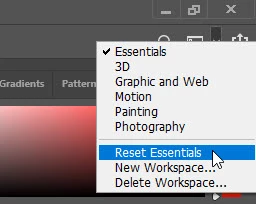
This is configuration which can be changed. One quick way is to reset workspace using workspace switcher on the right side of Options bar which is floating at the top. That should put Toolbar and the Options bar back in right place. Choose Reset Essentials or whatever else is offered to reset.

There is also and floating window which you can put back as tab if that is what you want using Window > Arrange > Consolidate All to Tabs.


And please do not get read of Options bar which is floating at the top of your screen because it contains crucial options which are not avaiable elesewhere when using tools.

1 reply

Bojan Živković11378569
Community Expert
Community Expert
July 6, 2020

This is configuration which can be changed. One quick way is to reset workspace using workspace switcher on the right side of Options bar which is floating at the top. That should put Toolbar and the Options bar back in right place. Choose Reset Essentials or whatever else is offered to reset.

There is also and floating window which you can put back as tab if that is what you want using Window > Arrange > Consolidate All to Tabs.


And please do not get read of Options bar which is floating at the top of your screen because it contains crucial options which are not avaiable elesewhere when using tools.

Sister Sabina
Inspiring
July 6, 2020

Thank you so very much.  All my problems solved.

Sr. Sabina