I think what we’re running into here is a quirk with how some Photoshop features interpret different methods of input, which affects how the Actions panel records them. How it records can depend on how you used a feature, especially when it comes to mouse vs. keyboard shortcut.
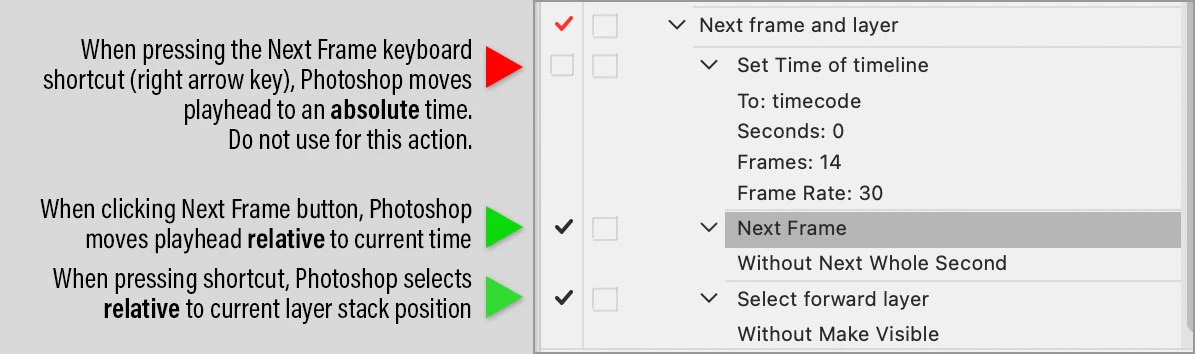
For example, I have long been aware that if I want to record “Select forward layer” or “Select backward layer” I must do it with a keyboard shortcut, because if I click on the next layer up or down in the Layers panel, Photoshop records selecting that specific layer name I clicked, so it doesn’t actually go up or down (relative), it selects that layer name exactly (absolute).
I recorded a combined action for your timeline question even before you replied, and it worked fine. When you replied saying it didn’t work, based on the above experience the first thing I questioned was how the next frame was being selected. I realized that I recorded my action by clicking the Go To Next Frame button. So I tested recording it by pressing the right arrow key instead, and discovered that Photoshop sends that to the Actions panel as moving the playhead to a specific timecode (absolute), so it will always go to that frame.
So, see if your action works as expected if you re-record the next frame step by clicking the Go To Next Frame button instead.

 AdChoices