
Inspiring
November 30, 2017
Answered

Annoying brush preview thumbnail

  • November 30, 2017
  • 4 replies
  • 844 views

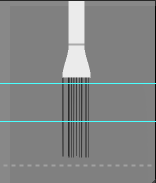
I get this preview image of the brush type I'm using while I'm using a brush, but it's only visible whenever I have my guides on, if I go to View - Extras and remove Extras it goes away but then I loose my guides as well! I only want the brush image to go away, not the guides. This never occurred earlier but after last update this is one of the all so typical new features that Adobe found interesting to make default. 
    This topic has been closed for replies.
    Correct answer cinziamarotta

    In the VIEW menu, just below Extras there is Show: you can check or uncheck the items you need

    4 replies

    cinziamarotta
    cinziamarottaCorrect answer
    Participating Frequently
    November 30, 2017

    In the VIEW menu, just below Extras there is Show: you can check or uncheck the items you need

    perrybrusAuthor
    Inspiring
    November 30, 2017

    Thanks . The option is named Brush Preview. That solved it! It's kinda annoying that Adobe makes features like this default after updates. Also, preferences re appear after updates that I turned off earlier or/and never turned on at all.

    c.pfaffenbichler
    Community Expert
    Community Expert
    November 30, 2017

    You could have hidden it without going to the menu by clicking the X.

    @mj
    Community Expert
    Community Expert
    November 30, 2017

    Oh, disabling extras, will hide everything, so that behavior is correct

    @mj
    Community Expert
    Community Expert
    November 30, 2017

    You switch it off in either the Brushes or Brush Settings Panels.

    Heres how: Live Tip Brush Preview

    HTH

    c.pfaffenbichler
    Community Expert
    Community Expert
    November 30, 2017

    When you hover the cursor over that does a grey bar with an »X« on the right side appear?