RC94
Participant
November 23, 2019
Answered

ANNOYING TABLE OF CHARACTERS POP-UP WINDOW

  • November 23, 2019
  • 5 replies
  • 8600 views

Good morning All,


First post. Not super psyched by the newest photoshop CC, tons of "gadgets" and "pop-up" windows which looks like Adobe is catering to the millenials crowd... 😞 

Better focus on making the tool more efficient instead of adding tons of useless annoyances.


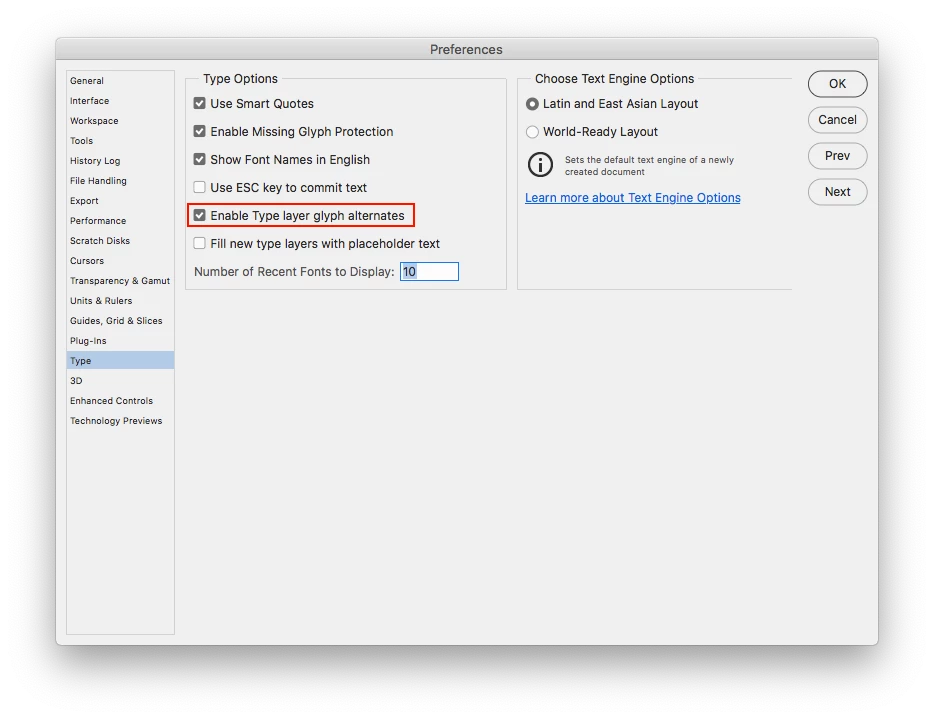
Anyways. When editing a text I get this super annoying pop-up window with a table of various characters and fonts... It prevents me from typing in my first character every single time and I have to go back, driving me nuts. Anybody has an idea to stop this crap from happening? Thank you.


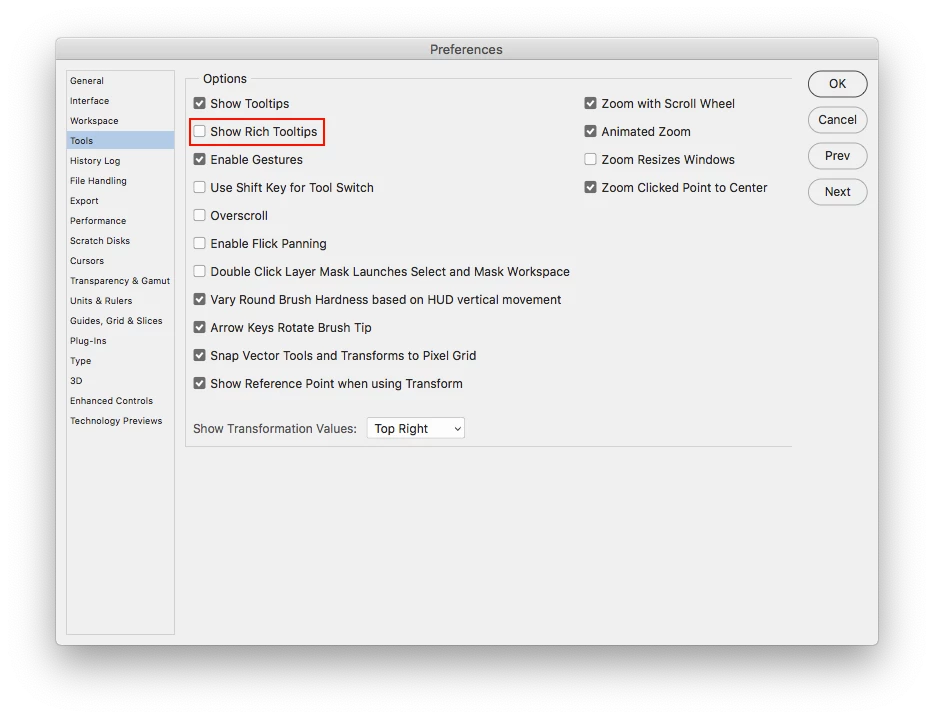
Also I would like to disable those pop-up images that now appear every single time you hoover on each of the tools. Same thing, recommendations appreciated.


ADOBE: Keep it simple and efficient!! Reduce the crap!!
Correct answer Jeff Arola

For the text go to Photoshop>Preferences>Type (mac) or Edit>Preferences>Type (windows) and uncheck Enable Type layer glyph alternatives.


As to the Pop-Ups go to Photoshop>Preferences>Tools (mac) or Edit>Preferences>Tools (windows) and uncheck Show Rich Tooltips


5 replies

Participant
May 18, 2021

Thank you so much.

The glyph and "learn more" tool pop-ups are driving me insane.

Participant
March 23, 2021

omg thank you... was driving me nuts. not sure the millenial comment was necessary though.

Participant
November 22, 2020

Glad someone brought it up because it was reducing my productivity and efficiency by large margins as well. Phew!

salpilk
Participating Frequently
October 28, 2020

Thank sweet heavens. That has been driving me crazy!

Jeff Arola
Community Expert
Jeff ArolaCommunity ExpertCorrect answer
Community Expert
November 23, 2019

For the text go to Photoshop>Preferences>Type (mac) or Edit>Preferences>Type (windows) and uncheck Enable Type layer glyph alternatives.


As to the Pop-Ups go to Photoshop>Preferences>Tools (mac) or Edit>Preferences>Tools (windows) and uncheck Show Rich Tooltips


RC94
RC94Author
Participant
November 24, 2019

Thanks Jeff you rock.