Participant
June 11, 2017
Answered

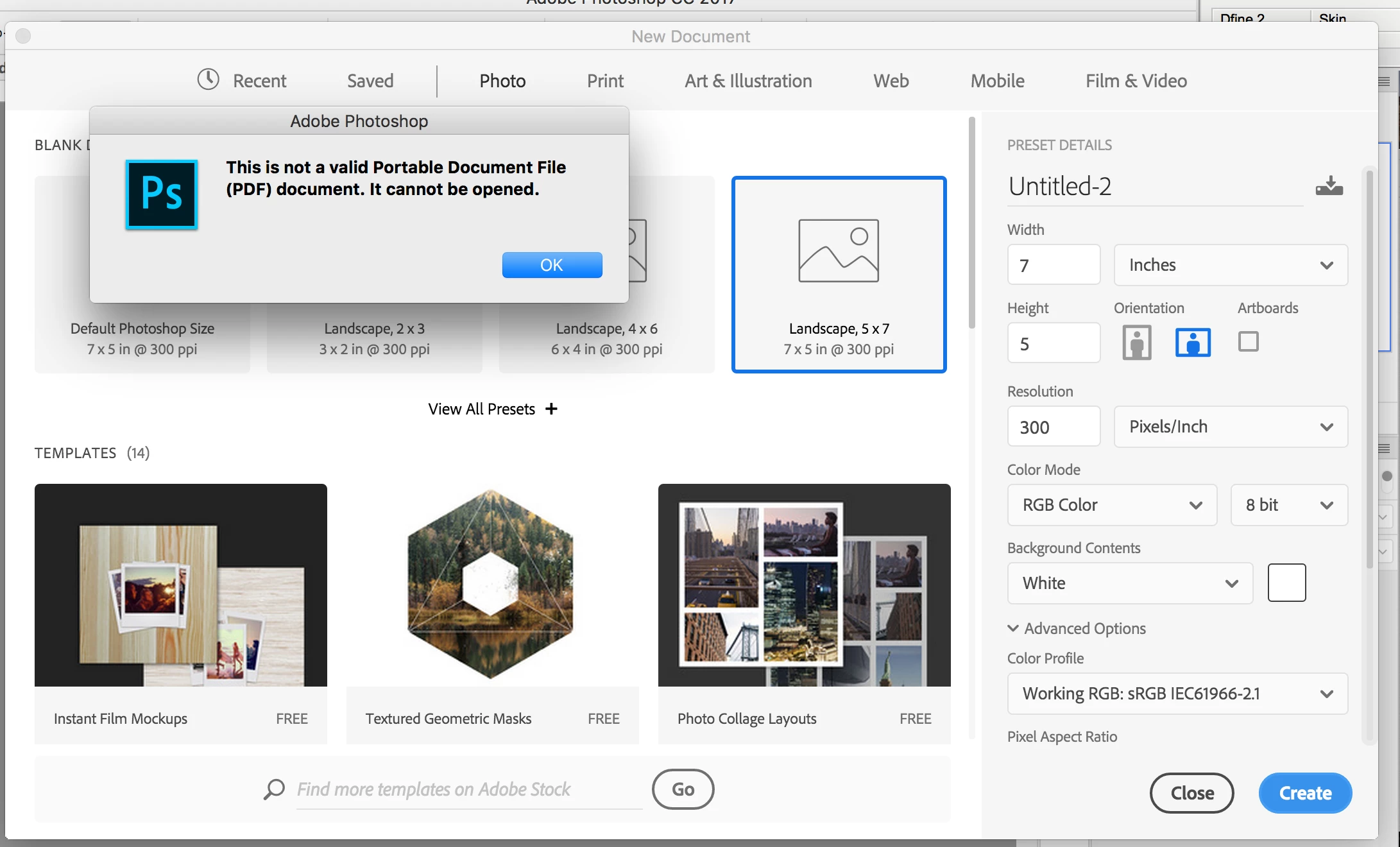
Any ideas? Photoshop CC New Document Shows "not a valid Portable Document File"

  • June 11, 2017
  • 1 reply
  • 1247 views

Can't create a New Document in 2017.1.1 release of Photoshop CC without getting multiple dialog boxes saying the "not a valid Portable Document File". Very confusing, very annoying. It eventually does open an untitled document, but this can't be right. Screenshot below for reference. Help? Anybody?... (Have tried resetting workspaces and a few other things, still not working.)

This topic has been closed for replies.
Correct answer JJMack

You seems to be showing the new document  panel.  I do not understand why Photoshop would be opening and old document file instead of just creating a new empty Document. If you can determine which PDF the pop-up message is referring to. Try opening that PDF file with Acrobat Reader to see if it is a valid file.   New documents do not have a backing File on your machine for a new document has never been saved to a file there should not be a file being opened IMO.  Try resetting your preferences.  Photoshop does not seem to be operating correctly.  If you are trying to use a template I do not use Adobe Stock templates see  if it is a PDF file and Open it with Acrobat reader. I have no idea what an Adobe Stock template is or how one would use an Adobe template.

From what I read templates are either Blank Documents with preset sizes or PSD files that have Artboards for different devices. not PDF files.

Templates and presets

provide inspiration and reusable elements for your documents. You can download templates from Adobe Stock that include quality graphics and illustrations right within Photoshop. You can then build on these templates to easily create documents that share common settings and design elements. Templates open as .psd files in Photoshop and generally include multiple artboards.

Blank Document Presets

are blank documents with predefined dimensions and settings. Presets make designing for specific device form factors or use cases easier. For example, you can use a preset to quickly start designing for the iPad Pro. Blank document presets have predefined size, color mode, unit, orientation, positioning, and resolution settings. You can modify these settings before creating a document using the preset.

Templates and presets are categorized into these sets:

  • Photo
  • Print
  • Art & Illustration
  • Web
  • Mobile
  • Film & Video

1 reply

JJMack
Community Expert
JJMackCommunity ExpertCorrect answer
Community Expert
June 11, 2017

You seems to be showing the new document  panel.  I do not understand why Photoshop would be opening and old document file instead of just creating a new empty Document. If you can determine which PDF the pop-up message is referring to. Try opening that PDF file with Acrobat Reader to see if it is a valid file.   New documents do not have a backing File on your machine for a new document has never been saved to a file there should not be a file being opened IMO.  Try resetting your preferences.  Photoshop does not seem to be operating correctly.  If you are trying to use a template I do not use Adobe Stock templates see  if it is a PDF file and Open it with Acrobat reader. I have no idea what an Adobe Stock template is or how one would use an Adobe template.

From what I read templates are either Blank Documents with preset sizes or PSD files that have Artboards for different devices. not PDF files.

Templates and presets

provide inspiration and reusable elements for your documents. You can download templates from Adobe Stock that include quality graphics and illustrations right within Photoshop. You can then build on these templates to easily create documents that share common settings and design elements. Templates open as .psd files in Photoshop and generally include multiple artboards.

Blank Document Presets

are blank documents with predefined dimensions and settings. Presets make designing for specific device form factors or use cases easier. For example, you can use a preset to quickly start designing for the iPad Pro. Blank document presets have predefined size, color mode, unit, orientation, positioning, and resolution settings. You can modify these settings before creating a document using the preset.

Templates and presets are categorized into these sets:

  • Photo
  • Print
  • Art & Illustration
  • Web
  • Mobile
  • Film & Video
JJMack