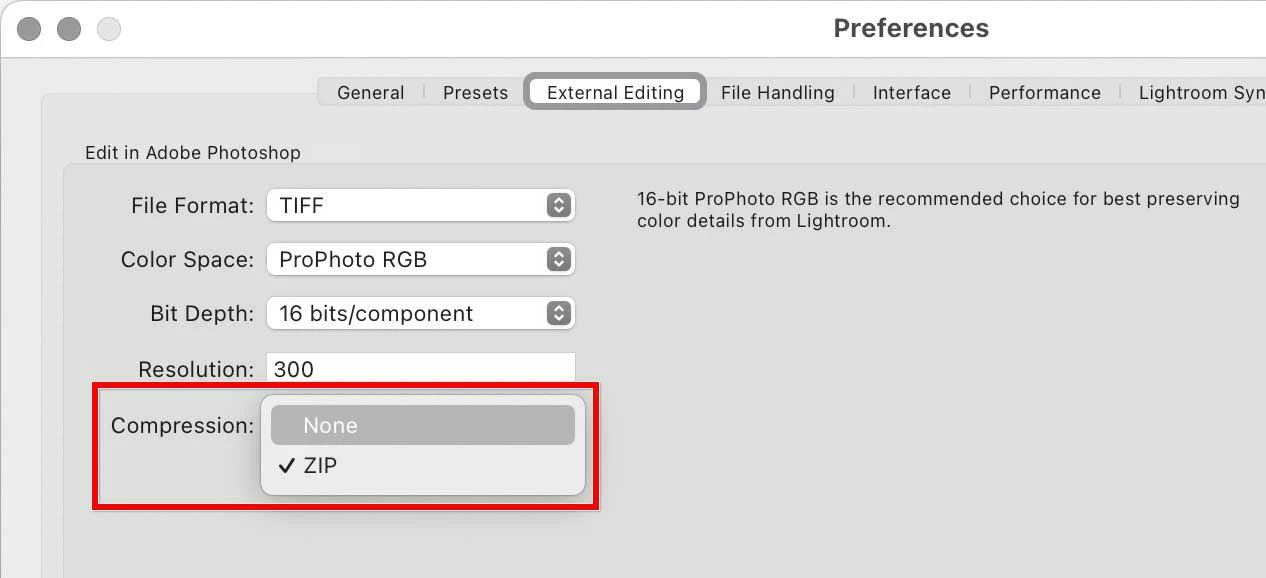
Whenever I open a file in photoshop from Lightroom, then go to save it as a TIF, it defaults to ZIP compression. Is there any way to set this to use no compression as the default?
By @Tom Goodell
Just to be clear, do you mean Lightroom or Lightroom Classic? In Lightroom Classic, the compression method for raw files sent to Photoshop is set in Lightroom Classic, in Preferences, in the External Editing tab. That setting is carried into the Save As dialog box in Photoshop, so if you want TIFF compression to be None, set up Lightroom Classic so that it sends TIFF files to Photoshop with None compression.
Also, is there any way to set photoshop to use IBM PC Byte Order to be the default instead of Macintosh?
By @Tom Goodell
I believe Photoshop simply remembers the way you set it last time, but you should test that.
Is there a reason you need to set it to IBM PC? The reason for the question is that today, properly written software on any platform is coded to recognize both byte orders, so the byte order no longer matters. The option was added to Photoshop in the early 1990s, when byte order still mattered. But because of how software works today, many of us who use TIFF files on both PCs and Macs have not paid attention to TIFF byte order in over 20 years.



 AdChoices