
Participant
February 14, 2024
Answered

Application frame in Photoshop 2024 / Mac

  • February 14, 2024
  • 3 replies
  • 1983 views

Hi All,

In the past, there was an option to disable the application frame and have the images float. Has the option to have "Float All in Windows" as the default been disabled? Or am I missing how to achieve this?


Thanks for any input.


GG
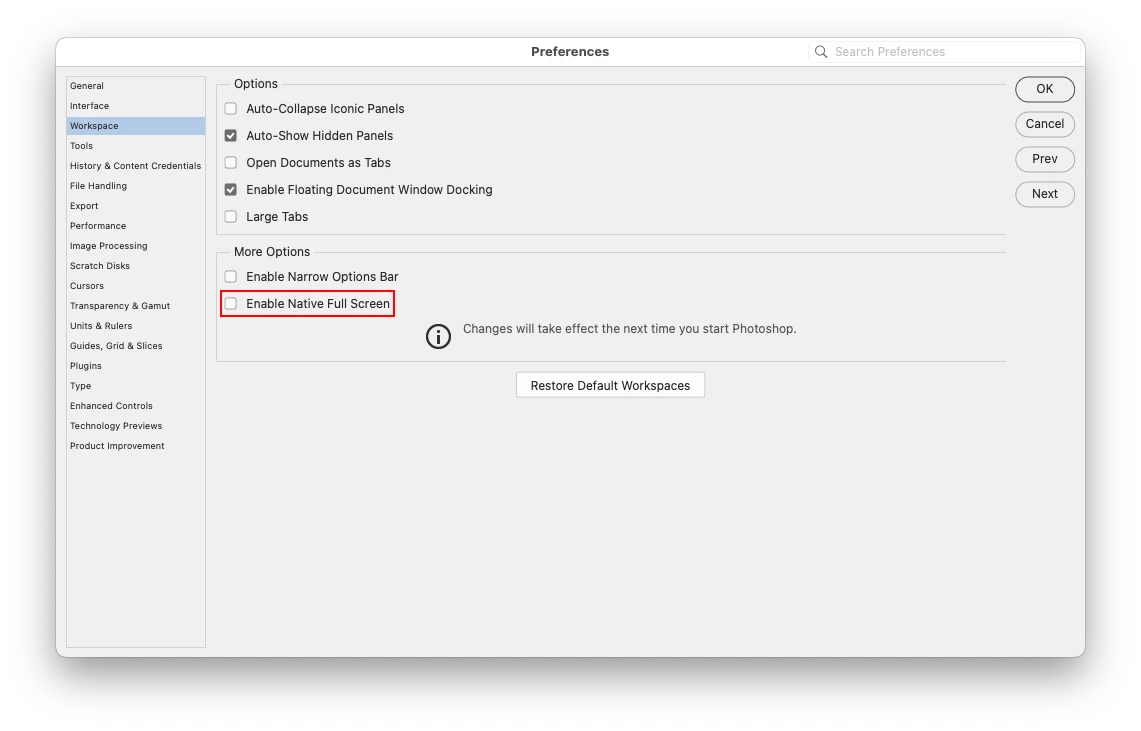
Correct answer Jeff Arola

Forgot to add to make sure Enable Native Full Screen is not checked in the Photoshop 2024>Settings (Preferences)>Workspace


3 replies

Jeff Arola
Community Expert
Jeff ArolaCommunity ExpertCorrect answer
Community Expert
February 14, 2024

Forgot to add to make sure Enable Native Full Screen is not checked in the Photoshop 2024>Settings (Preferences)>Workspace


Participant
February 14, 2024

Thank you so much, Jeff!! :)))

Jeff Arola
Community Expert
Community Expert
February 14, 2024

In Photoshop go to Window and uncheck Application Frame then go to Photoshop 2024 >Settings (Preferences)>Workspace and uncheck Open Documents as Tabs


kglad
Community Expert
Community Expert
February 14, 2024

in the future, to find the best place to post your message, use the list here, https://community.adobe.com/

p.s. i don't think the adobe website, and forums in particular, are easy to navigate, so don't spend a lot of time searching that forum list. do your best and we'll move the post (like this one has already been moved) if it helps you get responses.


<"moved from cc desktop">