This topic has been closed for replies.

5 replies

c.pfaffenbichler
Community Expert
Community Expert
November 20, 2024

Do you mean a Vector Mask (Layer > Vector Mask > Current Path)? 

Stephen Marsh
Community Expert
Community Expert
November 19, 2024

@christiang94431733 - As @c.pfaffenbichler notes, as you have tagged your topic with the Actions & Scripting label we need specifics to provide more than just general advice.

davescm
Community Expert
Community Expert
November 19, 2024

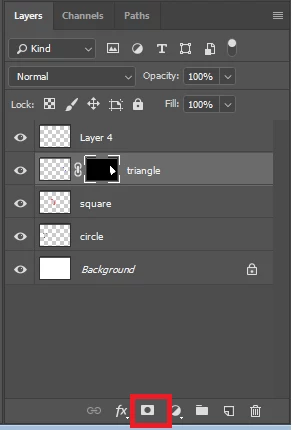
Press the button you have highlighted

or use Menu Layer > Layer Mask, Reveal Selection


You can of course go to Edit Keyboard Shortcuts and add a specific shortcut to that menu item. Or in Windows use the key sequence Alt L M V


Dave


c.pfaffenbichler
Community Expert
Community Expert
November 19, 2024

It is possible. 

But what do you actually mean? Do you want to perform this via an Action, a Script, …? 

Rene Andritsch
Community Expert
Community Expert
November 19, 2024

Once you have a selection and activated the mask layer you can fill it with white or black (or any grey value) to create the masked areas.