Inspiring
May 4, 2022
Answered

apply opacity to one layer only

  • May 4, 2022
  • 3 replies
  • 580 views

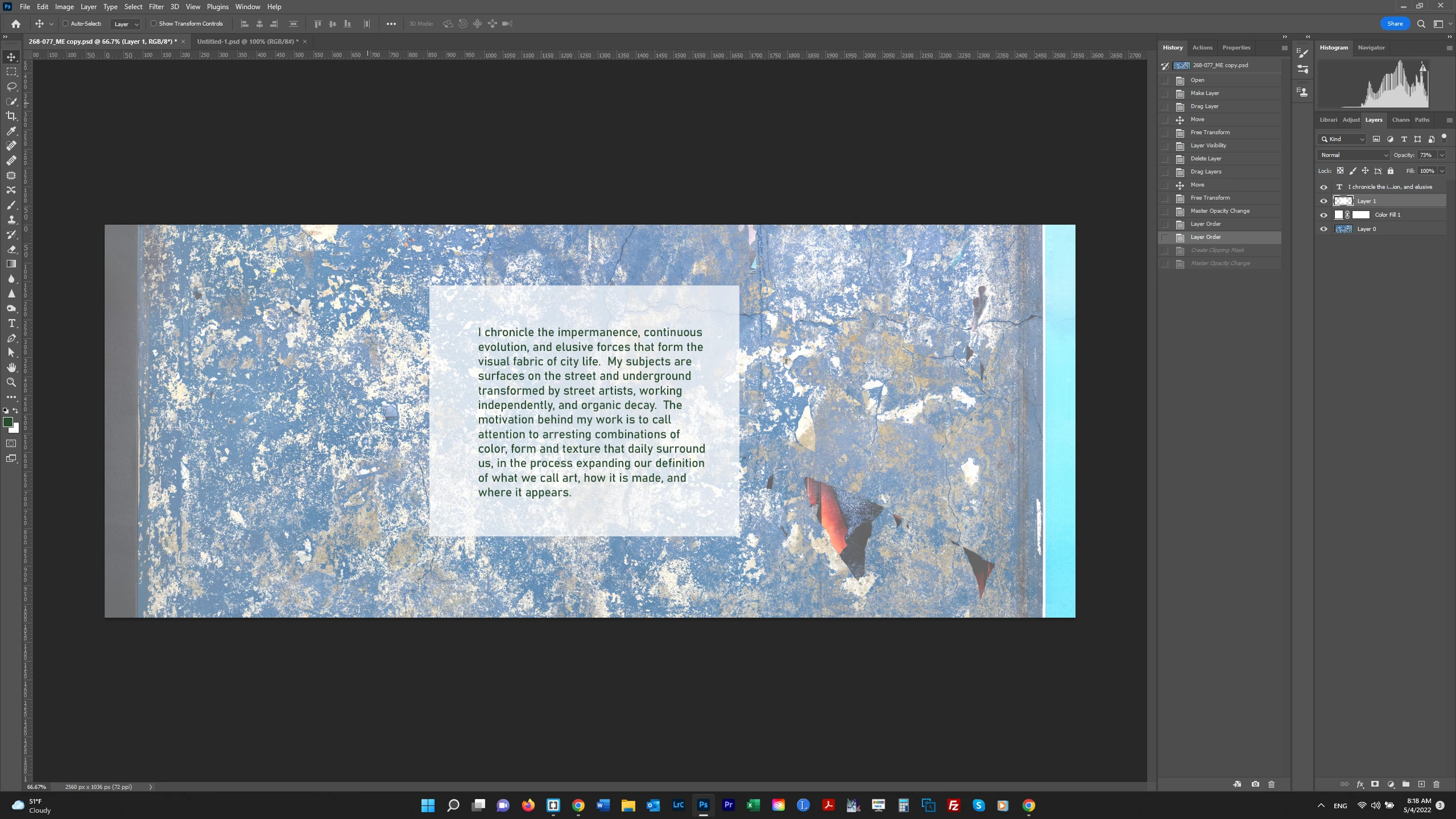
I want to apply opacity to a backgbround for a text layer that is then going over an image layer, so the text can be read.  I'd like the opacity to be adjustable on the background-text layer so I can tweak it.  In the screenshot below, the opacity is being applied to all the layers, and I don't want it applied to the bottom layer - the main image layer.  How do I achieve that?   Thank you.


This topic has been closed for replies.
Correct answer Theresa J

Looks to me like the Color Fill layer is the one that is changing the background. What happens when you turn the visibility of that layer off?

3 replies

Theresa J
Community Expert
Theresa JCommunity ExpertCorrect answer
Community Expert
May 5, 2022

Looks to me like the Color Fill layer is the one that is changing the background. What happens when you turn the visibility of that layer off?

Inspiring
May 5, 2022

You're right, turning off that Layer made it work right.  I am not sure how/why I created a Color Fill Layer for the main image.  I had created the text layer in a different file and then brought it in.  Maybe because I couldn't get things to work right I created that Fill Layer but I don't believe I need it.  Thank you!  

c.pfaffenbichler
Community Expert
Community Expert
May 4, 2022

For me the Forum seems to be malfunctioning and I cannot view the screenshot in your original post at full size, so please could you try attaching the screenshots instead of inserting them? 

Ged_Traynor
Community Expert
Community Expert
May 4, 2022

"For me the Forum seems to be malfunctioning and I cannot view the screenshot in your original post at full size"

It's not just you, it's been like that since last Friday for all 😒 It's was reported in the Back Room and Siliva's on to it, so hopefully it should be fixed soon.

c.pfaffenbichler
Community Expert
Community Expert
May 4, 2022

Thanks for the heads-up! 

I think I occassionally get a proper preview, maybe file format- or size-related? 

c.pfaffenbichler
Community Expert
Community Expert
May 4, 2022

Please post screenshots illustrating what you are doing exactly.