
Curiouskim4956473
Participant
January 7, 2019
Answered

Are we able to name psd files with apostrophes? CC 2019

  • January 7, 2019
  • 2 replies
  • 512 views

Hi All,

Previously, I was under the impression that we are not able to save psd or generally any digital format files with space, hyphens, and apostrophes. Only underscores seem to work fine. However I was able to save with space, hyphens, and apostrophes as psds just now, and they all seem to open and work fine. Is this a new update that happened at some point? Just want to make sure I got the okay before I start saving files in a way which I believe use to be problematic. I included a screenshot below, would appreciate a response, thanks so much!
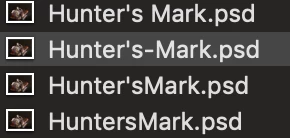
All the Best,

Jessica

This topic has been closed for replies.
Correct answer gener7

What Characters Are Not Allowed in File Names?

This page tells you which characters are not allowed in Windows or Mac.

Mac OS X uses HFS+ file system, Windows use NTFS. Both encode file names using UTF-16, although the exact encoding scheme is a bit different. Both also allow a max of 255 Unicode chars in file name.

Chars Not Allowed on Windows

NTFS does not allow the following chars:

/ \ : * ? " < > |

Chars Not Allowed on Mac

In Mac OS X, you cannot use the colon :. That's it.

File Name Characters Issues

In practice, this means, when you have files with a lot of chars that contains any of

/ \ : * ? " < > |

you'll have problems transfer it from Mac to Windows. Depending on what tool you use to transfer the file, the tool may stop dead, or change the file name in different ways.

Ref: What Characters Are Not Allowed in File Names?

2 replies

gener7
Community Expert
gener7Community ExpertCorrect answer
Community Expert
January 8, 2019

What Characters Are Not Allowed in File Names?

This page tells you which characters are not allowed in Windows or Mac.

Mac OS X uses HFS+ file system, Windows use NTFS. Both encode file names using UTF-16, although the exact encoding scheme is a bit different. Both also allow a max of 255 Unicode chars in file name.

Chars Not Allowed on Windows

NTFS does not allow the following chars:

/ \ : * ? " < > |

Chars Not Allowed on Mac

In Mac OS X, you cannot use the colon :. That's it.

File Name Characters Issues

In practice, this means, when you have files with a lot of chars that contains any of

/ \ : * ? " < > |

you'll have problems transfer it from Mac to Windows. Depending on what tool you use to transfer the file, the tool may stop dead, or change the file name in different ways.

Ref: What Characters Are Not Allowed in File Names?

Semaphoric
Community Expert
Community Expert
January 8, 2019

A quick search for "apostrophes in file names" shows you indeed can. I'd always assumed not, too.

jane-e
Community Expert
Community Expert
January 8, 2019

A second quick search shows that an apostrophe could cause problems uploading to a server and that coders will need to write extra code. That may or may not be of concern.