

studio 3D
Inspiring
March 18, 2017
Answered

Arial Black font is italic

  • March 18, 2017
  • 3 replies
  • 7730 views

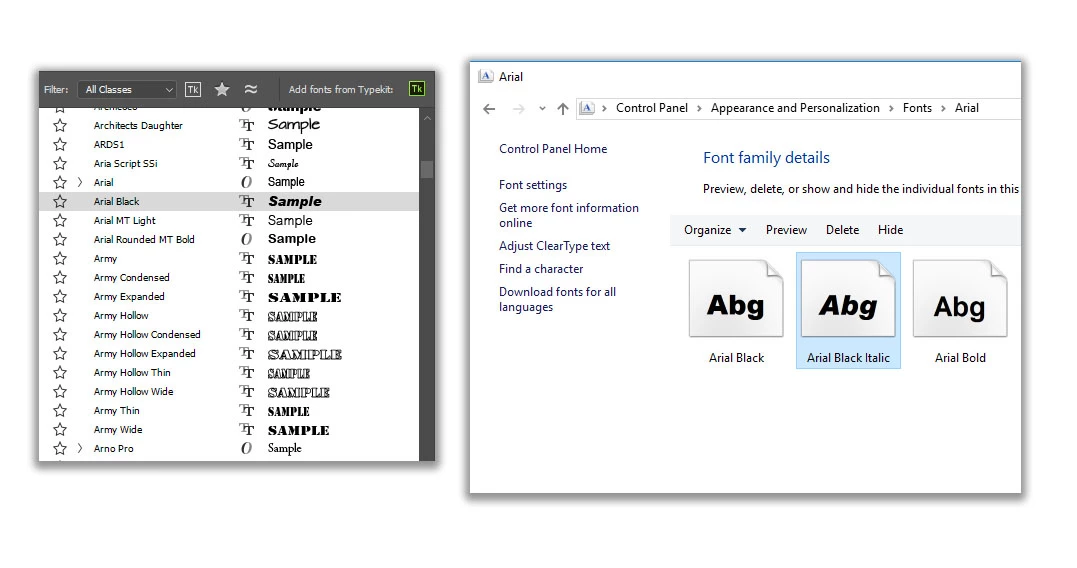
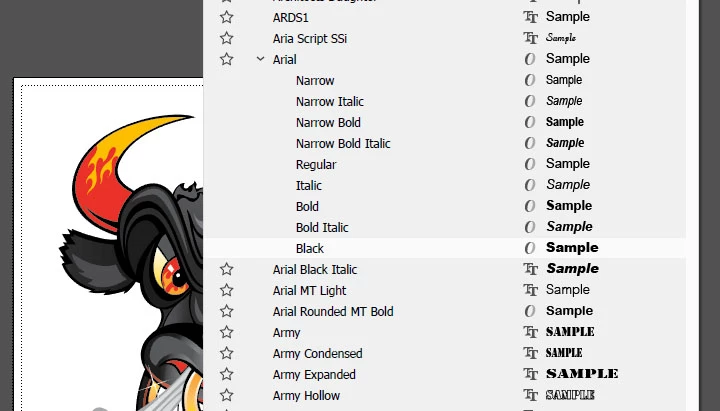
Arial Black and Arial Black Italic are installed correctly on my PC  (and appear correctly in CorelDraw), but in Photoshop the normal is italic, and there is no Italic version available in list.

How do I fix this? Please see photo. I need arial black back! Thanks.
This topic has been closed for replies.
Correct answer studio 3D

I found a solution: I checked Illustrator... THERE "Arial Black Italic" is how it's separately listed, and the normal Arial Black was hidden in the Arial family... so for some reason Arial Black Italic is separately listed, and displayed correctly in Illustrator but incorrectly in Photoshop.

3 replies

studio 3D
studio 3DAuthorCorrect answer
Inspiring
March 28, 2017

I found a solution: I checked Illustrator... THERE "Arial Black Italic" is how it's separately listed, and the normal Arial Black was hidden in the Arial family... so for some reason Arial Black Italic is separately listed, and displayed correctly in Illustrator but incorrectly in Photoshop.

postrophe
Inspiring
March 22, 2017

Hi

and ... Make sure your Character palet is not using Italic.

Pierre

studio 3D
studio 3DAuthor
Inspiring
March 22, 2017

You mean faux italic? No.

Akash Sharma
Legend
March 21, 2017

Hi StudioD,

Please follow the solutions 6 & 7  from this article Troubleshoot fonts issues in Adobe Photoshop CC, 2015, 2014, CS6, CS5 and let us know if that helps.

Regards,

Akash

studio 3D
studio 3DAuthor
Inspiring
March 21, 2017

Thanks, but it didn't work I was hopeful!
Maybe I should re-install Photoshop? I'm up to date with CC 2017.

Trevor.Dennis
Community Expert
Community Expert
March 22, 2017

What operating system?  Your screen shot looks like Windows, but most of the font issues I have seen are with OSX.  They would be covered with Akash's link to the Troubleshooting fonts FAQ though.

What have you tried in order to fix it?

Do you have a font plugin like Suitcase?  Suitcase is known to cause problems.

Try starting Photoshop while holding down the Shift key to force Photoshop to load without plug-ins or extensions.

I'm guessing you have tried restarting your computer and Photoshop?

Try removing the relevant fonts from the font folder, restarting, and popping them back.

Try replacing the relevant font files from another computer.

I think Windows SFC (System File Checker) looks at fonts, but we don't know your operating system yet.