
MrsG89
Participant
January 27, 2021
Answered

ARRRRGH! I have a BRUSH issue.

  • January 27, 2021
  • 2 replies
  • 238 views

I know I must have done something -- I just do not have a clue what I messed up. When I am using my paintbrush in Photoshop, if I try to change anything - the size of the brush, type of brush, flow, opacity, or smoothing the brush, for some unknown reason, switches to the eraser. I cannot change anything with my brush without it switching. Does anyone have any idea what I did to cause this? Thank you in advance for any help -- screenshot below
This topic has been closed for replies.
Correct answer davescm

A thought.

Your screen shot shows you have a brush preset with an associated tool (in this case the eraser) in your panel


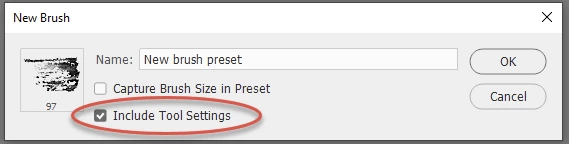
Brushes presets can be saved with or without the tool included (see save dialogue below)


If the tool is included (as indicated by that tiny tool icon at the top right of the stroke in your screenshot) then selecting that brush preset will also select the tool i.e switch to the eraser. You can override it by holding Ctrl+Alt when selecting a brush preset in which case the tool will not switch .


If you are making the other changes you mention without clicking on that brush preset - then ignore this 🙂


Dave

2 replies

davescm
Community Expert
davescmCommunity ExpertCorrect answer
Community Expert
January 28, 2021

A thought.

Your screen shot shows you have a brush preset with an associated tool (in this case the eraser) in your panel


Brushes presets can be saved with or without the tool included (see save dialogue below)


If the tool is included (as indicated by that tiny tool icon at the top right of the stroke in your screenshot) then selecting that brush preset will also select the tool i.e switch to the eraser. You can override it by holding Ctrl+Alt when selecting a brush preset in which case the tool will not switch .


If you are making the other changes you mention without clicking on that brush preset - then ignore this 🙂


Dave

S_Gans
Community Expert
Community Expert
January 27, 2021

This looks like a job for the first attempt to be to try resetting preferences:
https://helpx.adobe.com/photoshop/using/preferences.html

Adobe Community Expert / Adobe Certified Instructor