Participant
December 27, 2016
Answered

Artboard messing with crop tool

  • December 27, 2016
  • 1 reply
  • 1273 views

Hi,

I am shifted from Adobe CS6 to Adobe CC 2017.

I am new to Artboards, I did not added artboard in my design but I mistakenly clicked on artboard tool, since then Artboard is in my design. I want to get rid of this Artboard now but its not going away. I tried placing my layers outside the artboard folder but its not allowing me to. when I crop and export my image is showing white space around and not exporting cropped portion.

Whats the solution?

Thanks.

This topic has been closed for replies.
Correct answer davescm

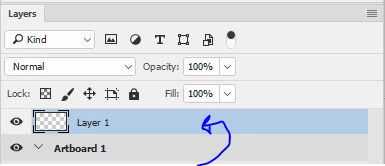
The artboard will contain a layer (s)

Go into the layers panel and drag the layer(s) out of the artboard.

Then right click on the artboard, in the layers panel,  and delete it

Dave

1 reply

davescm
Community Expert
davescmCommunity ExpertCorrect answer
Community Expert
December 27, 2016

The artboard will contain a layer (s)

Go into the layers panel and drag the layer(s) out of the artboard.

Then right click on the artboard, in the layers panel,  and delete it

Dave