Answered
Auto mask all new layers
Is it possible to automatically add a black and white mask to every new layer, including text layers and layer groups?

Is it possible to automatically add a black and white mask to every new layer, including text layers and layer groups?
Are you talking about Layer Masks?
If yes, then while there is not a shortcut for adding a layer mask, you can do so in Edit > Keyboard Shortcuts
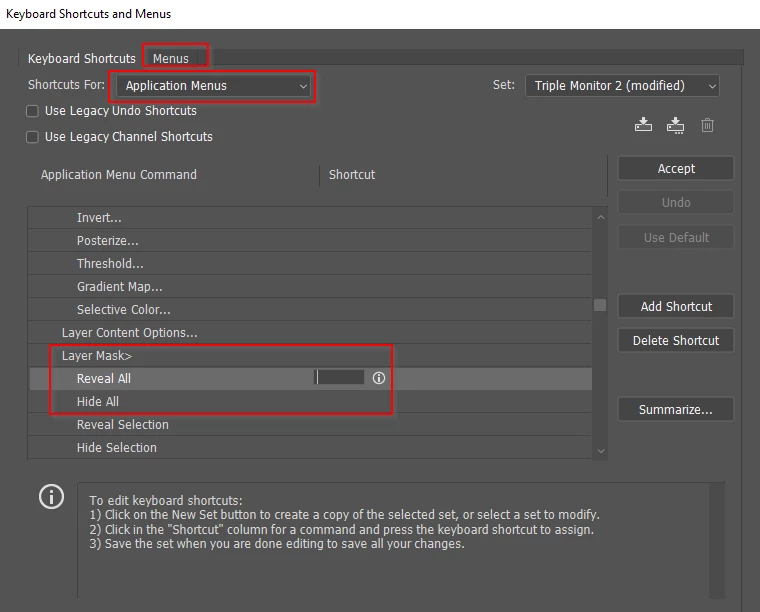
There are already a shortcut for adding a new layer (Shift Ctrl n) although it requires you to name the layer.
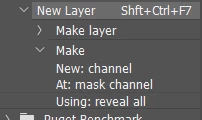
What you could do is create an Action that makes a new layer and adds a layer mask, and trigger it with a shortcut. I was not sure if this would work with the layer naming requirement, so I thought I'd better test it. If you click 'OK' for the new layer when making the Action, then it works fine, but you get the default layer name (i.e. Layer 1, Layer 2) But, in my test case Shift Ctrl F7 instantly produces a new layer with layer mask.
If you are using Photoshop CC, then you can store custom shortcuts with custom workspaces. This lets you make double use of shortcuts according to context.
Already have an account? Login
Enter your E-mail address. We'll send you an e-mail with instructions to reset your password.
 AdChoices