
Inspiring
March 16, 2019
Answered

Automatic centering of photo while scrolling - where'd it go?

  • March 16, 2019
  • 2 replies
  • 2460 views

Until a recent update, when an image was open in PS, it remained in the center of the window. Scrolling in or out automatically maintained this centering. Now, the image appears wherever in the window, and I have to dig around to find the scroll bars to recenter the image. Then, when I zoom in to look at something, zooming back out leaves the image in some other random place, not in the center.

How do I reset PS to always center an open pic? Probably a simple solution but I can't find it.

Thanks,

Ed
This topic has been closed for replies.
Correct answer Michael Bullo

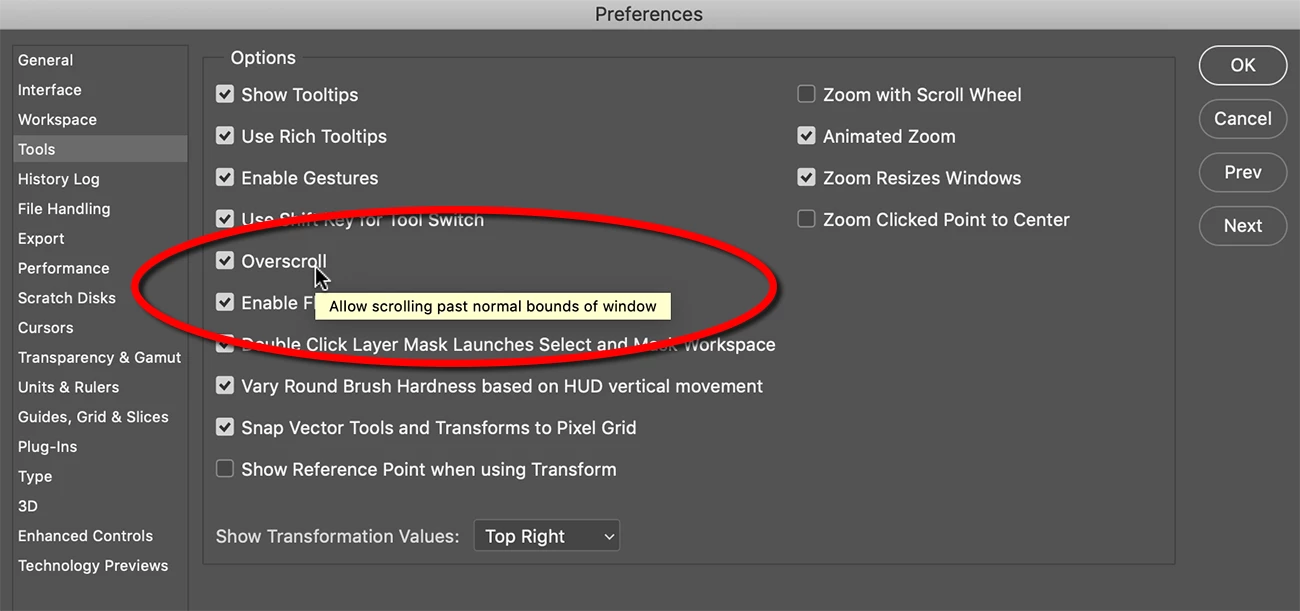
Have you tried the Overscroll option within the Tools section of the Preferences?

2 replies

Participating Frequently
July 26, 2022

I just upgraded to a newer version, after hestitating for sometime and the automatic centering was missing. Thank you for asking the question and making me feel I`m not alone in missing it. I agree the solution to turn off Overscroll is not as good as the previous feature. Cheers K

Michael Bullo
Community Expert
Michael BulloCommunity ExpertCorrect answer
Community Expert
March 16, 2019

Have you tried the Overscroll option within the Tools section of the Preferences?

ejbSFOAuthor
Inspiring
March 16, 2019

That's it!  I turned off Overscroll and the scroll centering is close to - though not exactly - like it used to be. Thanks.

Michael Bullo
Community Expert
Community Expert
March 16, 2019

Very cool.