Participant
February 1, 2018
Answered

Automatically locked new layers

  • February 1, 2018
  • 2 replies
  • 300 views

Hi,

I've been using PS for a few months when all of a sudden as of this morning, if I open multiple images (JPEG or RAW or text layers), then drag the layer of one image onto another image to make a new layer, once I let go of the mouse I can no longer re-position the layer. The layer isn't showing as locked, but I can't move any layers. I can adjust the transparency and style etc but not move it. This is really frustrating me.
This topic has been closed for replies.
Correct answer melissapiccone

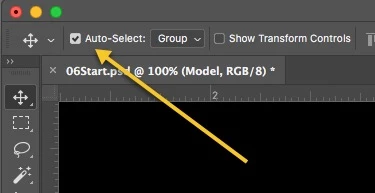
Did you have auto-select on and turned it off??

2 replies

melissapiccone
Community Expert
melissapicconeCommunity ExpertCorrect answer
Community Expert
February 1, 2018

Did you have auto-select on and turned it off??

Melissa Piccone | Adobe Trainer | Online Courses Author | Fine Artist
Participant
February 1, 2018

Fixed. Thank you. It was driving me crazy.

c.pfaffenbichler
Community Expert
Community Expert
February 1, 2018

Please post a screenshot including all pertinent Panels.

What exactly happens when you try to move the Layer – any sound, …?