Participant
February 16, 2012
Answered

Automating Production (Paths & Layers)

  • February 16, 2012
  • 3 replies
  • 1651 views

I have been reading and trying to figure this out, and I get the big pieces just not how to put them together, so thanks in advance for your help.

I am trying to integrate JS scripts and actions to create a production workflow for product shots. The issue is over the years the way people have left our master Photoshop files is far from consistent.

(These can be separate scripts if necessary so please chime in even if you know how to just do one of the 2 tasks)

I have almost everything working and these are the last 2 tasks I need to accomplish.

A.Need to see if there is a work path and if so:

  1. save that path (The name of this path is not important.)
  2. If there is no work path then skip to the next step.

(Manually you do this by double clicking the work path or dragging it on to the "new path icon" by Default if no other paths exist it is named Path 1, if there are other paths it is named with the next availble numerical path number Path 2, Path 3 etc.)

I found this snippet and I am trying to modify it, but can't quite figure it out

if (app.documents.length > 0) {

    var docRef = app.activeDocument;

    var n = docRef.pathItems.length;

        if((n>0)&&(docRef.pathItems[0].name!="Work path" ))

This looks like it is looking for path names OTHER THAN work path, but I'm not 100% sure.

I also tried scriptlistener to see what came up when I saved the Work Path manually and this is whay I got. It makes no sense to me.

var idMk = charIDToTypeID( "Mk  " );

    var desc6 = new ActionDescriptor();

    var idnull = charIDToTypeID( "null" );

        var ref4 = new ActionReference();

        var idPath = charIDToTypeID( "Path" );

        ref4.putClass( idPath );

    desc6.putReference( idnull, ref4 );

    var idFrom = charIDToTypeID( "From" );

        var ref5 = new ActionReference();

        var idPath = charIDToTypeID( "Path" );

        var idWrPt = charIDToTypeID( "WrPt" );

        ref5.putProperty( idPath, idWrPt );

    desc6.putReference( idFrom, ref5 );

    var idNm = charIDToTypeID( "Nm  " );

    desc6.putString( idNm, "Path 1" );

executeAction( idMk, desc6, DialogModes.NO );

2. I need to create a script that identifies if the top most layer is a standard layer or adjustment layer. If it is a standard layer move on, if it is an adjustment layer then:

  1. Select topmost layer
  2. "Stamp Visible"
  3. turn off all other layers
  4. save(without dialog) and end.

To clarify here is an example.

This is how the final files should look.
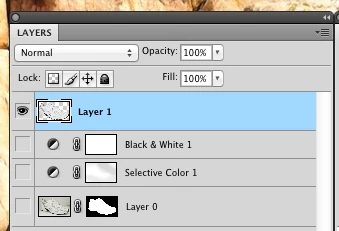
This is how they sometimes look when someone hasn't correctly completed the file.
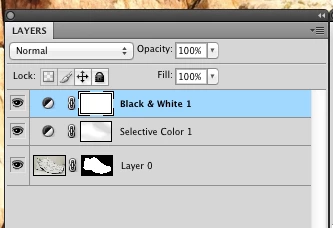
I can do a lot of other actions to kind of work around this, but in the end I want my file to be correct.

Any help would be appreciated. Even if it is just to point me in the right direction to find the info myself.

This topic has been closed for replies.
Correct answer Muppet Mark

1. If found will change the name thus saving it… else does nothing…

var doc = app.activeDocument;

var wp;

try {

    wp = doc.pathItems.getByName( 'Work Path' );

    wp.name = 'MY NEW PATH';

} catch( e ) {}

3 replies

c.pfaffenbichler
Community Expert
Community Expert
February 17, 2012

2. I need to create a script that identifies if the top most layer is a standard layer or adjustment layer.

What about LayerSets?

// 2012, use it at your own risk;

#target photoshop

if (app.documents.length > 0) {

var myDocument = app.activeDocument;

if (myDocument.layers[0].kind != LayerKind.NORMAL) {

// =======================================================

var idMrgV = charIDToTypeID( "MrgV" );

    var desc5 = new ActionDescriptor();

    var idDplc = charIDToTypeID( "Dplc" );

    desc5.putBoolean( idDplc, true );

executeAction( idMrgV, desc5, DialogModes.NO );

// =======================================================

var idShw = charIDToTypeID( "Shw " );

    var desc10 = new ActionDescriptor();

    var idnull = charIDToTypeID( "null" );

        var list4 = new ActionList();

            var ref7 = new ActionReference();

            var idLyr = charIDToTypeID( "Lyr " );

            var idOrdn = charIDToTypeID( "Ordn" );

            var idTrgt = charIDToTypeID( "Trgt" );

            ref7.putEnumerated( idLyr, idOrdn, idTrgt );

        list4.putReference( ref7 );

    desc10.putList( idnull, list4 );

    var idTglO = charIDToTypeID( "TglO" );

    desc10.putBoolean( idTglO, true );

executeAction( idShw, desc10, DialogModes.NO );

};

};

Participant
February 17, 2012


c.pfaffenbichler

The script your wrote for the layers issuet works very well.

Just one question. Is there a way to make the last step to assess whether or not the current stamped layer is the topmost layer and if not just move it to the top. I can just put an action in to make it do this, but I will will get error if it is already the top layer.

Once again thank you so much for your help.

c.pfaffenbichler
Community Expert
Community Expert
February 18, 2012

You could insert this after the hide-others-part of the Script:

if (myDocument.activeLayer != myDocument.layers[0]) {

myDocument.activeLayer.move(myDocument, ElementPlacement.PLACEATBEGINNING)

};

Muppet MarkCorrect answer
Inspiring
February 17, 2012

1. If found will change the name thus saving it… else does nothing…

var doc = app.activeDocument;

var wp;

try {

    wp = doc.pathItems.getByName( 'Work Path' );

    wp.name = 'MY NEW PATH';

} catch( e ) {}

c.pfaffenbichler
Community Expert
Community Expert
February 17, 2012

Dang, that’s economical!

Inspiring
February 17, 2012

At the cost of being robust… While I would expect a path item named 'Work Path' to be just that… Its by no means guaranteed… The name is NOT reserved by Photoshop… Nor did i check that the new name was unique either…

c.pfaffenbichler
Community Expert
Community Expert
February 17, 2012

You could try this for point 1.

// 2012; use it at your own risk;

#target photoshop

if (app.documents.length > 0) {

var myDocument = app.activeDocument;

if (myDocument.pathItems.length > 0) {

// check for work path;

if (myDocument.pathItems[myDocument.pathItems.length - 1].kind == PathKind.WORKPATH) {

var theNumber = myDocument.pathItems.length;

var theName = "Path "+ theNumber;

var check = false;

while (check == false) {

try {

var aPath = app.activeDocument.pathItems.getByName(theName);

theNumber++;

var theName = "Path "+ theNumber;

}

catch (e) {check = true}

};

// save work path;

// =======================================================

var idslct = charIDToTypeID( "slct" );

    var desc3 = new ActionDescriptor();

    var idnull = charIDToTypeID( "null" );

        var ref2 = new ActionReference();

        var idPath = charIDToTypeID( "Path" );

        var idWrPt = charIDToTypeID( "WrPt" );

        ref2.putProperty( idPath, idWrPt );

    desc3.putReference( idnull, ref2 );

executeAction( idslct, desc3, DialogModes.NO );

// =======================================================

var idMk = charIDToTypeID( "Mk  " );

    var desc4 = new ActionDescriptor();

    var idnull = charIDToTypeID( "null" );

        var ref3 = new ActionReference();

        var idPath = charIDToTypeID( "Path" );

        ref3.putClass( idPath );

    desc4.putReference( idnull, ref3 );

    var idFrom = charIDToTypeID( "From" );

        var ref4 = new ActionReference();

        var idPath = charIDToTypeID( "Path" );

        var idWrPt = charIDToTypeID( "WrPt" );

        ref4.putProperty( idPath, idWrPt );

    desc4.putReference( idFrom, ref4 );

    var idNm = charIDToTypeID( "Nm  " );

    desc4.putString( idNm, theName );

executeAction( idMk, desc4, DialogModes.NO );

};

};

};

Participant
February 17, 2012

c.pfaffenbichler

That script works as well. Tested both. But MuppetMarks does to, much more simply. My setup only used the English verison of Photoshop and Work Path is a standard name in photoshop for the non-saved path.

Thanks for the help. Much appreciated.