Known Participant
July 14, 2021
Resuelto

Ayuda !!! No me funciona texto vertical en photoshop

  • July 14, 2021
  • 4 respuestas
  • 3217 visualizaciones

Hace unos días me dejó de funcionar la escritura vertical en photoshop, hasta ahora yo podía escribir perfectamente de arriba hacia abajo, pero ahora no puedo, hay alguna forma de configurarlo ??? gracias. adjunto imagen de a lo que me refiero 

Este tema ha sido cerrado para respuestas.
Mejor respuesta de c.pfaffenbichler

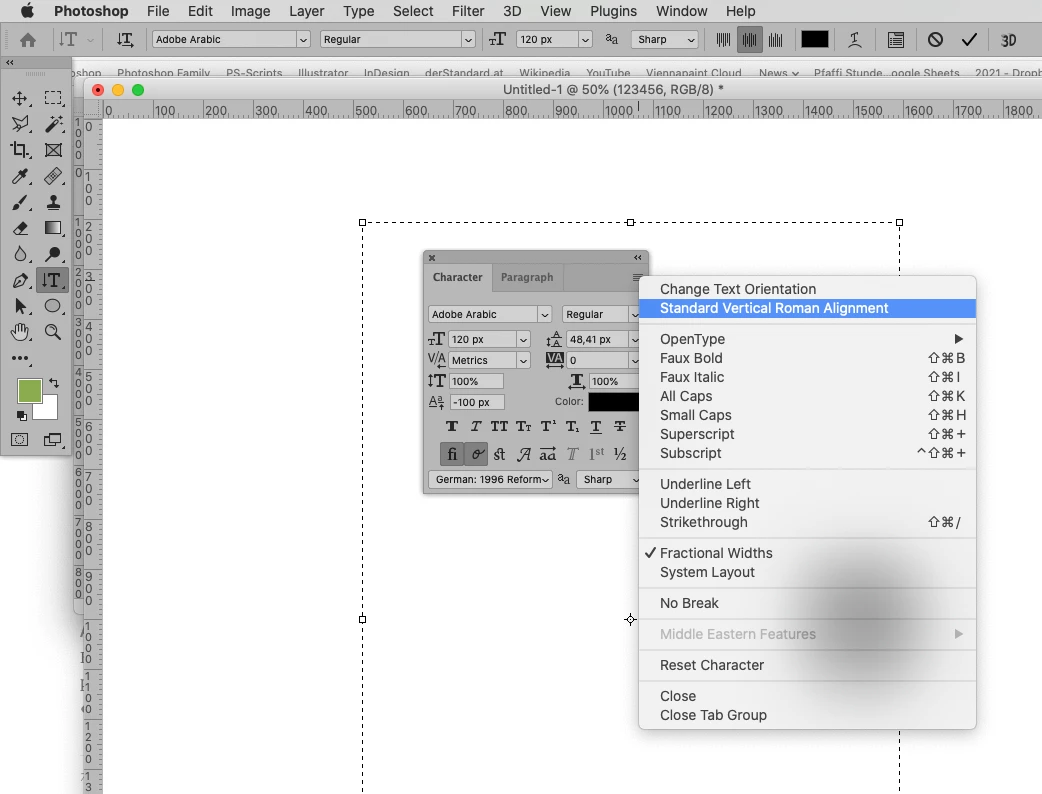
Is that setting checked? 

4 respuestas

Bojan Živković11378569
Community Expert
Community Expert
July 15, 2021

The last thing that comes to my mind is to try with preference reset https://helpx.adobe.com/photoshop/using/preferences.html

Known Participant
July 15, 2021

como ve la orientación es correcta, lo que no hace es escribir de arriba a abajo

c.pfaffenbichler
Community Expert
Community Expert
July 15, 2021

Is that setting checked? 

Known Participant
July 14, 2021

He hecho todo lo que decis, pero sigue igual, alomejor no me he explicado, las letras salen en posición vertical pero no se lee de arriba a abajo

Bojan Živković11378569
Community Expert
Community Expert
July 14, 2021

Your second screenshot looks like rotated horizzontally typed text. Please see request by @c.pfaffenbichler and post some screenshots.

Known Participant
July 14, 2021

Espero que eso le sirva, si necesita otra captura digamelo, gracias


Bojan Živković11378569
Community Expert
Community Expert
July 14, 2021

Is this happening with any font like Arial? Have you tried to reset tool? With Type tool active, right click on Type icon in the Options bar and choose Reset Tool.

c.pfaffenbichler
Community Expert
Community Expert
July 14, 2021

Could you please post screenshots with the pertinent Panels (Toolbar, Layers, Options Bar, …) visible? 

Known Participant
July 14, 2021

Ahí le mando captura de pantalla, si es necesario algo más dígamelo gracias por su ayuda

c.pfaffenbichler
Community Expert
Community Expert
July 14, 2021

What is that setting?