Participant
February 7, 2021
Question

Batch-convert colorspace in multiple PNG files

  • February 7, 2021
  • 1 reply
  • 1771 views

Hi, everyone


I'm currently using Photoshop CC 2015.


I need to convert the colorspace of several hundred PNG files from ProPhoto RGB to sRGB.


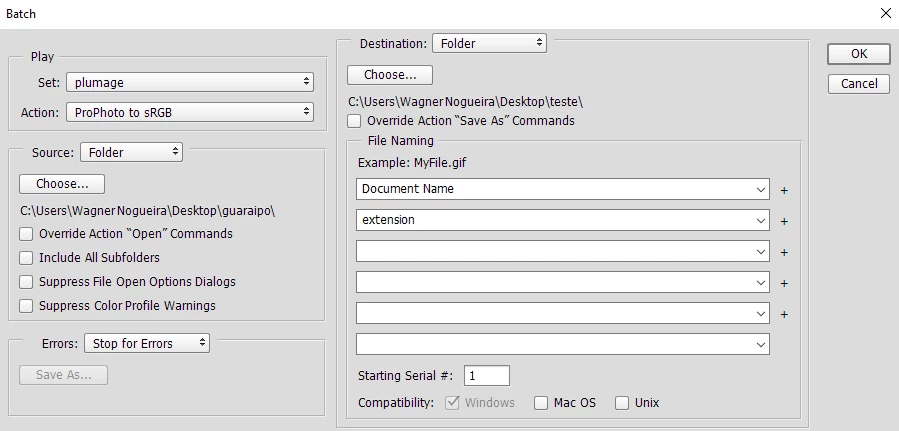
I tried that creating an Action and then using this Action in a Batch Process (images below).
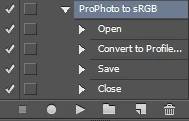
 

The Action works in the following steps: Open File-> Convert to Profile (destination colorspace correctly assigned, image bellow)-> Save in a different folder-> Close File
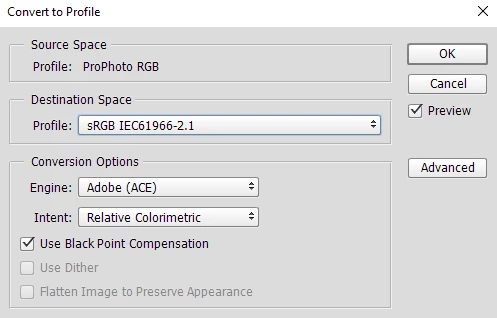
 

The conversion works fine in the file that is produced during the Action recording process, but every file created by the Batch keeps the original ProPhoto RGB colorspace instead of the sRGB.


Any ideas of what I might be doing wrong?


Best regards

This topic has been closed for replies.

1 reply

D Fosse
Community Expert
Community Expert
February 7, 2021

Save As PNG has a curious bug: It doesn't embed the sRGB profile. All other profiles embed correctly, but not sRGB.


To make matters worse: instead of showing up as <untagged>, which it should be because it is, instead it takes on your working space and assigns that.


In short, Save As PNG is an utter mess, and I don't go near it. Luckily, Save For Web and Export both do it correctly, so always use one of those when working with PNGs.


But there's one more problem. Export doesn't record in actions. So you can't use that. That leaves Save For Web. Record an action using Save For Web, and make sure to check both "convert to sRGB" and "embed color profile". The latter is unchecked by default. Batch that action.