Known Participant
January 7, 2024
Answered

Batch delete one specific layer from many psd files

  • January 7, 2024
  • 1 reply
  • 779 views

Hi,


I have many psd files with me and all the psd files contains a layer named say "Lora" inside them.

This layer can be in bottom or maybe in nested groups too.


I want to know how can we batch delete just this "Lora" layer from all of them and save the psd automatically.
This topic has been closed for replies.
Correct answer r-bin


1 reply

c.pfaffenbichler
Community Expert
Community Expert
January 7, 2024

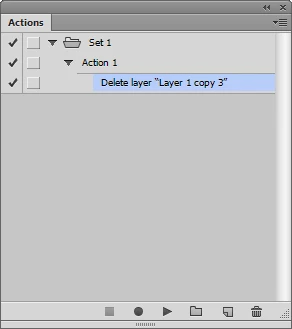
If no other Layer is named »Lora« then selecting that Layer and deleting it should record fine in an Action. 


Edit: 

Stephen Marsh
Community Expert
Community Expert
January 7, 2024

A few additions to the post from @c.pfaffenbichler –


* If no layers are selected in the document, you will get an error. The easiest way around this is to add a new layer and then delete it, which will then select the next layer at the top of the stack, allowing for the selection of the "Lora" layer without error.


* Actions selecting layers by name are case-sensitive, so "Lora" will work, but "lora" or "LORA" etc will not.


After creating the action, you would need to run the action through Automate > Batch or Scripts > Image Processor etc.


r-binCorrect answer
Legend
January 7, 2024