Participating Frequently
October 22, 2019
Question

Batch Mockup Update

  • October 22, 2019
  • 1 reply
  • 2632 views

Hello JJMack,

1st of all thanks a lot for that awesome scripts. Currently I'm using the Photoshop Bacth Mockup script (And Batchsmartobjcetupdate script). I need some help with that script. I want to do,

I'm mostly working with book mockups so,

1. The image of book should resize according to the canvas automatically & entirely. If I use fit image it doesn't resize to fix frame. As you can see in the picture, it leaves white background in the front and also

(Like 1st and 2nd Picture)
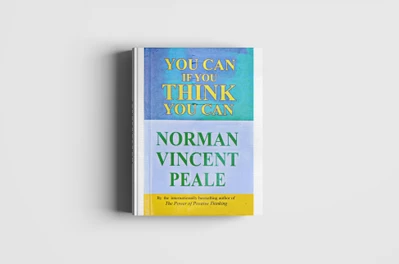
just get fixed on the spine


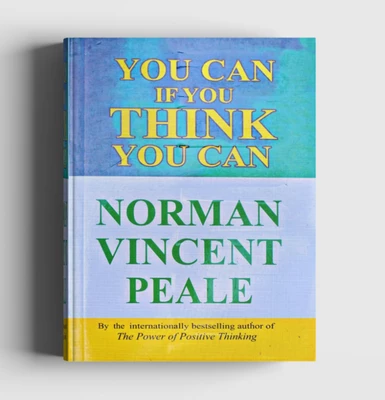
But I want it be be like this. It doesn't matter if the picture get stretched and looks weird. It's not a problem for me.


(Like 3rd picture)


2. It only work with Top layer & then second or third layer. Is there any possible way so that it can work with any smart object layer? 


Hope you'll help me in this regard.


Thanks a lot!

Rahat.


This topic has been closed for replies.

1 reply

JJMack
Community Expert
Community Expert
October 23, 2019

Smart object need to be replaced with exactly the same size object. The files Aspect Ratio, Size and print resolution needs to be exactly the same size as the object in the tehpate's file smart object layer.  That is what is requited if you use replace content. No resizing is done the replacement needs to be the correct sizes for the associated smart object layer transform to work correctly. The associated layer transform is not replaced or edited when you use Photoshop smart object layer replace content feature.   It you my scripts edit option the script well resize your  replacement image the fill the smart  Object area. However, if the aspect ratio of your image is not the same aspect ratio as the smart object there will be some virtual cropping of the  replacement. If you do not want the replacement cropped in addition of the edit option you can also add the Fit Image option. There will be boarders added the resized image. It will not fill the smart object area. I do not  support an unconstrained distortion resize. It look like you used Edit and Fit Image or the replacement was not the correct size for replace content. .  If you use edit and not Fit image you may get acceptable results the aspect ratio is close. The text will be sized  larger and my not be involved in the cropping effect. If unacceptable you can additionally use the save PSD option.  And the tweak the position of the object in the populated PSD saved using Photoshop. You may need to distort the image if the aspect ration to too fare off.

JJMack
Participating Frequently
October 23, 2019

Hello JJMack,

Thanks for your response. 

I've zero knowledge about script editing. Can you plz edit the script for me so that it can do

1. Fit Image to canvas + Fill the entire smart object area (It's not a problem for me if the image looked weird like it got stretched)

2. Fit image to canvas + crop the extra area (Like your third pictute)


So there will be two modified scripts. Can you do that for me please?


Thanks.

Rahat.

JJMack
Community Expert
Community Expert
October 23, 2019

I do not like to distort images.  I will not add code to do that. If you look at the code the Script  in its  function editContents at the Fit image code the else portion where I resize the replacement inage the fit the the smart objects width or height to have the image fit into the smart objects area..  You most likely change the resize to the width and height of the smart object and distort the image  to fill the smart object area.


if (!fitImage) {
if (objFile.width.value/objFile.height.value > objWidth/objHeight) { objFile.resizeImage(null, objHeight, null, ResampleMethod.BICUBIC); } // wider
else {objFile.resizeImage(objWidth, null, null, ResampleMethod.BICUBIC);} // same aspect ratio or taller
}
else{
if (objFile.width.value/objFile.height.value > objWidth/objHeight) {objFile.resizeImage(objWidth, null, null, ResampleMethod.BICUBIC); } // wider
else {objFile.resizeImage(null, objHeight, null, ResampleMethod.BICUBIC);}
}

JJMack