Participating Frequently
September 22, 2017
Answered

Batch process is copying images to my desktop

  • September 22, 2017
  • 1 reply
  • 400 views

Anyone know how I make this stop? Batch process, using the folder and action I choose, copies images to the destination folder as well as the desktop. I end up with hundreds of images on my desktop.
This topic has been closed for replies.
Correct answer Jeff Arola

Look at the action your using to save the images as.

Most likely the desktop was recorded as the path when making the action.

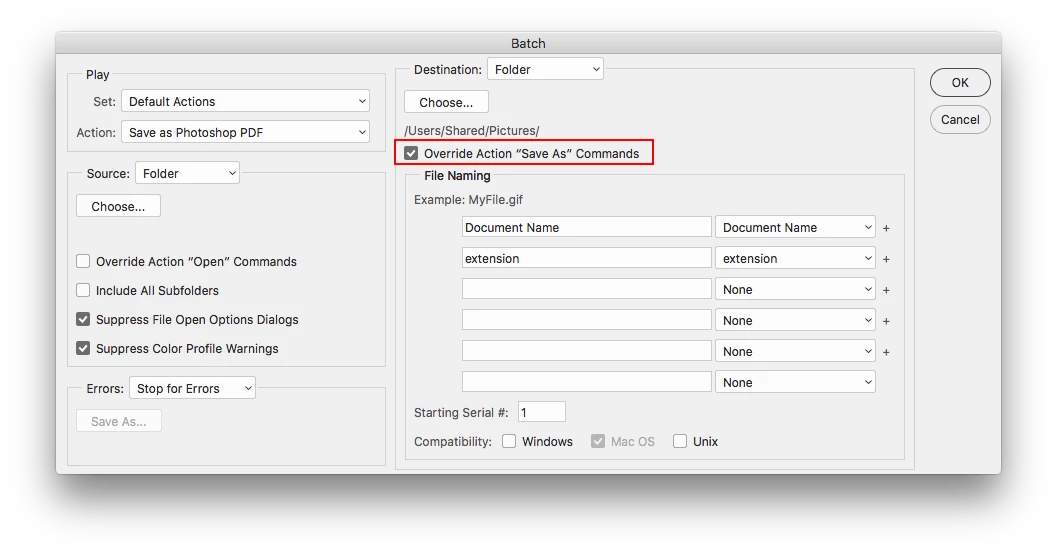
In the batch dialog under Destination one can check Override "Save As" Commands and the files will only be saved to the folder specified in the batch dialog and not in the action itself.

1 reply

Jeff Arola
Community Expert
Jeff ArolaCommunity ExpertCorrect answer
Community Expert
September 22, 2017

Look at the action your using to save the images as.

Most likely the desktop was recorded as the path when making the action.

In the batch dialog under Destination one can check Override "Save As" Commands and the files will only be saved to the folder specified in the batch dialog and not in the action itself.